Streaming Data Usage Calculator
Estimate audio streaming data from bitrate, listening time, devices, cached repeats, buffering overhead, cellular share, and a monthly data allowance.
Choose a realistic audio streaming pattern, then adjust the bitrate, schedule, repeat listening, network overhead, and cellular split. The calculator uses decimal storage units: 1000 MB equals 1 GB.
Full Streaming Data Breakdown
Data per hour
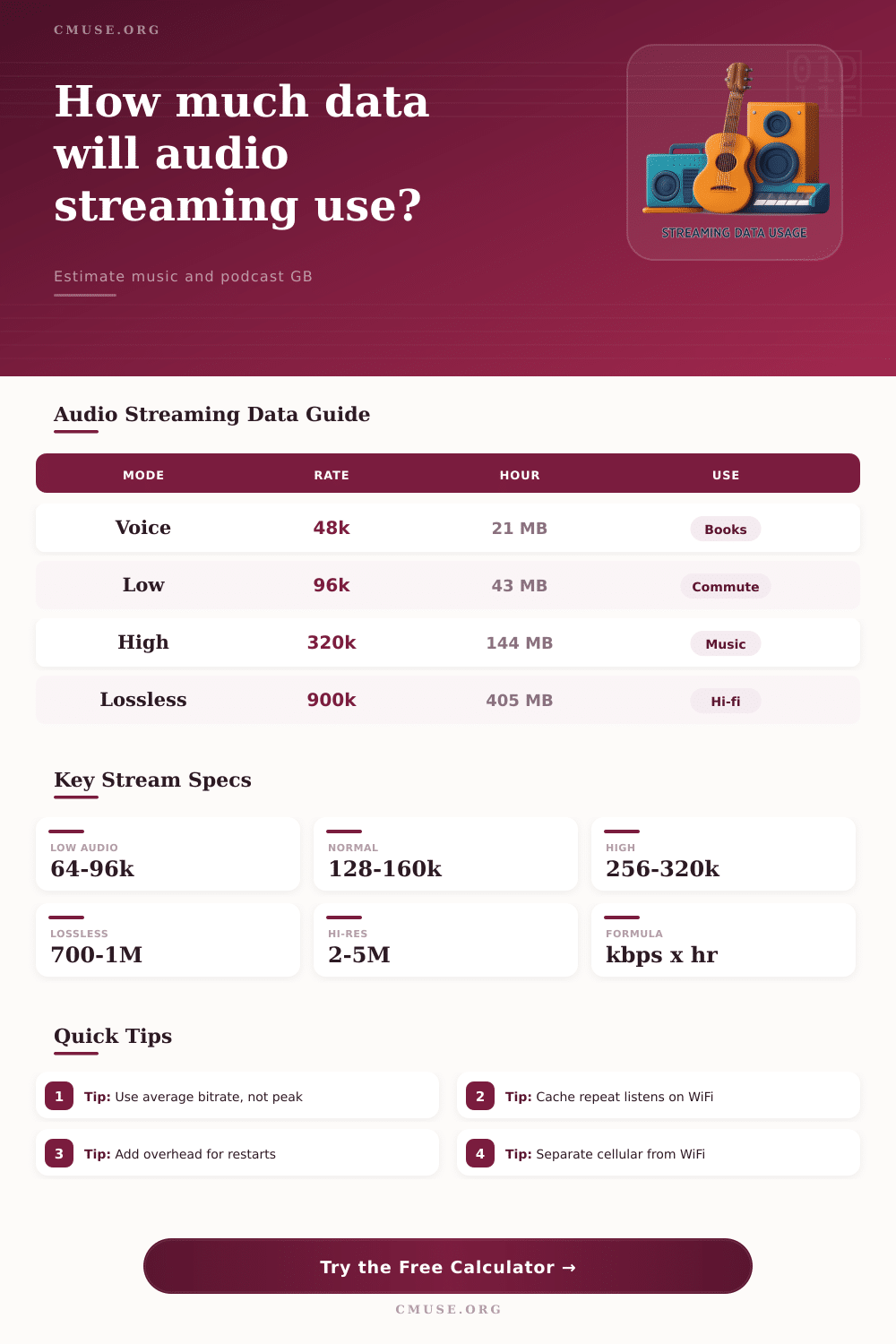
bitrate kbps x 3600 / 8000 = MB per hour
Scheduled hours
(daily hours + minutes) x days x streams
Network data
streamed hours x MB/hour x overhead factor
Cap share
cellular GB / mobile allowance GB x 100
28.8 MB
one hour at 64 kbps speech quality
72 MB
one hour at 160 kbps standard music
144 MB
one hour at 320 kbps compressed high quality
405 MB
one hour at 900 kbps lossless average
| Streaming Mode | Typical Bitrate | Data Per Hour | Best Planning Use |
|---|---|---|---|
| Speech, audiobook, or low-bandwidth talk | 48 kbps | About 21.6 MB per hour before overhead | Long narration, lectures, and voice-heavy programs. |
| Low mobile music mode | 64-96 kbps | About 28.8-43.2 MB per hour | Commutes, weak connections, and data-saving playback. |
| Standard compressed music | 128-160 kbps | About 57.6-72 MB per hour | Everyday background listening and mixed playlists. |
| High quality compressed audio | 256-320 kbps | About 115.2-144 MB per hour | Focused music listening when storage and data allow. |
| Lossless CD-quality stream | 700-1000 kbps | About 315-450 MB per hour | Hi-fi listening where mobile data use is monitored. |
| Hi-res lossless stream | 2000-5000 kbps | About 900 MB to 2.25 GB per hour | Short critical sessions or WiFi-first playback. |
| Scenario | Schedule | Bitrate | Approx Network Data |
|---|---|---|---|
| Daily commute playlist | 1 hour per day for 22 days | 96 kbps | About 0.95 GB before overhead |
| Podcast habit | 90 minutes per day for 30 days | 64 kbps | About 1.30 GB before overhead |
| High quality music month | 2 hours per day for 30 days | 320 kbps | About 8.64 GB before overhead |
| Lossless weekend listening | 4 hours per day for 8 days | 900 kbps | About 12.96 GB before overhead |
| Family speakers at home | 3 streams, 3 hours daily, 30 days | 160 kbps | About 19.44 GB before overhead |
| Factor | Typical Range | Calculator Input | Data Effect |
|---|---|---|---|
| Buffered starts and skipped tracks | 2-10 percent | Buffer and preload overhead | Adds partial song data that may never be heard fully. |
| Restarts, scrubbing, and replayed phrases | 0-25 percent | Restarts and replays overhead | Raises network use beyond scheduled listening time. |
| Repeat plays served from device cache | 5-60 percent | Repeat listening served from cache | Reduces network data when the same audio is replayed locally. |
| Offline downloads already saved | Project dependent | Offline downloads already saved | Removes those hours from streaming calculations. |
| Monthly Allowance | Hours at 96 kbps | Hours at 320 kbps | Hours at 900 kbps |
|---|---|---|---|
| 5 GB mobile plan | About 116 hours | About 35 hours | About 12 hours |
| 10 GB mobile plan | About 231 hours | About 69 hours | About 25 hours |
| 20 GB mobile plan | About 463 hours | About 139 hours | About 49 hours |
| 50 GB mobile plan | About 1157 hours | About 347 hours | About 123 hours |
Screen brightness isn’t as much of an issue as streaming audio on mobile data, since that’s always running in the background. But most users don’t realize audio can also burn through data quick too. If you’re not familiar with network overhead, cache behavior or bitrate, audio can still blow through your limited monthly plan without you even realizing it.
Just input your own usage habit into calculator above and it’ll crunch the numbers for you. This takes the guessing out of data usage and lets you see exactly what your upcoming bill could be.
How to Save Your Mobile Data While Streaming Music
Bitrate is the rate in kilobits per second at which audio information moves from a server to your earbuds. If you download a speech podcast that’s encoded at forty eight kilobits per second, it may be under twenty megabytes per hour, and thus economical to store. But bump that dial up to a lossless setting, and you’re talking almost four hundred megabytes of the same duration. That is twenty times as much, even though it sounds like music to most people.
Your challenge: Know when you cross your own line between good-enough and audiophile-perfection. Above about two hundred fifty-six kilobits per second on consumer headphones during casual listening, most compressed files sounds the same. This means you are paying for extra detail that your gear probably can’t even accurately reproduce.
The problem with making these decisions is that time multiplies them at a rate few appreciate: Two hours of music during commute sounds fine, but times twenty-two days per month makes for nearly two gigabytes. In other words, if you spend a little bit of time every day listening, then suddenly you’ve devoured almost half of your cell phone’s data allotment.
This does not even include streaming high-quality audio on more than one device, such as when you are cleaning the livig room while also listening to something on your way home from work. That doubles the equation.) This table above illustrates the math: How many gigabytes do you get each month based off what audio quality tier you choose?
This should give you an idea of just how quickly hours accumulate to gigabytes; until you see where the bill stands halfway through the month, that is. Another twist can throw off these hourly rate calculations because apps pre-load content in anticipation of poor reception, so you end up downloading a lot more audio than you actualy play. (You also make extra data calls when you scrub around in timelines, restart songs, or skip tracks.)
That’s why there’s some little bit of overhead built into any estimate; it’s like “hey, we have no idea if you’ll skip around a ton or not, but just in case.” You’d think that would add up; but if you know you listen to a few episodes/albums repeatedly, having your phone store that on your device instead of the internet makes everything even out. Your data bill will be higher if you’re constantly scrapping the bottom of the barrel.
Increasing your cache % in your estimate capture that real-world fact, which prevents you from overestimating usage for repetitive listening habits. The most important thing when controlling your spend might be separating WiFi and cellular activity. After all, that big number of gigabytes sounds scary, but what if 80% of it is used while connected to free unlimited WiFi at home?
The calculator lets you divide these flows so you have a accurate picture of what’s going through your mobile plan. Only cellular data counts towards carrier throttling or overage charges. Unlimited hi-res lossless streaming is fine on WiFi; just don’t do it on cellular.
In the end, though, it’s all about awareness. What you don’t know, you can’t control. How much data have you used so far this month? Knowing that number puts you back in charge of your streaming life. When should you stream at a lower quality? When can you allow yourself to enjoy something in higher quality? Make those decisions consciously instead of wondering where all the data went after the fact.
If you’re new to this, begin by using one of the presets, or use your best guess. Then refine them with your actual listening times. Remember: Every preloaded song and skipped track add up. Watch out for those stealth charges. And suddenly, managing your data plan wouldn’t of feel like such a burden.