Room Absorption Calculator
Estimate surface sabins, average absorption, RT60, and treatment needs for studios, booths, practice rooms, and live music rooms.
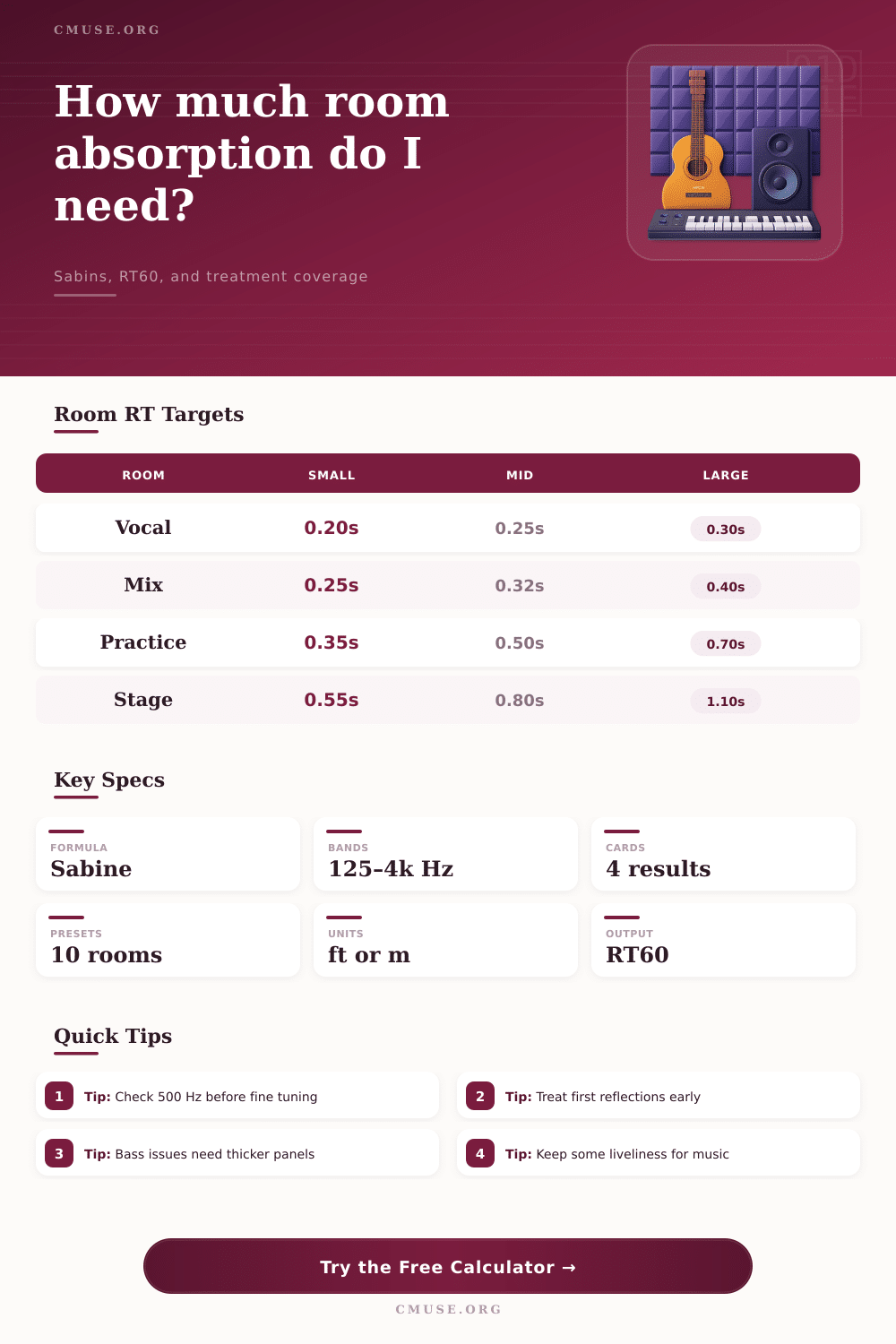
Formula basis: surface sabins = area × absorption coefficient. RT60 uses Sabine: 0.049 × room volume in ft³ divided by total sabins.
| Material | 125 Hz | 500 Hz | 1 kHz | Use in Calculator |
|---|---|---|---|---|
| Painted drywall | 0.29 | 0.05 | 0.04 | Reflective walls and ceilings |
| Carpet on pad | 0.08 | 0.57 | 0.69 | Absorptive studio floor |
| Heavy curtain | 0.14 | 0.55 | 0.72 | Variable wall absorption |
| 2 in broadband panel | 0.17 | 0.80 | 0.92 | First reflections and flutter |
| 4 in broadband panel | 0.45 | 1.05 | 1.02 | Balanced broadband treatment |
| 6 in bass panel | 0.72 | 1.12 | 1.05 | Low-mid and bass control |
| Room Use | Small Room | Medium Room | Large Room | Practical Aim |
|---|---|---|---|---|
| Vocal booth | 0.18–0.28 s | 0.22–0.32 s | 0.25–0.38 s | Dry, controlled voice capture |
| Mix / control room | 0.23–0.35 s | 0.30–0.45 s | 0.38–0.55 s | Clear imaging with some life |
| Podcast / voice room | 0.20–0.32 s | 0.25–0.38 s | 0.32–0.45 s | Speech intelligibility |
| Practice room | 0.35–0.55 s | 0.45–0.70 s | 0.60–0.90 s | Musical feedback without harshness |
| Stage / ensemble | 0.55–0.85 s | 0.75–1.10 s | 0.95–1.35 s | Blend and projection |
| Scenario | Dimensions | Volume | Typical Treatment | Target RT60 |
|---|---|---|---|---|
| Recording booth | 5×5×8 ft | 200 ft³ | 30–55 sq ft panels | 0.18–0.28 s |
| DJ booth | 6×4×8 ft | 192 ft³ | 18–35 sq ft panels | 0.25–0.40 s |
| Home studio | 10×12×8 ft | 960 ft³ | 70–130 sq ft panels | 0.25–0.42 s |
| Drum room | 14×16×9 ft | 2016 ft³ | 100–190 sq ft panels | 0.35–0.60 s |
| Small stage | 20×16×12 ft | 3840 ft³ | 160–260 sq ft treatment | 0.65–1.05 s |
| Surface | Area Formula | Sabins Formula | Notes |
|---|---|---|---|
| Floor | length × width | floor area × floor alpha | Usually carpet, wood, concrete, or rubber |
| Ceiling | same as floor | ceiling area × ceiling alpha | Clouds can dramatically change midband RT |
| Walls | perimeter × height | wall area × wall alpha | Custom mode accepts measured wall area |
| Added panels | surface area × coverage % | panel area × panel alpha | Calculator subtracts covered base-wall absorption |
Acoustic treatment is a process that requires you to understand how sound reflects off of surfaces in your room and how much absorption you will need to add to your room to create teh sound you desire. Your room may feel controlled or harshly depending on the amount of reverb that fills the room. You can measure the reverb time of your room to determine how long it takes for the sound to reflect off of the walls in your room after you play a sound.
You will want to find the proper reverb time for your type of room and the tasks that it will perform so that your room works for you, rather than against you. Absorption within your room is measured in the unit known as sabins. The amount of sabins that you have in your room is equal to the total area of your room multiplied by the amount of sound energy that the materials within the room absorb at each frequency.
How to Use an Acoustic Treatment Calculator
You can use the calculator to determine the total sabin value for your room, as well as its estimated RT60 value. To calculate these values, you will need to enter the dimensions of your room. You will also have to select the materials that you currently use for your floor, walls, and ceiling.
Additionally, you will have to select what type of treatment you plan to provide to your room and how much treatment you will be adding. Based on these values, the calculator will provide an estimated RT60 value for your space. This value will help you to determine whether or not the treatment that you have selected for your room is appropriate for the use that you would like to make of the treatment.
For instance, the type of absorption that is required for a vocal booth will not be the same as the absorption that would be required for a room that is used to practice playing the drums. The absorption values for each frequency band within your room may not be the same. For instance, a thin panel may absorb sound well at 1 kHz but may not absorb low-mid frequencies with the same ease.
You can begin to analyze your room by first examining the 500 Hz band. This band correlates to the clarity of speech and music within your room. If the 500 Hz band reflects a reasonable value for your room, you can then continue to evaluate the 125 Hz or 250 Hz band to determine if you require any additional absorption of low frequencies within your room.
You can view these options all at the same time without having to use separate spreadsheets to calculate each scenario. The materials that you use within your room will have different amounts of sound absorption compared to other materials. For instance, painted drywall will reflect the majority of the energy within the midrange of frequencies; untreated bedrooms often sound boxy due to this material.
Carpet with a pad will absorb more of the energy within the midrange frequencies than thin carpet. However, carpet dont provide absorption of low frequencies. If you were to add 4-inch broadband panels of absorption material to your room, you would change the average absorption coefficient of your room.
The calculator will subtract the amount of sound absorption of the surfaces that you plan to cover in your treatment plan so that you do not assume that the absorption coefficient of the new panels will be added to the coefficient of the existing surfaces. In addition to the materials in your space, the people in your room will also absorb some of the sound that is played. This is why there is an option to enter the number of people that will be in your room.
A single musician will add some degree of absorption to your room; however, that same musician will add as much absorption to the room as several square feet of paneling. The absorption from the people will change with the number of people in your room, so the calculator accounts for this. Additionally, the safety buffer option allows you to add more sound absorption than you otherwise calculate that you will need.
Adding a 10% safety buffer is usually enough for home use; however, you may require a higher percentage if you are not certain of the placement of the furnitures within the room or if the room will have more than one use. The target reverb time for your room will not be the same for each use of that room. For instance, a vocal booth will require a different reverb time than a practice room.
Based on the calculated RT60 value for your room, the calculator will compare the results to a target range for your space. This will allow the calculator to label your calculated RT60 as too live, very dry, or within a workable range. When your calculated RT60 value is within a workable range, you will have to calculate how much reflective surface you would like to leave in your room so that the acoustics of your space do not sound dead.
The geometry of your room will have some effect on the amount of acoustic treatment that is required to treat your room to a certain target RT60 value. Most rooms are not perfect rectangles, so you can use the custom mode of the acoustic treatment calculator to input the area of each wall in your room in case you have sloped ceilings or built-in cabinets. Round and square rooms will have different reverb times than rectangular rooms, and different treatment needs.
The acoustic treatment planning tool automatically calculates both of these values so that you are not required to calculate these values yourself. Finally, it is important to understand the limitations of the acoustic treatment calculator. The acoustic treatment calculator will not calculate the absorption of low frequencies in three dimensions.
Additionally, the placement of speakers within your room is outside of the scope of this tool. You will have to use another technique to calculate these variables. The acoustic treatment calculator will calculate the midrange frequencies; however, once you have calculated the appropriate absorption values for the midrange frequencies, you can treat the bass frequencies with thicker acoustic panels.
These options will allow you to plan for these different frequency ranges prior to purchasing acoustic treatments for your room. Overall, your goal as an acoustician or room builder is to allow the listener to hear there musical compositions with as much clarity as possible. This treatment plan will help to you to reach that goal without having to use trial and error techniques in your attempt to treat your room.