Q Factor Calculator for Audio Resonance
Solve bandwidth, damping, edges, and ring-down for filters, speakers, and LC resonators with one music-ready calculator.
🎵 Quick Presets
⚙ Calculation Setup
How the solver reads your inputs
Start with the -3 dB edges if you have them. If not, enter center frequency plus either Q, bandwidth, damping ratio, or decay time, and the calculator will back-solve the rest.
📊 Spec Grid
📖 Reference Tables
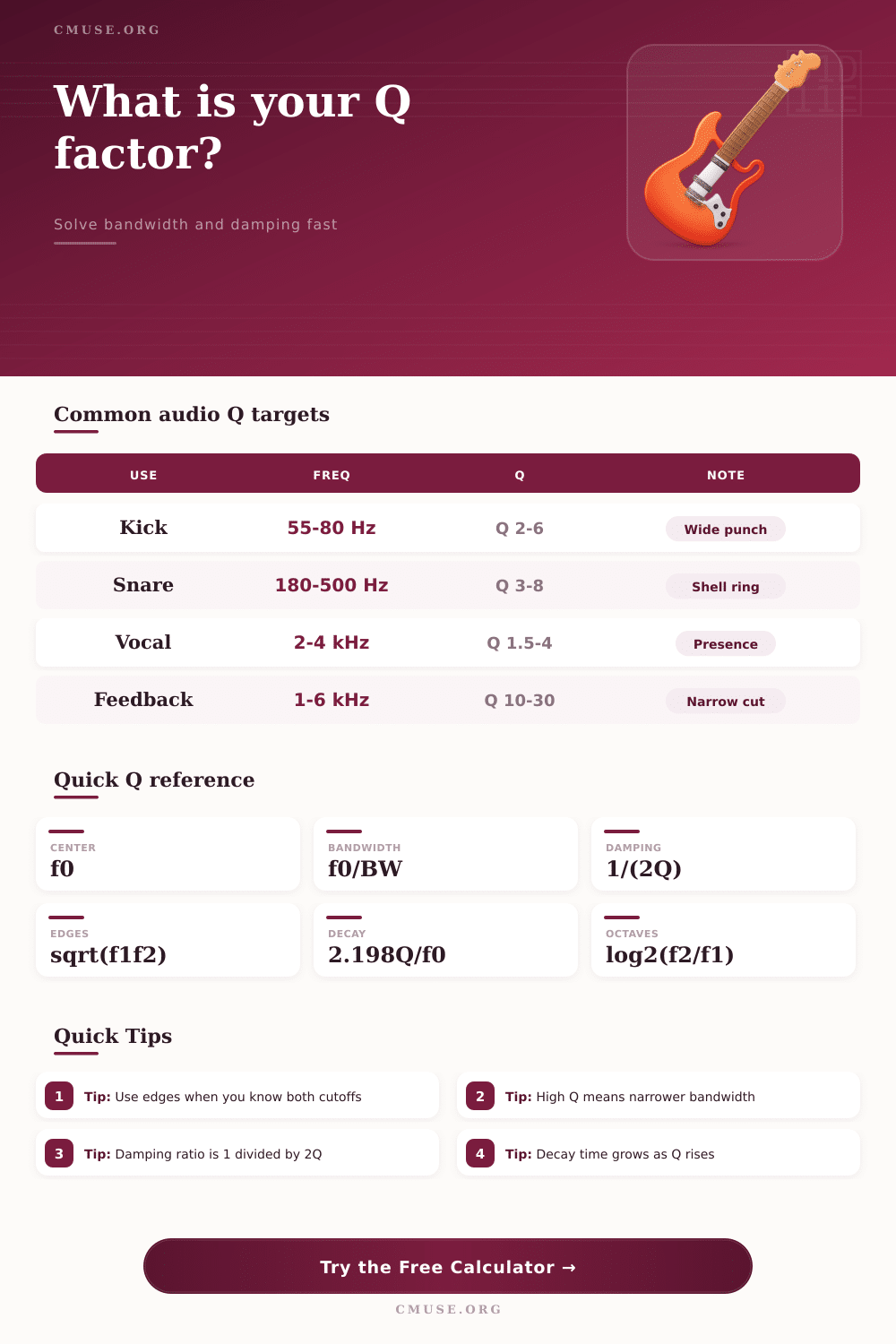
| Use | Freq | Q | Note |
|---|---|---|---|
| Kick punch | 55-80 Hz | 2-6 | Wide low end hit |
| Snare shell | 180-500 Hz | 3-8 | Drum ring control |
| Vocal presence | 2-4 kHz | 1.5-4 | Speech clarity zone |
| Feedback hunt | 1-6 kHz | 10-30 | Narrow rejection |
| Sub crossover | 70-100 Hz | 0.7-1.2 | Gentle slope work |
| LC tank | 100 Hz+ | 5-50 | Energy storage |
| Known | Solve | Equation | Use |
|---|---|---|---|
| f1, f2 | f0 | sqrt(f1 x f2) | Center from edges |
| f0, BW | Q | f0 / BW | Direct Q solve |
| f0, Q | BW | f0 / Q | Width from Q |
| Q | zeta | 1 / (2Q) | Damping ratio |
| Q, f0 | T60 | 2.198 x Q / f0 | Amplitude decay |
| f1, f2 | oct | log2(f2 / f1) | Octave span |
| Range | Character | Bandwidth | Audio use |
|---|---|---|---|
| 0.5-1.0 | Broad | Very wide | Crossovers |
| 1.0-3.0 | Balanced | Medium | Tonal shaping |
| 3.0-10.0 | Narrow | Tight | Rings and peaks |
| 10.0-30.0 | Surgical | Very tight | Feedback cuts |
| 30+ | Ultra narrow | Tiny | Notch work |
💡 Practical Tips
The Q factor are a measurement of how sharply an object will resonate, and the Q factor is also a measurement of how long the object will hold on its energy before the energy is damped out. In audio engineering, the Q factor is used to determine the width of a certain peak or notch in the frequency response of an audio device. If a person use a low Q factor for the sound mixing process, the frequency response will be wide in relation to the other audio devices in the system, and the tones will be smoothed out.
If a person uses a high Q factor for sound mixing, the frequency response will be narrow in relation to the other audio device in the system, and a high Q factor allow a person to carve out specific frequencies within the sound. The mathematics behind calculating the Q factor involve the use of the bandwidth of the audio device. Bandwidth is the range in which the power of a signal drop to half of the original power of that signal.
What is the Q Factor in Audio?
To calculate the Q factor of an audio device, the center frequency of the device is divided by its bandwidth. The resulting number is the Q factor of that audio device. The Q factor of that device will tell a person how wide or narrow the adjustment will be to the frequencies in the audio system.
One example of the use of the Q factor is in snare drum. Snare drums naturaly ring at frequencies between 200 Hz and 500 Hz. When a person uses a high Q factor for a snare drum (above 8), the snare drum will have its ringing produce an echo like response.
Between a Q factor of 3 and 4, though, the snare will have a controlled body to its sound; the body will be wide enough in relation to the other sounds in the band to have a punchy sound, but the sound will be narrow enough so that it will naturally damp out after being played. In speakers, the Q factor is related to the damping ratio of that speaker. The damping ratio is equal to one divided by two times the Q factor of the speaker.
The damping ratio controls the fluttering of the cone of the speaker that is playing frequencies under the resonance frequency of the speaker. The damping ratio is important in that it ensure that the bass of the speaker does not bloat if the damping ratio is too loose, or that the bass does not become flat if the damping ratio is too tight. To measure the Q factor of an audio system, the system can be swept with a sine wave.
The upper and lower -3 dB points can be noted with the sine wave. With these two points, the center frequency of the audio system can be determined by calculating the geometric mean of those two points. With the center frequency and the -3 dB points, it is possible to calculate the bandwidth and Q factor of that system.
The Q factor is also related to the fractional bandwidth of an audio system. Fractional bandwidth help to quantify the width of the relative peak in the audio system. For instance, if there is a 100 Hz bass peak with a 20 Hz bandwidth, the fractional bandwidth will be 20%.
If there is a peak of 10 kHz with a 20 Hz bandwidth, the bandwidth is considered to be “surgical” because it is narrow in relation to the peak. Other measurements include the octave span of the audio system, and the time constant of the audio system. Depending upon the task that is to be performed in the sound mixing process, different Q factor settings will be used.
For instance, a person may use a Q factor between 2 and 6 for kick drums to achieve a wide thump in the low end. A Q factor between 1.5 and 4 may be used for vocals to add “air” to the vocal sound. To remove feedback from a loud audio system, however, a person will use a very high Q factor between 10 and 30.
A person can use interpretation scales to understand the Q factor of an audio system. Any Q factor less than 1 is used for crossovers in audio systems. Any Q factor between 3 and 10 is used to shape the music.
Any Q factor above 30 is used for creating surgical notch in audio frequencies. Any Q factor above 30 will be used for removing a very specific and narrow frequency of sound from an audio system. If a person is measuring the Q factor of an audio system without considering the functions of that audio system, error will occur.
High values of the Q factor will cause issue with the phase of the sound that is created, and cause the sound to ring unnaturally after it is played. The sound before and after the adjustment needs to be compare. Additionally, the person should adjust the gain of the audio system so that the Q factor adjustment sounds more correct when played.
Its important to recieve the right results when mixing. You’ll find that the modern equipment is alot more comfortabley to use when you understand these things. You should of checked teh bandwidth first.