Pitch Correction Cents Calculator
Measure how far a detected frequency or MIDI note sits from a target note, then calculate cents error, correction amount, corrected frequency, retune speed, tolerance status, formant context, and scale fit.
Each preset fills a detected pitch, target note, reference tuning, correction depth, retune speed, tolerance, scale key, and formant handling profile.
Correction Breakdown
| Target Candidate | MIDI Note | Target Hz | Cents Error | Full Correction |
|---|---|---|---|---|
| Calculate to compare nearby target notes. | ||||
| Error Range | Perception | Correction Strength | Typical Context | Notes |
|---|---|---|---|---|
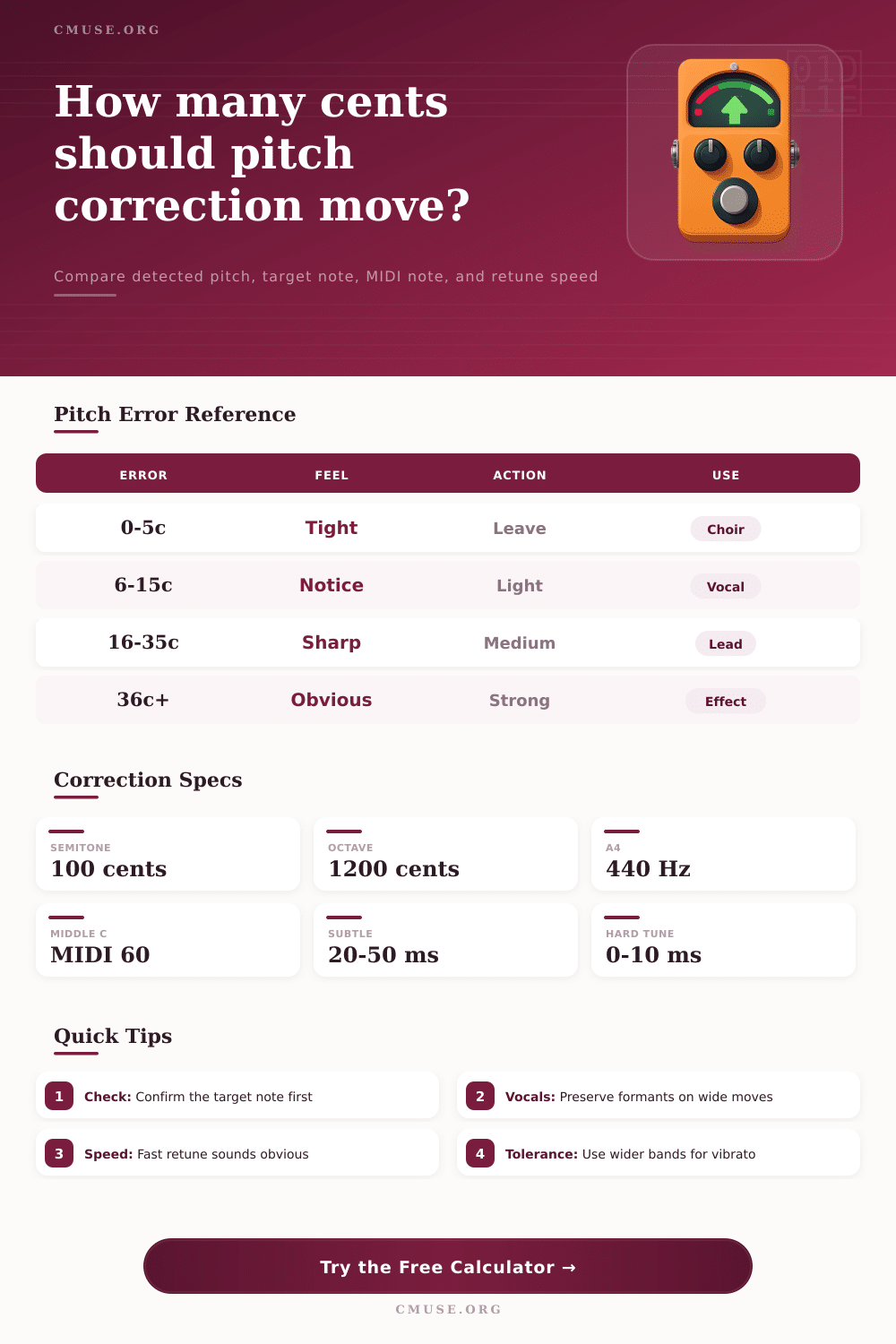
| 0 to 5 cents | Very tight | 0% to 25% | Choir blend, held piano layers | Often best left alone unless the part must lock to MIDI. |
| 6 to 15 cents | Slightly noticeable | 25% to 70% | Lead vocal, fretless bass, strings | Gentle correction keeps expression while improving center pitch. |
| 16 to 35 cents | Clearly sharp or flat | 60% to 100% | Pop vocal, guitar note, sampled phrase | Check the intended target note before applying strong correction. |
| 36 to 50 cents | Nearly between notes | 80% to 120% | Effect tuning, exposed notes | Half-semitone errors can jump to the wrong scale degree. |
| Over 50 cents | Closer to another note | Re-detect first | Pitch tracker cleanup | Use the nearby table to confirm the musical target. |
| Retune Speed | Sound | Best For | Risk | Practical Setting |
|---|---|---|---|---|
| 0 to 10 ms | Hard snap | Robotic hooks, EDM ad-libs | Stepped pitch and obvious artifacts | Use with deliberate effect vocals. |
| 11 to 35 ms | Fast pop correction | Modern lead vocals and synth lines | Can narrow vibrato if tolerance is too low | Pair with formant preserve on vocals. |
| 36 to 80 ms | Natural correction | Acoustic vocal, guitar, bass, strings | May leave quick scoops untouched | Good default for transparent repair. |
| 81 to 160 ms | Slow pitch guide | Choirs, sustained notes, expressive soloists | Large misses may remain audible | Use wider tolerance for vibrato. |
| Over 160 ms | Subtle drift | Live intonation maps and analysis | Not enough for exposed wrong notes | Use for reading pitch trend, not hard fixing. |
| Context | Formant Handling | Safe Move | Retune Feel | What To Watch |
|---|---|---|---|---|
| Vocal with formant preserve | Keep vocal tract color stable | Up to 50 cents | Natural to modern | Wide moves can still sound processed. |
| Vocal hard-tune effect | Usually locked or stylized | Any musical target | Deliberately obvious | Fast settings flatten slides and vibrato. |
| Monophonic instrument | No vocal formant shift | Up to 100 cents | Depends on articulation | Bends and scoops may be intentional. |
| Guitar or bass DI | Preserve attack and pick transient | Up to 35 cents | Subtle correction | Polyphonic notes need a different tool. |
| Synth or sampler | Source dependent | Often wide | Clean if monophonic | Sampler formants can shift on vocals. |
| Choir or doubled stack | Keep slight differences | 5 to 20 cents | Blend focused | Overcorrection can make stacks sterile. |
| Note | MIDI | Hz at A4 440 | Correction Use | Common Source |
|---|---|---|---|---|
| C2 | 36 | 65.41 Hz | Low bass center | Bass guitar, synth bass |
| E2 | 40 | 82.41 Hz | Standard bass low E | Bass DI and sample cleanup |
| C3 | 48 | 130.81 Hz | Lower vocal or cello | Baritone, cello, guitar |
| C4 | 60 | 261.63 Hz | Middle C reference | Piano, vocal tuning maps |
| A4 | 69 | 440.00 Hz | Concert pitch reference | Tuning forks and orchestras |
| C5 | 72 | 523.25 Hz | Upper vocal or synth | Lead vocal, melody synth |
| Step | Formula | Meaning | Output |
|---|---|---|---|
| Target MIDI | (octave + 1) x 12 + note | Converts note name to MIDI note number | Target MIDI card |
| Target Hz | A4 x 2^((MIDI - 69) / 12) | Equal-tempered note frequency | Target Hz spec |
| Cents error | 1200 x log2(detected Hz / target Hz) | Positive means detected pitch is sharp | Cents error card |
| Correction cents | -error x correction percent | Signed pitch shift applied to the source | Correction card |
| Corrected Hz | detected Hz x 2^(correction / 1200) | Pitch after retuning | Corrected frequency card |
Do you have perfect pitch? You’re born with it or you’re not. It’s true… Mostly. In today’s recording studios, precision is more mathematical than naturally ability.
A single digit difference in cents can be the dividing line between a robotic-sounding note and one that just fits. Small as they are, those split-second gaps distinguishes sterile auto-tuned effects from gleaming pop productions. To get your head around world of pitch correction, you need to go beyond the slider and into science of frequency.
How to Use Pitch Correction Tools
Pitch correction tools relies mainly on the concept of a target note paired with its corresponding frequency, with the calculator above doing all the number crunching for you when you input your unedited pitches. By converting them to cents (a logarithmically-scaled unit reflecting way we hear musical intervals), it spares you from having to estimate whether that tiny wobble on a high C will pass or fail muster.
If you’re not familiar with this unit: cents are used because they accurately reflect how an octave is split into twelve evenly-spaced intervals according to equal temperament. In this system, each interval is exactly one-hundred cents. That system establish a clear mathematical centre for each note, so it’s possible to measure how far off-centre a pitch might be instead of subjectively deciding if it’s wrong.
The actual variable are retune speed. That’s where producers find themselves at a standstill about how hard they should of push the envelope. Snap the pitch immediately to the target and you end up with the familiar robotic effect found on some electronic genres and in T-pitch tracks (retune speed = 0 milliseconds). Because it nixes the natural slide that occurs as a voice move from one pitch to another, it sounds obvious.
Slow the retune speed to thirty or even fifty milliseconds and suddenly the correction starts to go transparent again. Not only does the note correct itself, but it preserves just enough of its original shape to feel like a human voice. That’s the tricky business of mixing vocals: you’re bucking the listener’s memory of how a voice actualy moves.
Another level of control many people miss are tolerance windows. That’s the point at which the correction algorithm comes into play for how far away from pitch it will allow you to drift. For a singer with a broad vibrato, you don’t want to have the tolerance set so low that you’re continuously chopping off the expressive edges of their performance. Instead, you want to be right on edge of where that natural movement lives and let the sustain notes center while maintaining the character of the performance. The idea here is to clean up technical errors but not mess with the soul of the take.
The same is true for vocal sources. The sound of your voice will distort if the formants does not follow the pitch when you change it by more than a semi-tone. A corrected phrase could come out as an unintelligible mumble or even a chipmunk’s voice without careful attention. To account for this, the tool allow you to set context of the source so that the algorithm knows to treat a human throat different than say a guitar. Vocals contain quality of speech and change depending on the pitch; instruments are harmonically structured and behave in predictable ways.
All of this hinges on correctly identifying which note was sung (was it an A or an A-sharp). Get that wrong and everything else you correct become more distant from the intended melody. These reference tables gives some clue as to what is within the expected range and what needs to be corrected. Generally speaking, up to five cents off is frequently fine to leave, unless you’re aligning audio to MIDI tracks. Above that level require attention and comes with a warning: don’t pull the note out of the intended key center completely just because you think it’s ‘wrong’.
Ultimately, pitch correction means editing reality of what you’ve recorded while retaining the textural integrity of performance. You can fix a flat note with precision but you must respect the musical intent behind mistake. In some cases the minor flaw brings something to the performance that removing the flaw might eliminate.
Let these calculations be guides for your ears instead of replacements for them. They’ll show you where the pitch sit, but you’re the one who has to determine whether or not it should shift at all. This balance is where the artistry lies. It turns the technology from a chore into a choice, helping your mixes sound good while letting human element breathe.