Phaser Rate Calculator
Calculate LFO speed, sweep cycle, BPM sync, notch motion, stage count, feedback emphasis, phase offset, and musical divisions for phaser effects.
Calculation Breakdown
| Division | Beats Per Cycle | Rate at 90 BPM | Rate at 120 BPM | Use Case |
|---|---|---|---|---|
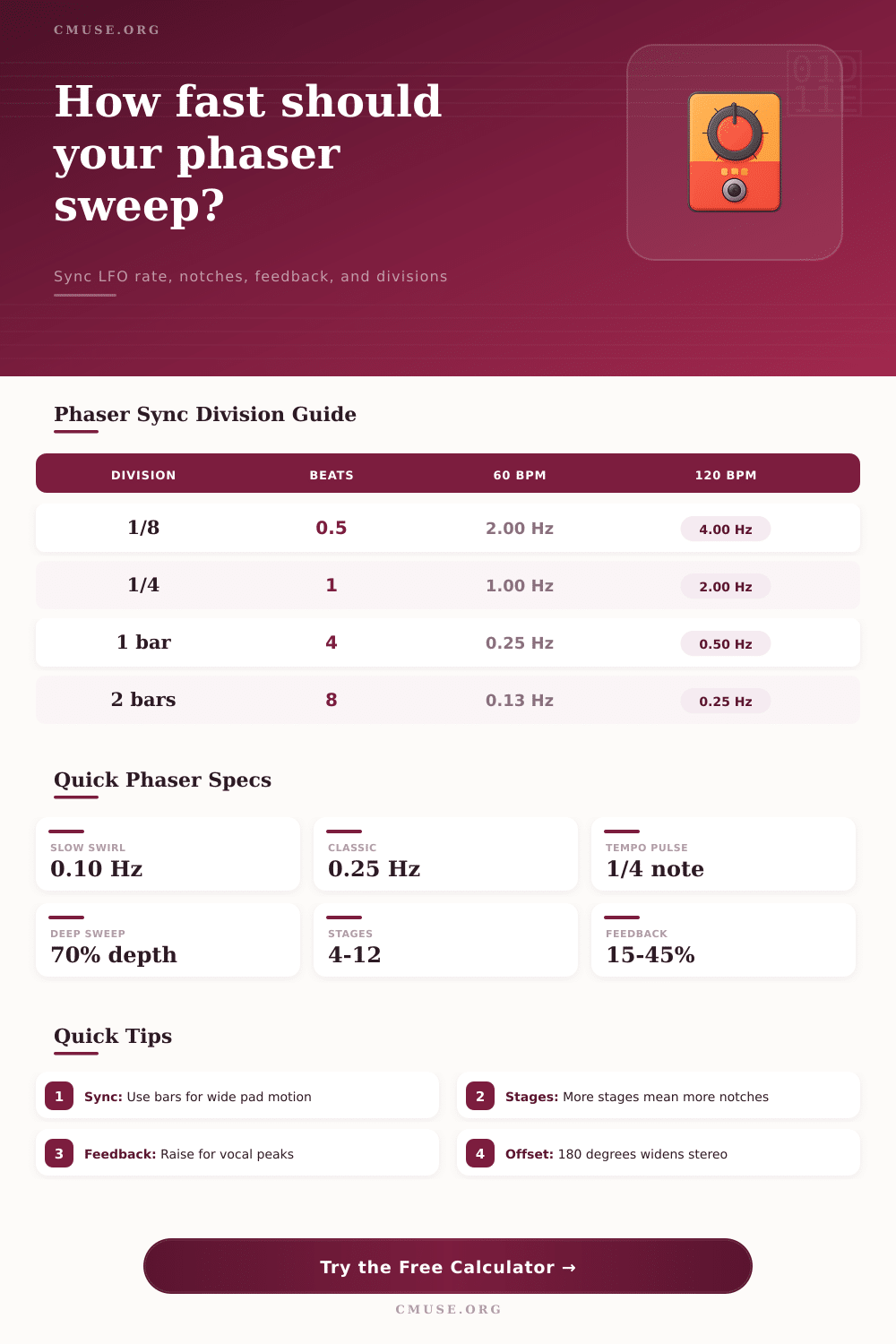
| 16th note | 0.25 beat | 6.00 Hz | 8.00 Hz | Fast rhythmic shimmer |
| 8th note | 0.5 beat | 3.00 Hz | 4.00 Hz | Funk pulse and choppy motion |
| Quarter note | 1 beat | 1.50 Hz | 2.00 Hz | Tempo-locked sweep accents |
| Half note | 2 beats | 0.75 Hz | 1.00 Hz | Moderate pedal-style swirl |
| 1 bar | 4 beats | 0.375 Hz | 0.50 Hz | Pad and synth movement |
| 2 bars | 8 beats | 0.188 Hz | 0.25 Hz | Wide, slow modulation arcs |
| 4 bars | 16 beats | 0.094 Hz | 0.125 Hz | Ambient drift and transitions |
| Stages | Approx. Notches | Texture | Motion Density | Typical Setting |
|---|---|---|---|---|
| 2 | 1 notch | Subtle comb movement | Light | Clean guitars, gentle inserts |
| 4 | 2 notches | Classic pedal swirl | Medium | Guitar, keys, synth stabs |
| 6 | 3 notches | Deeper vocal sweep | Medium-high | Leads and buses |
| 8 | 4 notches | Thicker animation | High | Studio phaser texture |
| 10 | 5 notches | Complex moving cancellations | Very high | Sound design and pads |
| 12 | 6 notches | Dense, layered sweep | Extreme | Special effects and wide synths |
| Offset | Cycle Fraction | Stereo Feel | Best Use |
|---|---|---|---|
| 0° | 0.00 cycle | Mono-compatible sweep | Centered guitars and buses |
| 45° | 0.125 cycle | Slight left/right drift | Subtle stereo thickening |
| 90° | 0.25 cycle | Quadrature motion | Rotary-like movement |
| 120° | 0.333 cycle | Wide moving image | Triad-like modulation spacing |
| 180° | 0.50 cycle | Opposite sweep positions | Maximum stereo contrast |
| 270° | 0.75 cycle | Reverse quadrature feel | Counter-motion textures |
| Feedback | Resonance | Perceived Tone | Practical Range |
|---|---|---|---|
| 0-10% | Very low | Smooth cancellation, low color | Clean rhythm and transparent bus use |
| 10-25% | Light | Classic soft swirl | Most guitar and keyboard parts |
| 25-45% | Medium | Vocal peaks and deeper whoosh | Lead lines, synths, ear-catching motion |
| 45-65% | High | Pointed resonance and jet-like edges | Breakdowns and special sections |
| 65-95% | Extreme | Intense ringing, possible harshness | Sound design and automation moments |
| Phaser Type | Rate Range | Stages | Feedback Range | Best Match |
|---|---|---|---|---|
| Vintage pedal style | 0.05-10 Hz | 2-4 | 0-35% | Guitar, organ, electric piano |
| Studio multi-stage | 0.02-20 Hz | 4-12 | 0-70% | Mix inserts and stereo buses |
| Synth modulation | 0.01-25 Hz | 4-12 | 0-85% | Pads, basses, evolving leads |
| Tempo-synced plugin | Divisions | 2-12 | 0-95% | DAW sessions and rhythmic automation |
| Stereo dual LFO | 0.01-15 Hz | 4-10 | 0-60% | Wide guitars, synth layers, transitions |
| Scenario | BPM / Division | Rate | Stages | Feedback | Phase Offset |
|---|---|---|---|---|---|
| Classic 4-stage guitar | 100 BPM / 2 bars | 0.208 Hz | 4 | 18% | 0° |
| Slow pad wash | 80 BPM / 4 bars | 0.083 Hz | 8 | 20% | 90° |
| Funk 16th pulse | 112 BPM / 16th | 7.467 Hz | 4 | 28% | 0° |
| Drum bus movement | 124 BPM / 1 bar | 0.517 Hz | 6 | 16% | 45° |
| Ambient two-bar drift | 70 BPM / 2 bars | 0.146 Hz | 10 | 30% | 180° |
| Wave Shape | Motion Pattern | Peak Speed | Use When |
|---|---|---|---|
| Sine | Slower at ends, faster at center | 1.57× average | You want natural pedal-style sweep |
| Triangle | Constant up and down movement | 1.00× average | You need predictable rhythmic motion |
| Ramp up | Rises then resets | 1.00× average | You want rising filter-like accents |
| Ramp down | Falls then resets | 1.00× average | You want downward sweeps and drops |
| Square | Jumps between two positions | Instant jump | You want stepped, two-state phasing |
Ever heard a guitar part that just isn’t moving? You’ve got this dry and static recording sitting on the floor wanting to breathe and swirl in a way that makes it sound alive. Enter the phaser.
You don’t set up a phaser correctly by turning knobs at random; you do it by knowing how modulation speed work with your chosen tempo. Too fast and it becomes a mess of noise, too slow and then the effect falls away completely during the verse. We are figuring out exactly what that rate control on our plugin or pedal measure.
How to Set Up a Phaser Effect
To do this we simply put the tempo of our song into the top of the calculator above and select the rhythmic division we want to divide it by. No more guess work for you!
Is an eighth note at 60 BPM going to feel any different than a quarter note sync at 120 BPM? In terms of Hertz. Yes, actual number is identical. But as far as music goes, its like being on two separate planets. By syncing your Low Frequency Oscillator to the beat, notch filters will always come back to where they started on every new measure. This brings cohesion to the sound instead of having a wobbly effect that floats free and gets lost in space.
They tend to forget about number of stages. With a four stage phaser you have two moving notches in the frequency spectrum, which give you that classic subtle swirl common in guitar parts from the 70’s. Bump that up to eight or twelve and you has a greater number of notches plus a denser sound. It sounds thicker, but it can also muddy up an already busy mix. To avoid having a clean rhythm part become a thick soup of cancelled frequencies, the calculator will show you approximately where each of the notches is moving based off the number of stages. Often keeping the number of notches down keep the groove clearer as opposed to broader sweeps with increased complications.
The other thing that dramatically alters the sound is amount of feedback. Set it at the lower levels (ten to twenty percent), and it sounds transparent and smooth. Turn it above forty percent, however, and now those notches begins to sing like peaks in a resonant frequency spectrum. It begins to take on a sort of vocal characteristic; almost like a jet engine lifting off.
This is where folks miss the mark with this effect. They believe turning up the feedback simply increase its volume. What it does is alter the tonality of the phasing from a gentle canceling to a sharper, biting ring. Use the lower levels for warmth and go high if you desire more edge and attitude…but be careful as things will become harsh rather fast.
The magic often occurs with stereo width. Use an LFO on the left and another on the right, offset by any number of degrees. For example, one hundred eighty degrees results in a wide picture that appears to be turning in listener’s head. This creates a moving, wide image. So at any time the left channel is doing the complete opposite from the right. If the right channel sweeps up in pitch, the left come down. This widens the sound considerably, but will result in phase issues if summed to mono.
Small offsets like forty-five or ninety degrees are a safe way to thicken the sound. This helps you avoid losing low-end power when listening back on a single speaker system.
Where on the frequency spectrum those notches travel depend on depth. You don’t necessarily have to sweep from bass to treble. In fact often you’re better off confining it to the midrange where your instrument is likely to livig. The narrower sweep, hitting just the right place, will hit harder than a wider sweep spending half its time in empty air. A small thing but it matter if it all sounds clear.
Phasers ultimately come down to being musical while still having motion. It’s great if the modulation adds to the track’s feel but you shouldn of wanted it fighting against it either. Whether you are syncing your phasing effect to the bar for ambient pad sounds or to sixteenth notes for a funkier guitar line, the aim is the same. The goal is to give life to the otherwise dead track while keeping the essence of what the original sound was. When you get that perfect shape and rate, that lifeless track can suddenaly take a breath.