Opus Bitrate Calculator
Estimate Opus audio bitrate, per-channel allocation, packet payload, one-way latency, network overhead, and storage size for voice, music, game chat, streaming, and archive workflows.
Load a real Opus scenario, then adjust the channel count, target bitrate, frame size, packet grouping, overhead type, duration, and safety margin. The calculator separates encoded audio bitrate from packet or container overhead.
Full Calculation Breakdown
Total Audio Rate
Total kbps = per-channel kbps × channel count, or the direct total target.
Packet Payload
Payload bytes = audio bits per second ÷ 8 ÷ packets per second.
Latency Budget
Latency = 6.5 ms Opus lookahead + packet span + jitter buffer.
File Size
Size MB = combined kbps × 1000 ÷ 8 × seconds ÷ 1,000,000.
6-510
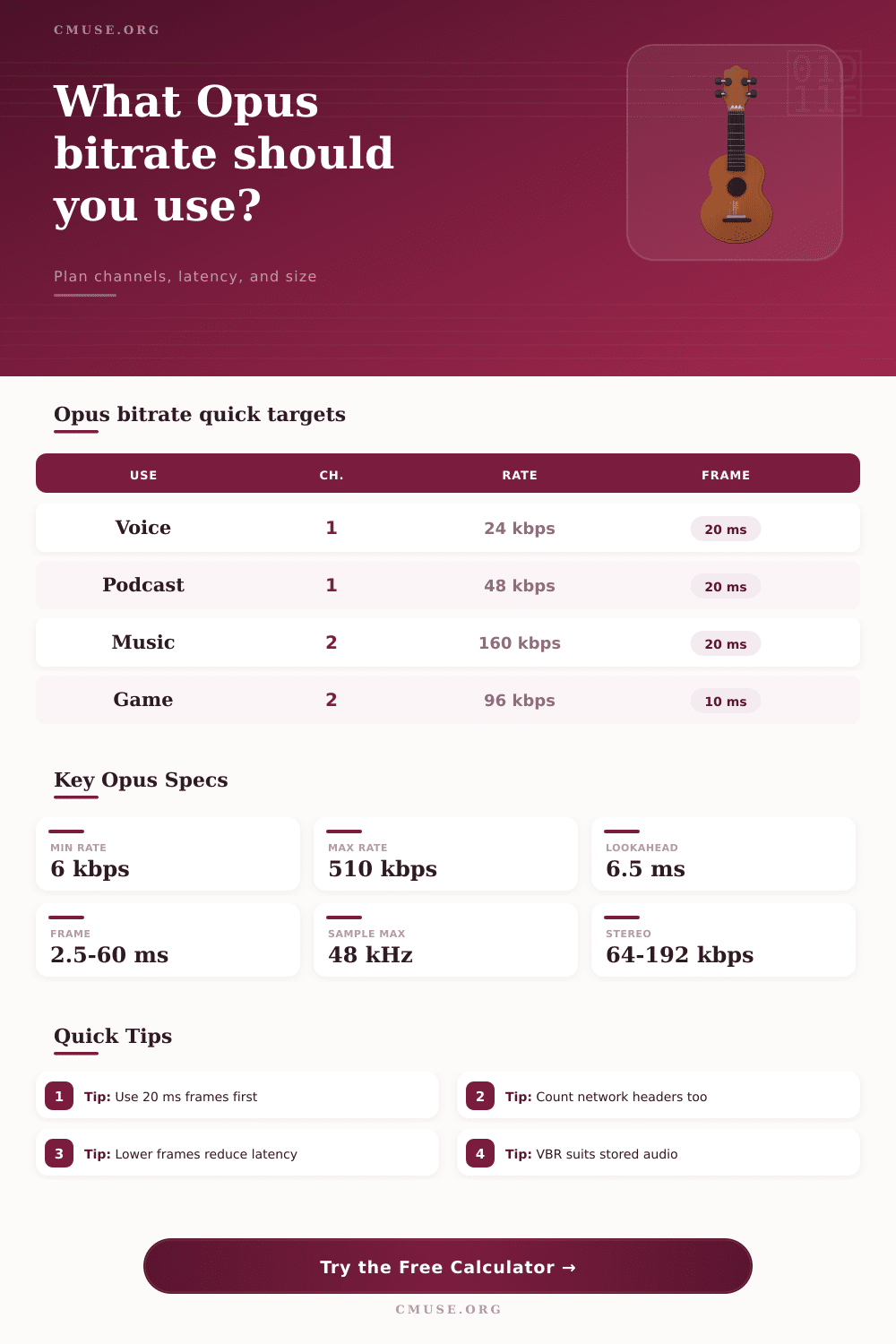
kbps practical Opus bitrate range
2.5-60
ms supported frame duration
48 kHz
maximum Opus fullband audio rate
6.5 ms
typical encoder lookahead used here
| Opus Use Case | Typical Channels | Useful Bitrate Range | Common Frame | Planning Note |
|---|---|---|---|---|
| Voice chat | Mono | 16-32 kbps total | 10-20 ms | Prioritize latency and packet loss recovery over maximum fidelity. |
| Podcast or narration | Mono | 32-64 kbps total | 20 ms | Speech usually benefits more from clean source audio than very high bitrate. |
| Stereo music | Stereo | 96-192 kbps total | 20 ms | Use the higher end for dense mixes, cymbals, reverb tails, and masters. |
| Game or live stream | Stereo | 64-128 kbps total | 10-20 ms | Small frames improve response but increase packet overhead. |
| Surround ambience | 5.1 or 7.1 | 256-510 kbps total | 20 ms | Multistream Opus can use coupled stereo pairs plus uncoupled channels. |
| Frame Size | Packets Per Second | Best For | Latency Tradeoff | Overhead Tradeoff |
|---|---|---|---|---|
| 2.5 ms | 400 pps | Very low latency monitoring | Lowest packet span | Very high header load |
| 5 ms | 200 pps | Interactive audio links | Very responsive | High header load |
| 10 ms | 100 pps | Games, calls, contribution feeds | Low | Moderate header load |
| 20 ms | 50 pps | Default speech and music | Balanced | Efficient |
| 40-60 ms | 25-16.7 pps | Files, audiobooks, archives | Higher | Very efficient |
| Overhead Model | Calculator Assumption | Most Useful For | What Changes The Result |
|---|---|---|---|
| Raw payload only | 0 extra bytes | Codec comparison and clean math | Does not represent a real container or network path. |
| Ogg Opus file | 1.5% estimated container overhead | Music files, podcasts, long-form speech | Page size, tags, seek tables, and very short clips. |
| WebM or Matroska | 2.5% estimated container overhead | Video tracks, browser media, streaming files | Cluster size, timestamps, track count, and metadata. |
| RTP/UDP/IPv4 | 40 header bytes per packet | Realtime LAN or WAN transport estimates | Packet size, tunneling, encryption, and link-layer headers. |
| WebRTC SRTP estimate | 52 header bytes per packet | Browser voice and game chat planning | ICE path, SRTP profile, TURN relay, and congestion control. |
| Preset | Channels | Audio Bitrate | Frame | Typical Duration |
|---|---|---|---|---|
| Low Latency Voice Chat | 1 | 24 kbps | 10 ms | 30 minutes |
| Podcast Mono Master | 1 | 48 kbps | 20 ms | 45 minutes |
| Stereo Music Demo | 2 | 160 kbps | 20 ms | 4 minutes |
| Transparent Stereo | 2 | 256 kbps | 20 ms | 5 minutes |
| 5.1 Ambience Bed | 6 | 384 kbps | 20 ms | 10 minutes |
Bitrate selection for Opus is a bit of a puzzle with no one answer: It depends on what you think sounds best in your podcast, but it also needs to get through a dodgy cellular network without hiccupping. Efficiency vs. Fidelity. Fortunately, after specifying your constraints, the calculator up top do the math for you… Sparing you from doing packet size conversions, overhead coefficient guesses and all that.
Opus has a secret sauce. Because Opus combines these two coding engines, it’s sort of a duality at its core. Depending on the frequency content, one engine will take over. For low frequencies, Opus use a linear prediction model, something that has been used in telephony for decades. Then, for high frequencies, Opus goes with a psychoacoustic model, such as what you would find in an AAC or MP3. Basically, this hybrid design lets Opus switch from one mode to another easy based off the type of audio being played. So you could begin with voice, then move into music all in the same file.
How to Choose Your Opus Settings
The coding engine used depends on your selected bitrate. Lower bitrates will lean more toward speech coder, while higher rates enables the full musical potential.
Most people have a problem with the frame size. How big? That’s the balance between efficiency and latency. For normal applications, 20 milliseconds is the sweet spot. It provide enough of a response time without being so large that packet headers chew up lots of bandwidth.
Go smaller (say 5 or 10 ms) and you cut your delay. Awesome if you’re doing live monitoring or playing games. But at that point each packet carry more header data relative to its payload, and your real-world network utilization goes way up, since the packet overhead increases at a greater rate than the audio decreases.
But it’s not only about the frame size when considering latency. Also consider encoder lookahead. Opus can makes educated guesses about how to compress the audio by looking at a few milliseconds into the future. It’s usually around 6.5 milliseconds. And then there’s what happens behind the scenes: the encoder adds an additional 6.5-millisecond delay (accounting for this hidden latency). On top of all that, add your packetization delay and jitter buffer, and now you’ve got the actual one-way latency. For most use cases (e.g., if you’re developing a real-time collaboration tool), those extra milliseconds matters far more then shaving off a couple of kilobits per second.
The distinction between container overhead and audio bitrate makes it easier to plan storage. Ogg adds little extra padding. A Matroska or WebM container adds some structure but not much. RTP packets on a network stream include lots of headers for each and every packet. For hours-long archives of interviews, the container differences won’t matter much at all. For voice chat streams over a limited connection, those header bytes accounts for a big chunk of your total budget. The calculator breaks things down so you can see which parts really cost you bandwidth.
But what about bitrate? That’s all over the map depending on how you use it. For example, you don’t need more than 24 to 32 kilobits per second to get clean mono voice conversation. On the other end of the spectrum, music requires a lot more. Often 128 to 192 kilobits per second is needed to deliver stereo mixes with complex instruments and broad dynamics in a transparent way. These common levels appear in the table on the page, though keep in mind that source quality is equally important. You can compress a poorly recorded track at a high bitrate and still not have a great sounding track. It is just a bigger file.
For storage, variable bitrate mode typically provide optimal performance; that’s because it applies relatively few bits to silent sections or simple tones and more bits to the complex parts. So the perceived sound quality remains constant as you play back different types of music or other audio. With constant bitrate, the codec is required to apply the same number of data points to every section no matter how complex it might be, which can waste your available space on uninteresting material. In between is constrained VBR, which has a predictable ceiling in cases where there are strict bandwidth caps for live streams.
Because Opus adapts to your requirements instead of boxing you into one, it is flexible. Want lower latency? Adjust frame size. Need higher quality? Change the bitrate. Always tune tech settings to match your desired human experience. That could of maintaining the nuance in a jazz recording or synchronizing gamers. It all depends on your goal. The math’s the same. Just the priority changes.
Start with your lowest acceptable level and go up from there.