Note Length Percent Calculator
Turn any MIDI gate length percent into sounding milliseconds, the silence gap after the note, sounding ticks and the overlap when you push past 100% – at any BPM and step value
Full Calculation Breakdown
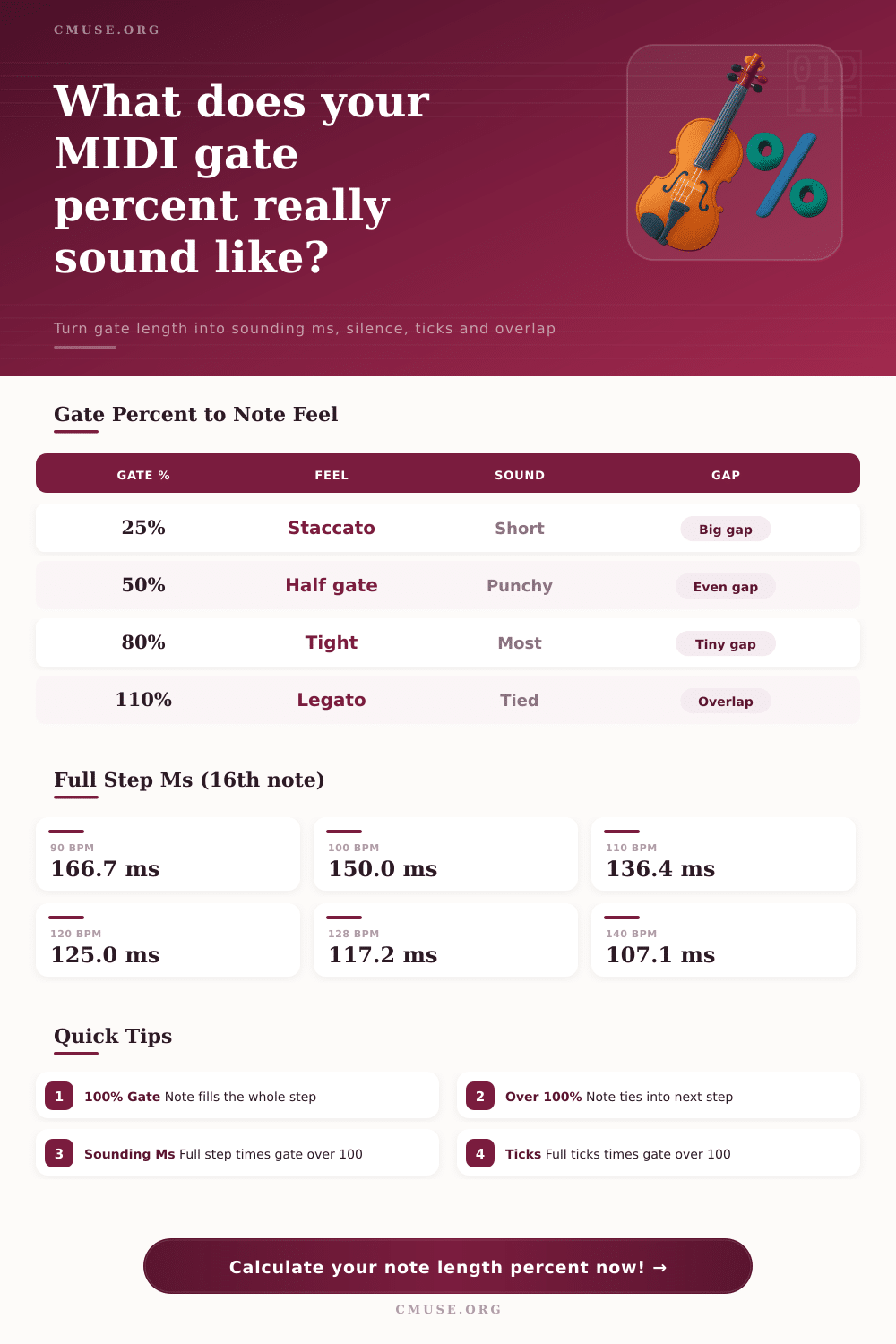
| Gate % | Feel / Articulation | Sounds Like | Gap After Note |
|---|---|---|---|
| 10 – 25% | Hard staccato | Clicky / plucked | Very large gap |
| 30 – 50% | Staccato / half gate | Punchy stabs | Even gap |
| 60 – 75% | Normal | Detached groove | Small gap |
| 80 – 95% | Tight | Connected | Tiny gap |
| 100% | Full step | Note fills step | No gap |
| 101 – 200% | Legato / tie | Overlapping | Overlap / tie |
| BPM | 16th note | 8th note | Quarter note |
|---|---|---|---|
| 90 | 166.7 ms | 333.3 ms | 666.7 ms |
| 100 | 150.0 ms | 300.0 ms | 600.0 ms |
| 110 | 136.4 ms | 272.7 ms | 545.5 ms |
| 120 | 125.0 ms | 250.0 ms | 500.0 ms |
| 128 | 117.2 ms | 234.4 ms | 468.8 ms |
| 140 | 107.1 ms | 214.3 ms | 428.6 ms |
| BPM | 16th @80% | 8th @80% | Quarter @80% |
|---|---|---|---|
| 90 | 133.3 ms | 266.7 ms | 533.3 ms |
| 100 | 120.0 ms | 240.0 ms | 480.0 ms |
| 120 | 100.0 ms | 200.0 ms | 400.0 ms |
| 128 | 93.8 ms | 187.5 ms | 375.0 ms |
| 140 | 85.7 ms | 171.4 ms | 342.9 ms |
| Gate % | Sounding ms | Silence ms | Sounding Ticks |
|---|---|---|---|
| 50% | 62.5 ms | 62.5 ms | 60 |
| 80% | 100.0 ms | 25.0 ms | 96 |
| 100% | 125.0 ms | 0.0 ms | 120 |
| 110% | 137.5 ms | 0.0 ms | 132 |
In many ways, a MIDI sequence can look right on the grid, but sound disconnected when played back. It has all the notes. They is quantized correctly, but there is no groove. Typically that means the gates is set to default length.
Gates determine how long a note plays compared to amount of silence that follows. By default, most producer keep their gates set to 100 percent, making each note take up the full space of its time step. Often doing so eliminate the human feel you’re going for.
How Gate Length Changes Your Music Feel
Instead, a calculator like this do it for you. It translates those hard to grasp percentage values into real spaces of silence, in milliseconds. So you don’t have to think about that just what the sound sounds like in your mix.
Adjusting the gate length shapes the envelope of your rhythmic element. And if you make the gate shorter, it place each note further apart. It lets the previous one ring out naturaly before the next strikes. This is perfect for instruments such as acoustic piano or plucked synths whose transients are more important then their sustain.
Two chord piano parts played too closely together with fully opened gates will muddle into one another and become indistinguishable. This really comes down to understanding how note duration relate to tempo. At 120 beats per minute, a sixteenth note will last 125 milliseconds. Set your gate to 80 percent and that note sound for only 100 of them. Then there’s a 25 millisecond break before the next one starts.
On paper, that may not sound like much time, but it’s more than enough to keep harmonic clutter from building up in busier patterns. For a quick visual reference, chart on the page explains it all: the same percentage represents a different amount of actual time at different speeds. Why does this matter? Because what feels tight at 90 BPM can feel choked at 140 BPM unless you account for it.
Below 50 percent, however, the results often yield a punchier, staccato type of effect that you can hear in classic funk guitar parts or house music. The notes don’t blend into one wash of sound. They’re distinct events. Why? Because now there’s time for instrument’s release phase to breathe.
It’s all about trusting the tail-end of the last note to come into play without the next note stomping on its toes. It’s rhythmic more than melodic. And the key is largely knowing what you are adjusting. We conceptualize things musically through notes and rests. But the sequencer conceptualizes them in terms of milliseconds and ticks. That’s the gap we need to bridge, and that’s where the adjustment take place.
At the far end of the scale, legato lines is produced when you push gates longer than 100 percent. In this case, the note overlaps the following step and continues to sustain through it. This produce a continuous line of lead or pad sounds that have a smooth transition from one pitch to the next instead of being clearly attacked.
At 110 percent, you’ll notice the sixteenth note has a slight bleed into the next slot. This joins the phrases together. If there’s no overlap then the melody can become disjointed and choppy. With too much then you lose clarity. You need just enough to make the blend work. The calculator lets you see the overlap in milliseconds so you’re not guessing about amount of bleed you are adding.
The mistake many producer make is hearing the pattern as a whole instead of breaking down each step. Instead of realizing the issue, they don’t know if it’s a matter of velocity, timing, or gate length. Once you convert those percentages into actual time durations, you gain a tangible metric for your adjustments. You can see that changing from 75 percent to 90 percent adds a specific amount of sustain. In other words, you turn your intuition into a data point. That takes out the guessing game and makes editing much more accurate.
To sum up, good sequencing is all about balance. Enough to give your track movement and enough space between the notes that keeps the rhythm interesting. These micro-timings are picked up by human ear in an instant. Whilst we may not be able to explain what makes a groove off, we certainly feel it when it lands.
Use the presets and have a play around. Switch on staccato for drums or legato for pads. Adjust those percentages and see how this alters the emotional impact of your track. It is a small thing but it matters. Control over gate length gives you the ways to master the very feel of your music, transforming a flat grid into a livig, breathing performance.
You should of seen the difference.