Nested Tuplet Calculator
Work out the compound ratio, inner and outer note durations in milliseconds, and MIDI ticks for any tuplet nested inside another tuplet at any tempo and PPQN
Full Calculation Breakdown
| Outer (No:Mo) | Inner (Ni:Mi) | Compound Ratio | Total Notes |
|---|---|---|---|
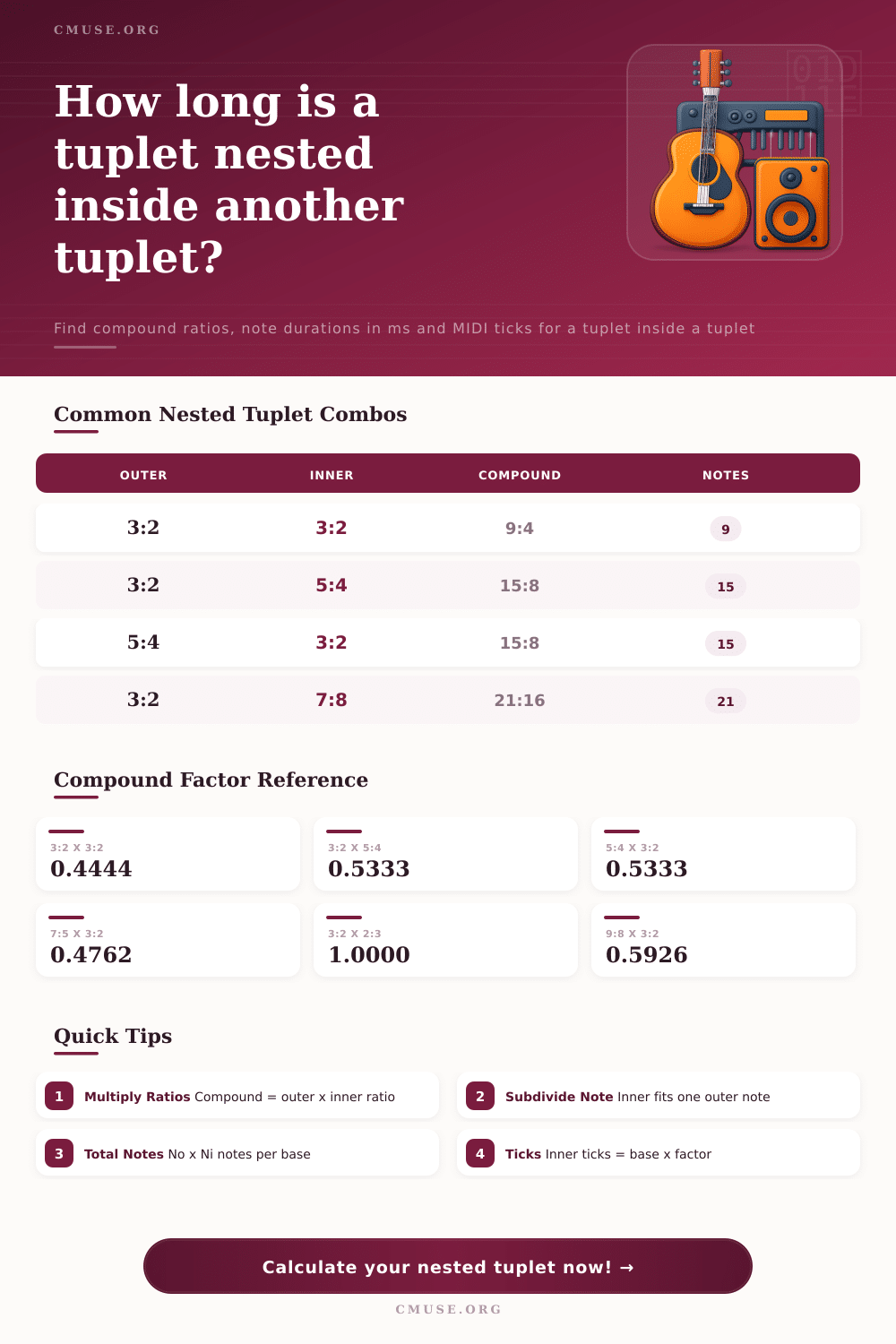
| 3:2 (triplet) | 3:2 (triplet) | 9:4 | 9 |
| 3:2 (triplet) | 5:4 (quintuplet) | 15:8 | 15 |
| 5:4 (quintuplet) | 3:2 (triplet) | 15:8 | 15 |
| 3:2 (triplet) | 2:3 (duplet) | 6:6 = 1:1 | 6 |
| 5:4 (quintuplet) | 7:8 (septuplet) | 35:32 | 35 |
| 7:4 (septuplet) | 5:4 (quintuplet) | 35:16 | 35 |
| 9:8 (nonuplet) | 3:2 (triplet) | 27:16 | 27 |
| 3:2 (triplet) | 6:4 (sextuplet) | 18:8 = 9:4 | 18 |
| BPM | Quarter Note | Eighth Note | Sixteenth Note |
|---|---|---|---|
| 60 | 1000.00 ms | 500.00 ms | 250.00 ms |
| 90 | 666.67 ms | 333.33 ms | 166.67 ms |
| 100 | 600.00 ms | 300.00 ms | 150.00 ms |
| 110 | 545.45 ms | 272.73 ms | 136.36 ms |
| 120 | 500.00 ms | 250.00 ms | 125.00 ms |
| 140 | 428.57 ms | 214.29 ms | 107.14 ms |
| Outer (Mo/No) | Inner (Mi/Ni) | Compound Factor | Compound Ratio |
|---|---|---|---|
| 3:2 (0.6667) | 3:2 (0.6667) | 0.4444 | 4:9 of base |
| 3:2 (0.6667) | 5:4 (0.8000) | 0.5333 | 8:15 of base |
| 5:4 (0.8000) | 3:2 (0.6667) | 0.5333 | 8:15 of base |
| 7:5 (0.7143) | 3:2 (0.6667) | 0.4762 | 10:21 of base |
| 3:2 (0.6667) | 2:3 (1.5000) | 1.0000 | 1:1 of base |
| 9:8 (0.8889) | 3:2 (0.6667) | 0.5926 | 16:27 of base |
| Outer | Inner | Compound | Notes / Base |
|---|---|---|---|
| 2:1 (duplet) | 3:2 (triplet) | 3:2 | 6 |
| 3:2 (triplet) | 4:4 (quadruplet) | 3:2 | 12 |
| 4:3 (quadruplet) | 3:2 (triplet) | 4:2 = 2:1 | 12 |
| 5:4 (quintuplet) | 5:4 (quintuplet) | 25:16 | 25 |
| 6:4 (sextuplet) | 3:2 (triplet) | 18:8 = 9:4 | 18 |
Nested tuplets is tricky to program into a sequencer as a polyrhythm too. Unless you’re a freak of nature, it’s easy to get lost when programming nested tuplets manualy. You start counting and your head jumps between two sets of grid lines, this creates a messy timeline with no clear pulse.
Once you input your ratios the calculator do the math for you. It eliminates the need to guess and convert coefficients and lets you concentrate on feeling groove instead. It sounds so obvious when put that way, yet it can be difficult to apply.
How Nested Tuplets Work
A nested tuplet refers to placing one subdivision within one note from an outer tuplet. For example, if you take a triplet within a quarter note each of the three notes holds two-thirds of a beat’s value. Now, if you nest another tuplet (e.g., a quintuplet), then only one of these triplet notes will contains five equal subdivisions. In other words, don’t think about dividing the entire beat into fifteens; instead, simply slice up that third into five equal parts.
Why does it matter? It alters level of density and, as the chart illustrates with commonly used combinations, also the total number of note. Most producers falls into the trap of thinking additively rather than multiplying. Placing one triplet within another doesn’t give you eight notes but fifteen! You get this compounding effect producing rhythmic density that can sound either chaotic or luxurius depending on how it’s mixed.
To help with accurate programming, you can switch between seeing these inner note durations as MIDI ticks or as milliseconds. Ticks guarantee that whatever tempo changes you later make your sequencer puts the notes exactly where they need to go in grid. Milliseconds are more helpful because you can listen to them against a metronome and hear what you’re doing.
If you multiply numbers on the outside, that gives you the overall compound ratio. In other words, if you have a 3:2 triplet inside another 3:2 triplet, you get a 9:4 ratio. That’s four-ninths of initial length per inner note. This may not be a huge point, but it is important as you layer percussion sounds and attempt to sync effects. Your accents won’t align with the pulse unless you take into account the compound nature of the pulse. The calculator does that breakdown for you too, indicating just how much shorter those inner notes are different than starting pulse.
Tempo also plays a role in perceived clarity. When playing the nested tuplets slowly they have time to breathe and each subdivides lands with distinct clarity. Push it beyond 140BPM however and unless carefully quantized to a specific tempo these same sub-divisions will blur together becoming nothing more than noise. This is where PPQN settings are useful. Increasing the number of ticks per second eliminates rounding errors that could lead to a quintuple note snapping on an incorrect grid line. Your timing will be tight even at extreme speed.
So why go through all this trouble with these intricate rhythms? In short, polyrhythms provides the forward motion and tension missing from straight grids while mirroring the kind of natural push and pull you experience in a live performance. However, there’s a catch: without precise data, you’re just hoping the quantization engine does its job. If not, your hands are crossed and you’re relying on the quantization engine to do the right thing. Knowing the settings (i.e., tempo and base note value) gives you control over results. Is a particular rhythm feeling right? Adjust accordingly before committing to a recorded take.
In conclusion, nesting tuplets can be considered as time on top of time. Exact and patient work are required. Using the calculator also eliminates the math problem and allows free experimentation in combinations that may of been felt too complicated to code. Knowing exactly how long every note will last lets you push the limits of rhythm with confidence. This applies to everything from composing electronic music to writing for film. Moving from not knowing where each beat falls to controlling how those beats land turns a messy sequence of events into steady groove.