🏚️ LUFS to dBFS Calculator
Convert between LUFS, dBFS & dBTP — plus streaming platform loudness standards
✅ Conversion Results
| LUFS (Integrated) | Approx. dBFS RMS | True Peak (dBTP) | Headroom from 0 dBFS |
|---|---|---|---|
| -6 LUFS | ≈ -6 dBFS | ≤ -0.5 dBTP | 6 dB |
| -9 LUFS | ≈ -9 dBFS | ≤ -1.0 dBTP | 9 dB |
| -14 LUFS | ≈ -14 dBFS | ≤ -1.0 dBTP | 14 dB |
| -16 LUFS | ≈ -16 dBFS | ≤ -1.0 dBTP | 16 dB |
| -18 LUFS | ≈ -18 dBFS | ≤ -1.0 dBTP | 18 dB |
| -23 LUFS | ≈ -23 dBFS | ≤ -1.0 dBTP | 23 dB |
| -24 LUFS | ≈ -24 dBFS | ≤ -2.0 dBTP | 24 dB |
| -27 LUFS | ≈ -27 dBFS | ≤ -3.0 dBTP | 27 dB |
| Platform | Target LUFS | Tolerance | True Peak Max |
|---|---|---|---|
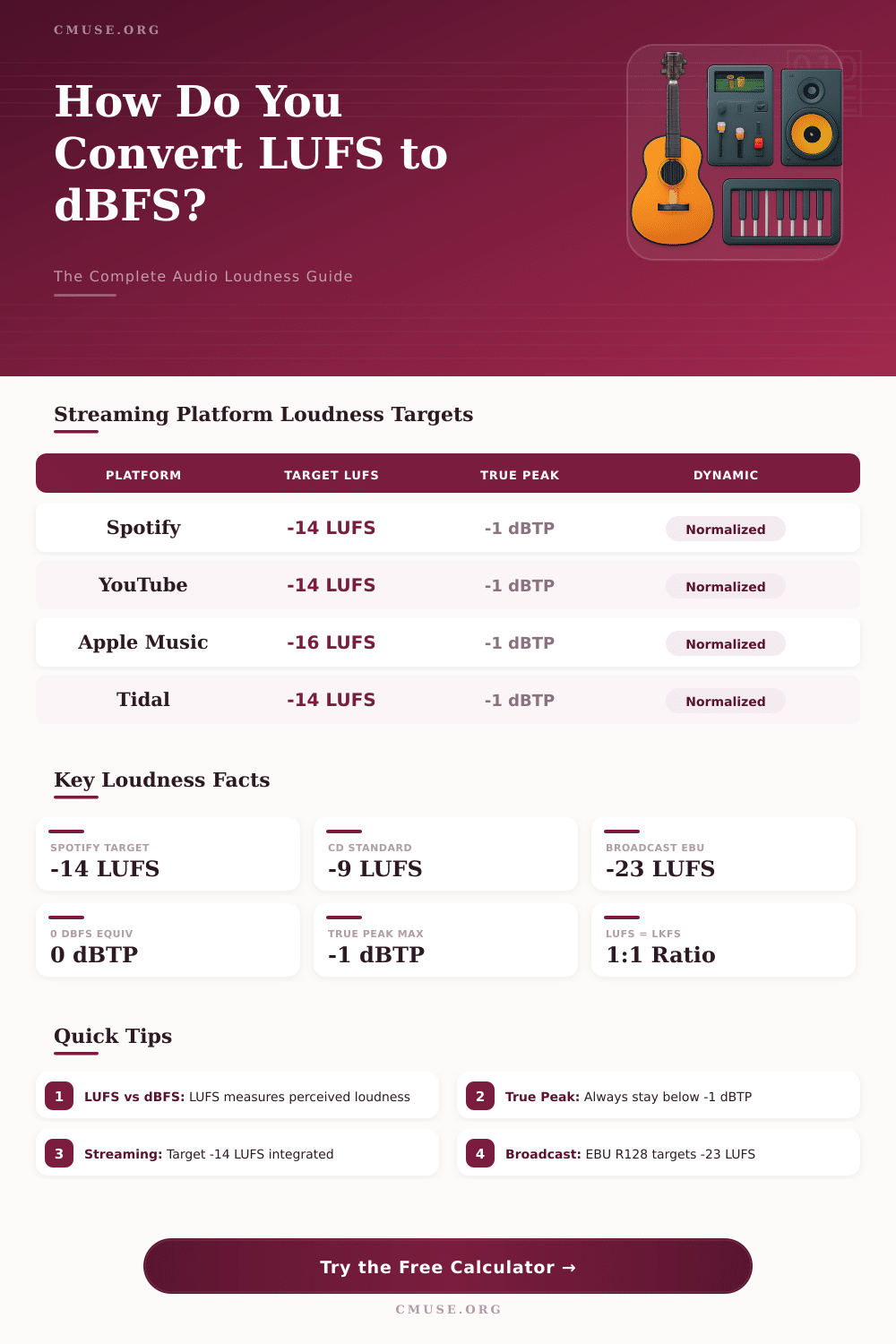
| Spotify | -14 LUFS | ±1 LU | -1 dBTP |
| YouTube | -14 LUFS | ±1 LU | -1 dBTP |
| Apple Music | -16 LUFS | ±1 LU | -1 dBTP |
| Tidal | -14 LUFS | ±1 LU | -1 dBTP |
| Amazon Music | -14 LUFS | ±1 LU | -2 dBTP |
| Deezer | -15 LUFS | ±1 LU | -1 dBTP |
| SoundCloud | -14 LUFS | ±1 LU | -1 dBTP |
| EBU R128 (Broadcast) | -23 LUFS | ±1 LU | -1 dBTP |
| ATSC A/85 (US TV) | -24 LUFS | ±2 LU | -2 dBTP |
| Podcast (general) | -16 LUFS | ±1 LU | -1 dBTP |
| CD Mastering | -9 LUFS | Variable | 0 dBFS |
| Film Dialogue | -27 LUFS | ±2 LU | -3 dBTP |
| Concept | Formula / Rule | Example | Notes |
|---|---|---|---|
| LUFS = LKFS | 1 LUFS = 1 LKFS | -14 LUFS = -14 LKFS | Identical units |
| LUFS → dBFS (approx) | dBFS ≈ LUFS (for sine) | -14 LUFS ≈ -14 dBFS | Depends on content |
| LU (Loudness Unit) | 1 LU = 1 dB | +3 LU = +3 dB | Relative only |
| Gain Adjustment | Gain = Target - Current | -14 - (-18) = +4 LU | Add to reach target |
| True Peak vs Sample Peak | dBTP can exceed dBFS | Inter-sample peak | Always measure dBTP |
| Loudness Range (LRA) | Max short-term - gate | 8 LU typical music | Lower = compressed |
| Clipping Risk | dBTP > -1 = risk | Over -1 dBTP | Limit to -1 dBTP |
| Volume Normalization | Platform auto-adjusts | If too loud = reduced | Never boosted louder |
Loudness normalization allow streaming platforms to ensure that all the songs within a playlist maintain a similar volume. If the volume of a song is much louder then the other songs in that playlist, the streaming platform will automaticly adjust the volume of that song. To ensure that your songs are streamed at a proper volume for the streaming platforms, you must understand loudness normalization.
In order to prepare your audio file, you must understand the difference between LUFS and dBFS. LUFS measures the loudness of a song over a period of time, whereas dBFS measure the peak levels of a song in a digital file. If you do not account for LUFS, streaming platform may adjust the volume of your song.
Make your songs the right loudness for streaming
LUFS consider how humans perceive loudness over the length of an audio file. The difference between LUFS and dBFS is that LUFS use K-weighting to account for how human ears perceive loud bass and loud treble notes in a song. DBFS and LUFS have similar reading for songs that have minimal dynamic change in their song.
However, songs with dynamic changes in the song will have different reading on these two measurement tool. This is because LUFS calculates the average loudness of a song over its playing time. Streaming platforms use LUFS because it can account for different type of music having different loudness levels.
Additionally, you must monitor the true peak level in your song, which dBTP can measure. The true peak levels indicate the instance in which your song may clip when it is converted from a digital signal to an analog signal. Your digital audio workstation may display that there are no clipping instance in your song.
However, instances in which your song clips on analog device (car stereos, phones) may occur. Most streaming platforms will require your true peak to be –1 dBTP. If the true peak of your song exceed this limit, the streaming platform may apply aggressive processing to your song, which may cause distortion of the song.
Certain type of content require a different loudness than other types of content. This is due to the fact that certain types of content are within a certain loudness range then others. For instance, cinematic score have a wider loudness range than pop songs.
Additionally, you can use instances in which short-term max LUFS can be monitored in your song to adjust the gain of your song to match the requirements of the streaming platform. Although each streaming platform has slightly different requirements for loudness, most music streaming service will have a target loudness of –14 integrated LUFS. Television content will have a different target loudness than music content.
Television content may require true peak level of -23 or -24 LUFS. This ensures that there is enough headroom for dialogue within the broadcast. Because CD mastering does not use loudness normalization, CDs may have a target loudness of –9 LUFS.
The limits on loudness for all of these platform must be followed. If the song is too loud for the target loudness of the platform, that platform will attenuate (also referred to as “turn the volume down”) that song. The platform will not, however, increase the volume of songs that are too quiet for the target loudness.
One of the most common mistake with loudness is treating LUFS as if it were peak metering. For example, you may limit your project to 0 dBFS, but the integrated LUFS of your song may be significantly lower than the target loudness for the streaming platform. This is due to the fact that the peak metering level of a song can be significantly higher than the integrated LUFS of that song.
Another common mistake is to ignore the true peak of the song. You should always use an oversampled true peak meter to ensure that the true peak does not exceed the limit. Otherwise, your song may clip when played on various consumer device.
In order to reach the correct level of loudness for your song, you can use gain staging. For example, if your song measure –18 LUFS but your target is –14 LUFS, you should add 4 unit of gain to your song. You should also monitor the peaks of your song so that adding gain does not cause clipping.
Additionally, you can use batch conversion tool to test different section of your song. These tool can allow you to see if your song meet the requirements for standards like EBU broadcast or Apple Music. In creating professional mix, there are a few specific step to follow.
First, measure your song’s loudness using a metering plugin. This will calculate your song’s integrated LUFS, true peak, loudness range (LRA), and short-term max LUFS. Next, compare these value to the requirements of the streaming platform for which you are mixing your song.
Based on these comparison, adjust the gain or re-limit your song to meet the requirement of that streaming platform. Finally, re-measure your song to ensure that its loudness measurement are now correct and meet the requirements of the streaming platform. By following these step, you can ensure that your song will play at the intended volume on the streaming platform.