LUFS to RMS Calculator
Estimate RMS voltage, dBFS level, peak headroom, and load power from a calibrated loudness anchor for broadcast, streaming, podcast, and music workflows.
LUFS is a loudness scale, so this calculator uses a real calibration anchor. Set a known LUFS-to-voltage pair, then translate the measured program loudness into RMS, peak, and power.
Each preset loads a real alignment pair, crest margin, and load context, then recalculates the RMS estimate immediately.
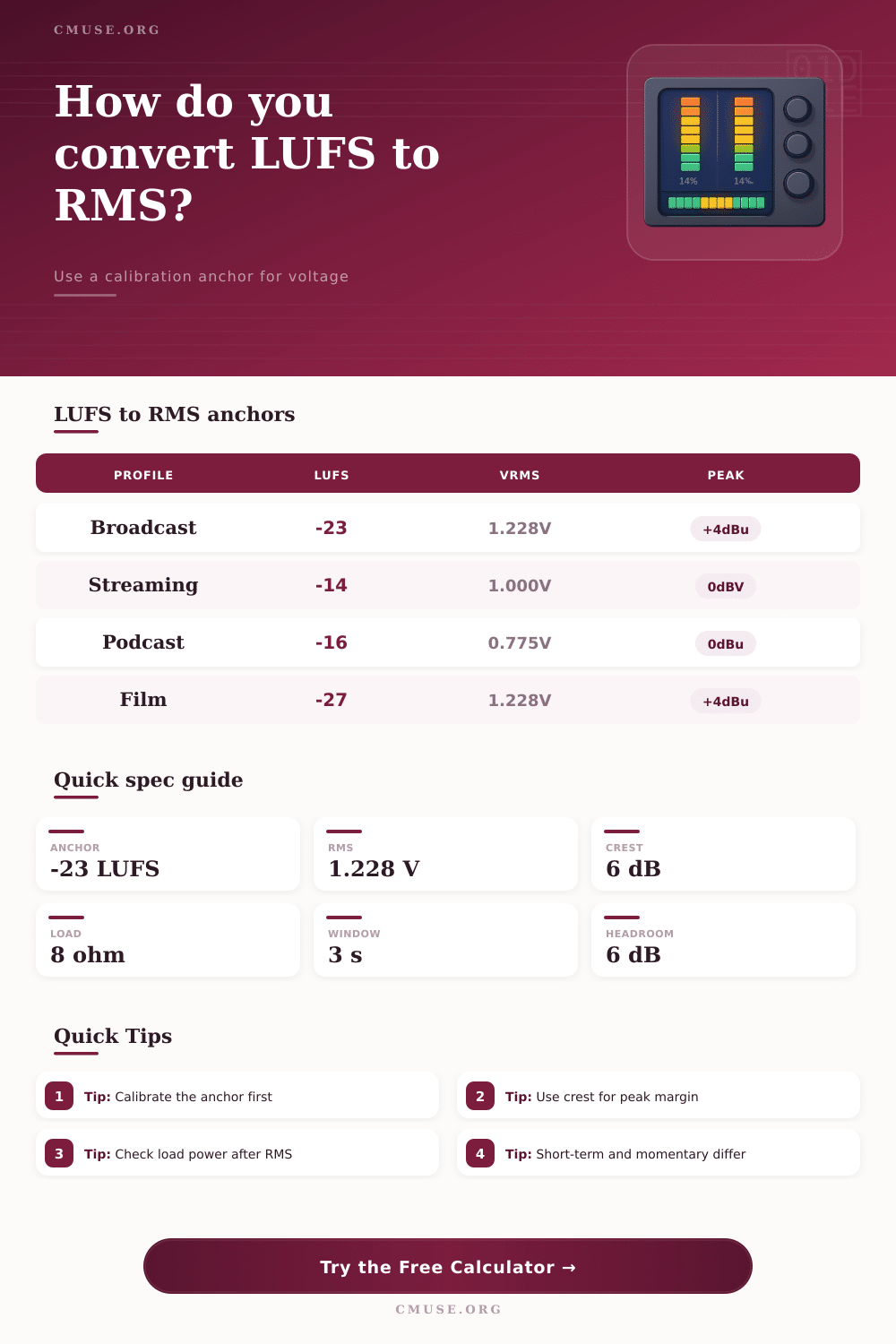
| Profile | Anchor LUFS | Anchor RMS | Typical use |
|---|---|---|---|
| Broadcast R128 | -23 | +4 dBu / 1.228 V | TV and radio line-up |
| Streaming master | -14 | 0 dBV / 1.000 V | Online music delivery |
| Podcast voice | -16 | 0 dBu / 0.775 V | Speech and talk shows |
| Film dialogue | -27 | +4 dBu / 1.228 V | Post and dub stages |
| Program type | Crest dB | Peak factor | Comment |
|---|---|---|---|
| Sine-like tone | 3.0 | 1.414x | Steady reference |
| Dense music | 6.0 | 1.995x | Common mix margin |
| Speech program | 8.0 | 2.512x | Voices need more room |
| Wide dynamic master | 12.0 | 3.981x | Film and orchestral work |
| Reference | Voltage | Equivalent | Note |
|---|---|---|---|
| 0 dBV | 1.000 V | 1.000 Vrms | Consumer line ref |
| 0 dBu | 0.775 V | 0.775 Vrms | Pro nominal ref |
| +4 dBu | 1.228 V | 1.228 Vrms | Broadcast line-up |
| -10 dBV | 0.316 V | 0.316 Vrms | Typical consumer send |
| Scenario | Input LUFS | Estimated RMS | Headroom cue |
|---|---|---|---|
| Broadcast line-up | -24.0 | 1.09 Vrms | Comfortable |
| Streaming master | -13.0 | 1.12 Vrms | Near unity |
| Podcast voice | -18.0 | 0.62 Vrms | Well below peak |
| Club master | -8.0 | 2.18 Vrms | Hot but controlled |
LUFS measure loudness, and RMS indicate the electrical power of a signal. Understanding the difference between LUFS and RMS is crucial for measuring audio corectly. LUFS measures loudness as humans perceive it, while RMS measure the actual voltage of the signal.
LUFS multiply the sensitivity of the human ear to loudness and considers the lengths of the program. RMS is the square root of the average power of a signal squared and dictates the voltage that speaker and other audio hardware receive. Knowing the difference between these two measurements allows audio engineer to calibrate the relationship between the two to avoid clipping and other hardware issues caused by overly loudly audio.
LUFS and RMS: A Simple Guide to Loudness and Voltage
To bridge the gap between LUFS and RMS, you need to find an anchor point for the two measurements. An anchor point for LUFS and RMS exist at specific voltage level and loudness targets. For instance, broadcast media use an anchor point of -23 LUFS to 1.23 volts RMS, which is +4dBu.
Streaming media are often normalized at -14 LUFS for 1 volt RMS, while podcasts is often set to -16 LUFS for 0.775 volts RMS. Without an anchor point for LUFS to RMS, the LUFS meter will provide incorrect information regarding the audios voltage. Without knowing the voltage of the signal, it is impossible to make sound decisions about you’re audio hardware.
Using the anchor point for LUFS and RMS allows audio engineers to calculate the RMS voltage of a given audio file. All that is needed is a measurement of the LUFS of the audio file and the difference between that number and the anchor points LUFS value. If the audio file is 1 dB louder than the anchor point, it will have a 12% increase in RMS voltage.
Another essential factor to consider is the crest factor, which is the difference between the RMS voltage and the peak voltage of the audio signal. The crest factor for music is 6 dB, while speech and dynamic audio have a crest factor of 8 dB to 12 dB. Accounting for the crest factor is essential to avoid clipping from peak voltages that are more higher than the RMS voltage.
You must factor in the load impedance for audio hardware such as speakers with 8 ohms of impedance. Depending on the kind of audio content being produce, there are different approaches to LUFS and RMS. For live streaming, if a guest join the stream and talks, the LUFS value will increase to reflect the loudness of the guests voice, and the RMS voltage will increase according.
If the audio engineer does not account for the crest factor of human speech, the RMS voltage will increase too fast to cause clipping. Club music often have an LUFS anchor point of -9 LUFS to reflect the loudness of club music. However, club music also has a low impedance load that can cause power spikes in the audio signal that can damage audio hardware.
As the integrated LUFS meter measure the loudness of the entire audio program, short-term and momentary LUFS meters allow audio engineers to understand the voltage variation over short periods. Audio engineers can make mistake when chasing specific LUFS values because they do not consider the impact of RMS voltage. For instance, audio engineers may normalize an audio file to a specific LUFS target but ignore the crest factor of the audio.
If the crest factor of the audio file peak at 0 dBFS, clipping will occur. If you are working with professional gear and consumer gear, the voltage levels for 0 dBFS is not the same. Using the wrong voltage levels for audio master files can cause the next stage of the audio signal to recieve too much loudness.
For surround sound mixing, the distribution of loudness among the channels alter the loudness and RMS value of the audio signal compared to stereo mixing. By understanding the variable of LUFS and RMS, engineers can use calibration for audio hardware to find the best settings. Engineers can use the LUFS and RMS anchor point for broadcast or streaming media.
The programs LUFS can be set using the LUFS meter. The crest factor can then be adjusted for the type of content being mix. At this point, engineers can observe the RMS voltage and other audio signal parameter.
Audio engineers should of always leave 4 dB to 8 dB of headroom in their mix in case there is other unknown changes to the audio signal. If the engineer understands the relationship between LUFS and RMS, LUFS will no longer be a mystical number to them. Instead, they will have a solid understanding of the hardware requirement needed to achieve the desired loudness for audio content.