Integrated Loudness Window Calculator
Estimate the LUFS measurement window, loudness block count, gated program share, trim gain, and delivery margin for broadcast, streaming, podcast, voice, film, and game audio.
Load a realistic measurement case. Presets set the program length, delivery target, content variation, silence amount, block step, loudness readings, and confidence level.
Calculation Breakdown
Momentary Blocks
Counts 400 ms loudness windows across the chosen analysis time.
blocks = floor((T - 0.4) / step) + 1
Short-Term Blocks
Counts 3 second windows used to judge short-term program peaks.
ST = floor((T - 3.0) / step) + 1
Gated Share
Estimates how much of the window remains above absolute and relative gates.
gate = max(-70, I - 10 LU)
Trim Gain
Finds the level move needed to land near the selected delivery target.
trim = target - measured - margin
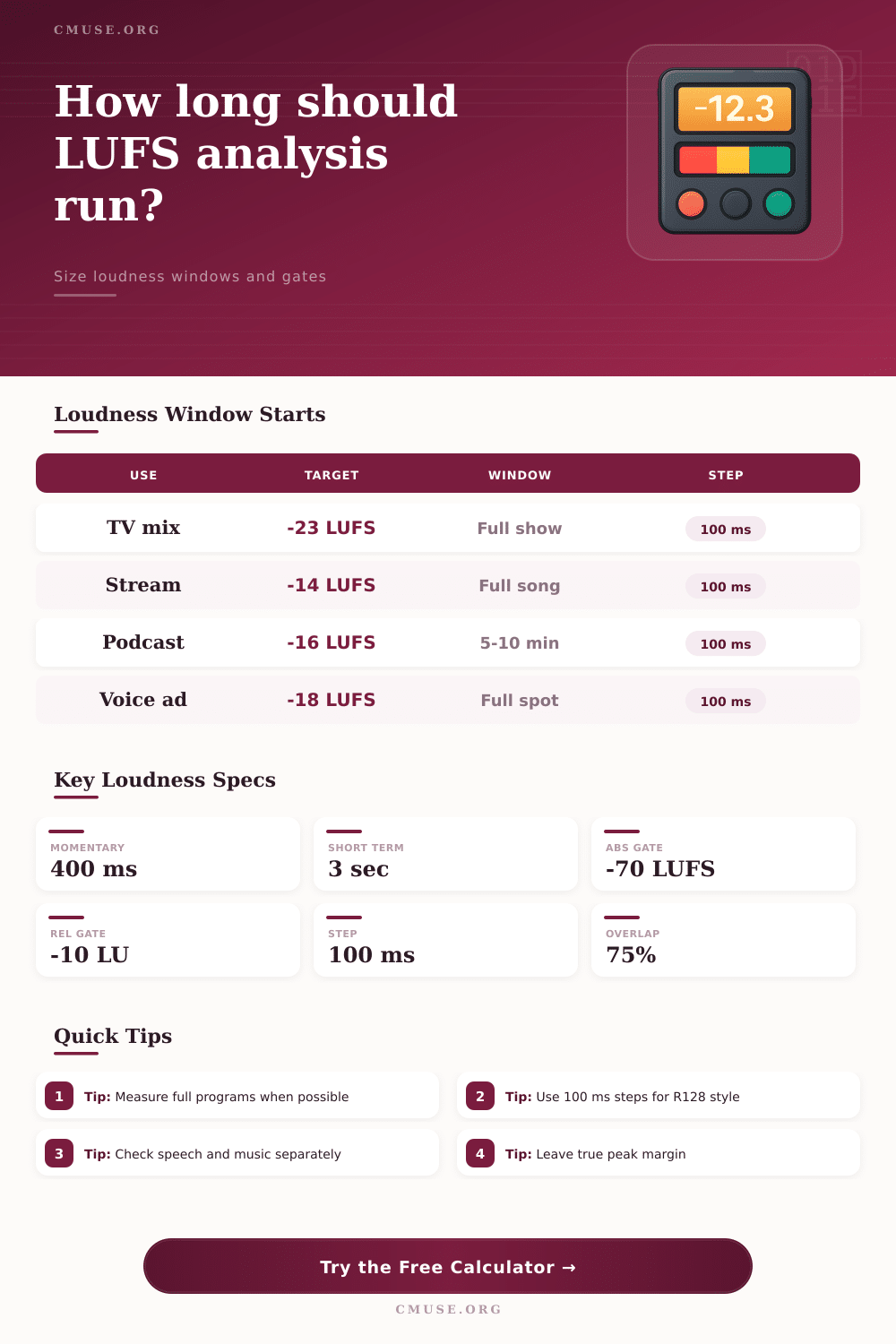
Momentary loudness window
Short-term loudness window
Absolute gate floor
Relative gate offset
| Standard | Integrated Target | Typical Tolerance | True Peak Limit | Best Window |
|---|---|---|---|---|
| EBU R128 broadcast | -23 LUFS | About 0.5 LU | -1.0 dBTP | Full program or complete segment |
| ATSC A/85 broadcast | -24 LKFS | About 1 LU | -2.0 dBTP | Full program with dialogue anchor |
| Streaming music master | -14 LUFS reference | Platform dependent | -1.0 dBTP common | Full song or complete master |
| Podcast speech program | -16 LUFS stereo | About 1 LU | -1.0 dBTP common | Full episode or long representative chapter |
| Film dialogue reference | -24 LUFS style anchor | Project dependent | -2.0 dBTP common | Dialogue reel plus representative effects |
| Program Type | Minimum Useful Window | Preferred Window | Risk If Too Short | Meter Focus |
|---|---|---|---|---|
| Short voiceover spot | Full spot | Full spot | Opening breaths or tags dominate | Integrated plus true peak |
| Pop or rock song | Full song | Full song | Chorus may overrepresent loudness | Integrated, short-term, true peak |
| Podcast episode | 5 minutes | 10 minutes or full show | Ad breaks or silence skew average | Integrated plus speech consistency |
| Classical movement | Complete section | Full movement | Quiet passages are misread | Integrated with loudness range |
| Broadcast episode | Complete act | Full program | Recap, credits, and beds are missed | Integrated delivery compliance |
| Measurement Element | Nominal Value | What It Excludes | Practical Result | Watch Point |
|---|---|---|---|---|
| Absolute gate | -70 LUFS | Digital silence and very quiet noise | Removes tails, black, and leader | Long fades can reduce valid time |
| Relative gate | 10 LU below ungated loudness | Low-level passages below program bed | Prevents silence from pulling too low | Dynamic music needs full sections |
| Momentary block | 400 ms | Sub-block transients | Tracks fast loudness shape | Not a replacement for true peak |
| Short-term block | 3 seconds | Instantaneous spikes | Shows phrase-level loudness | Speech can jump between phrases |
| Project | Typical Duration | Target | Suggested Window | Secondary Check |
|---|---|---|---|---|
| 30 second voice ad | 0:30 | -18 to -16 LUFS | Full spot | True peak and breath edits |
| Streaming single | 3:30 | -14 LUFS reference | Full song | Loudest short-term chorus |
| Podcast interview | 45:00 | -16 LUFS stereo | 10 min plus spot checks | Guest-to-host level drift |
| TV documentary act | 12:00 | -23 LUFS | Full act | Music beds under narration |
| Game cinematic | 2:00 | -18 LUFS guide | Full scene | Explosions against dialogue |
The mix is done, and it sounds right in your room. Bass is weighted, vocals is there, and dynamics seem alive. Send it to the platform and it comes back needing something changed. The integrated loudness are off by two units, or automatic normalization has cut off a loud peak. This becomes frustrating for today’s producer, who has to balance art and technology.
Where do you stand? Is it because of audio quality, or a misunderstanding of how measurement work? More often than not, no. The issue is a lack of understanding of how content and measurement window sizes works together, and how silence gating affect that relationship.
How Loudness Measurements Work
A note about built-in loudness measurements: They don’t account for all the decibels that are in your file. They estimate what listeners hear as level of the actual program material. That means no silences and no room tone. The standard approach uses a relative gate to exclude quiet parts of the program; however, care must be taken when deciding which blocks of audio gets counted toward the final average.
For example, if you were to measure a thirty second spot with a window geared for a full hour broadcast, it doesn’t have any statistical meaning. You’ll know how much silence is in your program and its total running time. Then use calculator on the page to put in those numbers. It will calculate how many valid analysis block are left after the gate.
This comes back to the brief block of time; specifically, 400 milliseconds. That’s how short it looks at your audio. It uses overlapping blocks that is three-quarters long (meaning they overlap by seventy-five percent) so it can grab transients while not losing slower swells. Next, each block are compared against a gate threshold. Below it, things gets tossed out for consideration when computing the average. So those long pauses and silent leaders don’t drag down the integrated level artificialy.
It’s just a tiny difference. But it makes all the difference when thinking about delivery compliance. Most engineers don’t realize that length of any given window is far more important then nearly anything else. You can listen to a short clip and think, “yes, my chorus nails it,” but you won’t know whether or not quiet passages drags the average under spec.
In the case of speech-heavy content like podcasts, 10 minutes is frequently long enough to find statistical comfort in making a trim cut, but music with wider dynamic range needs longer segments. If you’re dealing with music, longer periods is required to flatten highs and lows. The table on the page indicates full songs for streaming services and entire programs for TV usage. Anything less runs the risk of being different than, and those automatic systems will catch you.
Now here comes real world theory: trim gain. Here’s where we measure our level. We set our target. Then, we use the difference to find how many dBs we need to add. At the same time though, we also want to think about actual peak levels. Increasing gain to reach the integrated target can send an audio file into the digital stratosphere, causing nasty distortion on lossy codecs. A safety margin of half a unit or so protect against this pitfall. It is better to be slightly quiet than fully clipped, because most platforms will use heavy limiting when they process your file.
Compliance with loudness doesn’t mean that everything sounds alike. Compliance means consistency. This makes sure the listener’s experience stay the same in every context and on any device without fatigue.
Your ears must confirm the number that the tool spits out. Trim conservativeley so there is some headroom for post-processing. Measure long enough to account for variation in your mix. Use gating appropriately when ignoring what is not there. Know what’s in the window behind the number and then you don’t fight the meter anymore…you’re working with it.
The file gets delivered as expected. The mix remains intact. The listener never knows how well engineered it was behind the scenes.