Haas Effect Calculator
Convert source distance, target delay, air temperature, and mix purpose into a precedence-safe delay setting.
🎛Haas Presets
📏Delay Setup
🔍Selected Source Reference
📊Haas Timing Zones
| Delay window | Path difference | Typical perception | Best calculator use |
|---|---|---|---|
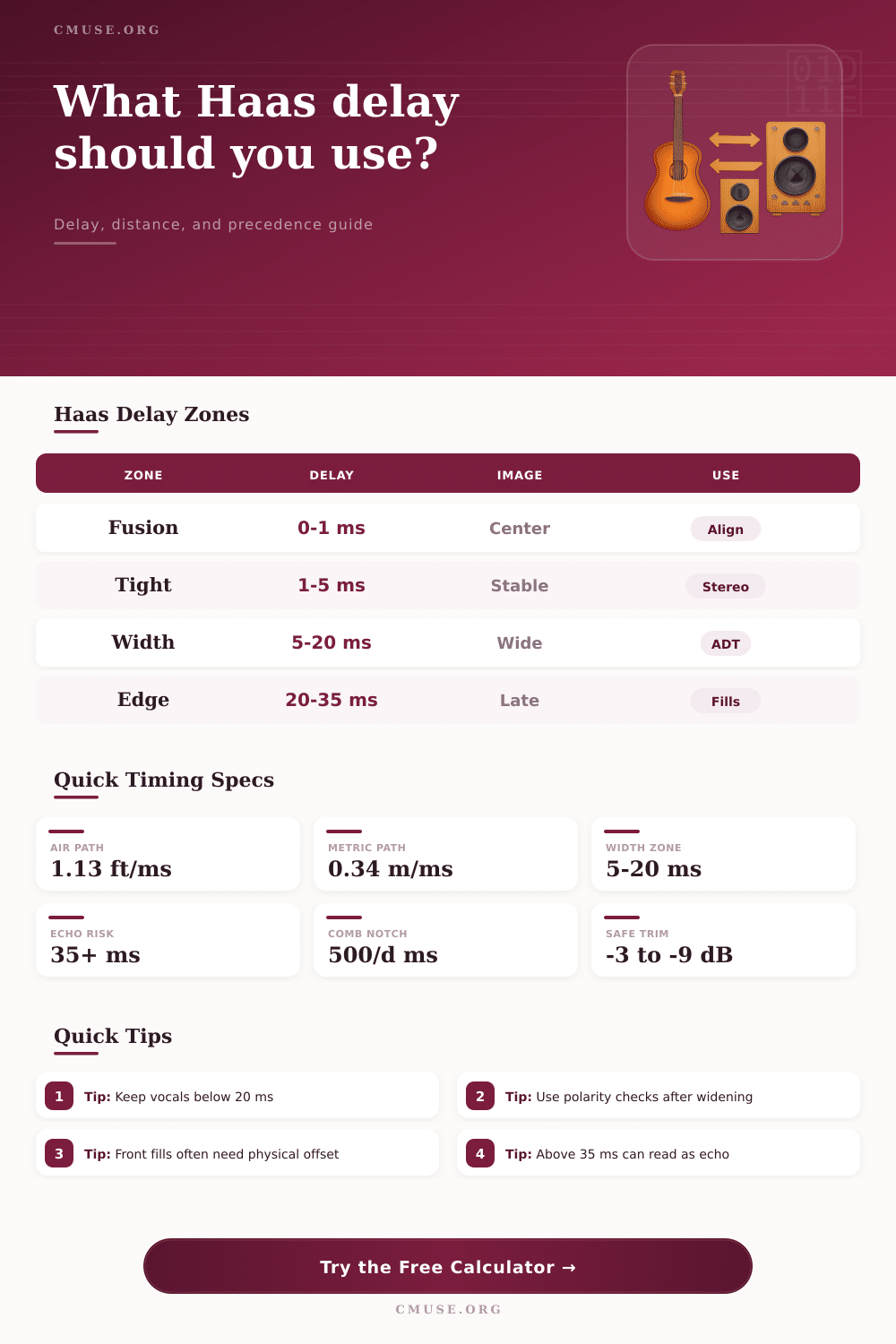
| 0-1 ms | 0-1.1 ft / 0-0.34 m | Fusion, strongest comb filtering | Alignment checks and mic distance fixes |
| 1-5 ms | 1.1-5.6 ft / 0.34-1.7 m | Stable image with small tonal changes | Speaker pair and overhead placement |
| 5-20 ms | 5.6-22.5 ft / 1.7-6.9 m | Classic Haas width without obvious repeat | Vocals, guitar doubles, synth spreads |
| 20-35 ms | 22.5-39.4 ft / 6.9-12.0 m | Late but often still tied to the first sound | Stage fills, rooms, short throw delays |
| 35-50 ms | 39.4-56.3 ft / 12.0-17.2 m | Transition into audible slap or separation | Flag as echo risk and lower blend |
🎙Source Comparison Table
| Source type | Suggested delay | Blend start | Calculation note |
|---|---|---|---|
| Lead vocal double | 8-18 ms | -6 dB | Keep intelligibility centered and check mono. |
| Electric guitar double | 10-25 ms | -4 dB | Higher delays read wider on sustained parts. |
| Synth or keyboard split | 6-16 ms | -5 dB | Shorter windows protect transient clarity. |
| Drum room microphone | 2-12 ms | -8 dB | Use distance offset before plug-in delay. |
| Front fill speaker | 10-30 ms | -3 dB | Align to the main source arriving first. |
| Delay tower speaker | 25-45 ms | -6 dB | Often exceeds Haas width; watch slapback. |
📝Common Haas Calculator Presets
| Preset | Distance setup | Target delay | Expected result |
|---|---|---|---|
| Home Studio 10x12 | 8 ft lead, 9.5 ft delayed | 12 ms | Moderate stereo width for nearfields |
| Practice Room 8x8 | 5 ft lead, 6 ft delayed | 8 ms | Tight widening with low echo risk |
| Stage Area 20x16 | 18 ft lead, 30 ft delayed | 24 ms | Fill timing near the precedence edge |
| DJ Booth 6x4 | 4 ft lead, 5 ft delayed | 6 ms | Small offset for monitoring spread |
| Recording Booth 5x5 | 3 ft lead, 4.5 ft delayed | 10 ms | Short ADT-style vocal support |
💡Calculation Tips
The Haas effect is a phenomenon in which a sound appear to have width and depth due to the small delay between two version of the same sound. The Haas effect occurs when you take a sound that is positioned in the center of your sound field, and you add a second version of that same sound with a slight time delay to it. The human brain tends to focus on the sound that initially arrive at your ears, and allows a second sound to reach your ears up to 35 milliseconds later.
As a result, that second sound appears to make the original sound appear more wider. This process is referred to as the precedence effect, and allows humans to perceive sound dimensionality based only upon the timing of those sounds. If the delayed sound reach your ears after 35 milliseconds, however, it will no longer be perceived as a continuation of the original sound, but rather as a reflected sound that your brain recognize as an echo.
How the Haas Effect Makes Sound Wider
The physical distances of sounds from there sources and the environment in which they travel will impact how they arrive at the listener, as well. These factors must be considered when attempting to use the Haas effect. For example, if you are microphoning a kit of drums, the microphones that are physically near the drums will hear the sound of the kit before the sound reaches the microphones that are located in the room.
If you apply an electronic delay to those close microphones without accounting for these physical distances, you may smear the attack of the snare and kick drum. Similarly, room temperature can alter the speed at which sound travels through the air. If the air is cold, sound travels at a slower rate through the air than if the air is warm.
These factors must be accounted for prior to the application of electronic delays. One tool available to assist engineers who wish to utilize the Haas effect is an online calculator. This tool allow engineers to enter the physical distances of the lead sound and delayed sound from the listener into the tool.
The tool will calculate the amount of electronic delay that should be applied. In addition to distance, the tool also allows engineers to account for the warmth of the recording environment and the type of sound source that is being used. Another benefit of this tool is that it will display the precedence zone for that sound and alert engineers to potential issue with comb filtering.
Combing filtering may occur if the two reflected sound waves interfere with one another; such interference can make vocal sounds appear hollow. If the blend percentage of the delayed sound is high, the sound will become wider. High percentages of blend, however, will also increase the chance of comb filtering.
Thus, engineers may have to reduce the volume of the delayed sound to avoid intense comb filtering. The amount of width that is achieved by applying the Haas effect is dependent upon the length of the delay of the sound. If the delay is between 5 and 20 milliseconds, the brain will perceive the two sounds as having unified width.
If, however, the delay is below 5 milliseconds, the sound will appear to have tight imaging and subtle tone shifts. For delay effects between 20 and 35 milliseconds, sounds will begin to separate. However, if you apply them to vocals, the consonants may begin to become blurry.
For these reasons, engineers should use shorter delays with vocal sounds. Guitars have more sustain than other vocal sounds, giving them more time to utilize longer delays. Finally, because time is of the essence with drums, engineers should use conservative time settings when applying the Haas effect to snare and kick drums.
In addition to the factors discussed above, engineers should also be aware of mono compatibility when applying the Haas effect. For example, if a wide sound is played on mono systems, it can lead to phase shifting of the sound. Additionally, if the sound has too much width to it, the sound may lose it’s presence on mono systems.
For example, if a synthesizer pad is widened using a 28-millisecond delay, those same sounds may become problematic for mono systems such as club speakers with heavy bass frequency. In such instances, it may be necessary to reduce the blend percentage of the delayed sound or to reduce the volume of that delayed sound. For applications such as broadcast voice applications, engineers may wish to use delays short enough to preserve sibilance, but at the same time keep the blend of delayed sound to a minimum to avoid comb filtering in the 200 to 500 hertz frequency range.
Another benefit of this tool are its presets. For example, a vocal double setting will suggest a delay of 12 to 14 milliseconds for the delayed vocal. For stage fill effects, the tool will subtract the natural offset of the distance of the vocal from the target delay setting.
Engineers can also use the source tables to determine how much to reduce the volume of delayed sounds. For instance, the vocal sounds may need to be reduced by six decibels, while the drums may be reduced by eight decibels. The polarity of the delayed sound should be checked after applying a time offset.
The settings of both the engineers ears and their meters should be used to ensure the desired sound is achieved. Finally, if the delay is above 35 milliseconds, echoes will be created rather than the Haas effect; thus, you should adjust the delay to ensure the echo is avoid.