Groove Quantize Percent Calculator
Estimate how far a MIDI or audio performance moves toward the grid, how much swing offset remains, and whether the chosen strength keeps the groove musical.
Load a named production starting point, then adjust tempo, grid, swing, offset, and humanize values. The calculator treats positive offsets as late notes and negative offsets as early notes.
Groove Quantize Breakdown
quarter ms = 60000 / BPMmove ms = target error x effective strengthswing ms = grid ms x (swing% - 50) / 50ticks = move ms / (quarter ms / PPQ)Straight eighth or sixteenth timing
Common swung sixteenth pocket
Tight pop or electronic correction
Loose pocket with natural drift
Common high resolution MIDI grid
Small timing change many players hear
Default drum and bass edit grid
Typical subtle humanize window
| Strength Range | Timing Result | Best For | Groove Risk | Listening Check |
|---|---|---|---|---|
| 0-25% | Very small movement | Jazz, live piano, brush drums | Loose | Confirm the groove still anchors the chorus. |
| 25-50% | Natural correction | Funk bass, percussion, comping parts | Organic | Check that pushes and pulls still speak. |
| 50-75% | Audible tightening | Pop drums, R&B keys, hip hop bass | Balanced | Make sure ghost notes do not flatten out. |
| 75-95% | Strong grid lock | Dance music, layered MIDI drums | Tight | Listen for flam removal and transient focus. |
| 95-100% | Nearly exact grid | Electronic kicks, programmed rolls | Rigid | Add humanize if the part feels mechanical. |
| Grid | Beats | At 90 BPM | At 120 BPM | Typical Use |
|---|---|---|---|---|
| 1/4 note | 1.000 | 666.7 ms | 500.0 ms | Main pulses, kick anchors, chord stabs |
| 1/8 note | 0.500 | 333.3 ms | 250.0 ms | Backbeat pushes and simple bass movement |
| 1/8 triplet | 0.333 | 222.2 ms | 166.7 ms | Shuffle, blues, triplet hi-hats |
| 1/16 note | 0.250 | 166.7 ms | 125.0 ms | Modern drums, bass, keys, guitar chops |
| 1/16 triplet | 0.167 | 111.1 ms | 83.3 ms | Trap rolls, fills, fast percussion |
| 1/32 note | 0.125 | 83.3 ms | 62.5 ms | Detailed rolls and fast edit repairs |
| Swing Amount | Offbeat Delay | Feel Description | Common Parts | Quantize Note |
|---|---|---|---|---|
| 50% | 0% of grid | Straight, centered subdivision | House kicks, rock sixteenths | Use pocket bias for small pushes. |
| 54-57% | Light delay | Subtle laid-back motion | Pop hats, bass syncopation | Works with 60-85% strength. |
| 58-62% | Medium delay | Noticeable bounce and pocket | Neo soul, hip hop, funk | Protect ghost notes and grace notes. |
| 63-67% | Heavy delay | Deep swing or shuffle edge | Triplet-feel drums, brushed grooves | Check against bass before printing. |
| 68-75% | Very heavy delay | Exaggerated long-short pattern | Special fills and stylized loops | Use sparingly on dense arrangements. |
| Preset | Tempo And Grid | Strength | Swing | Editing Goal |
|---|---|---|---|---|
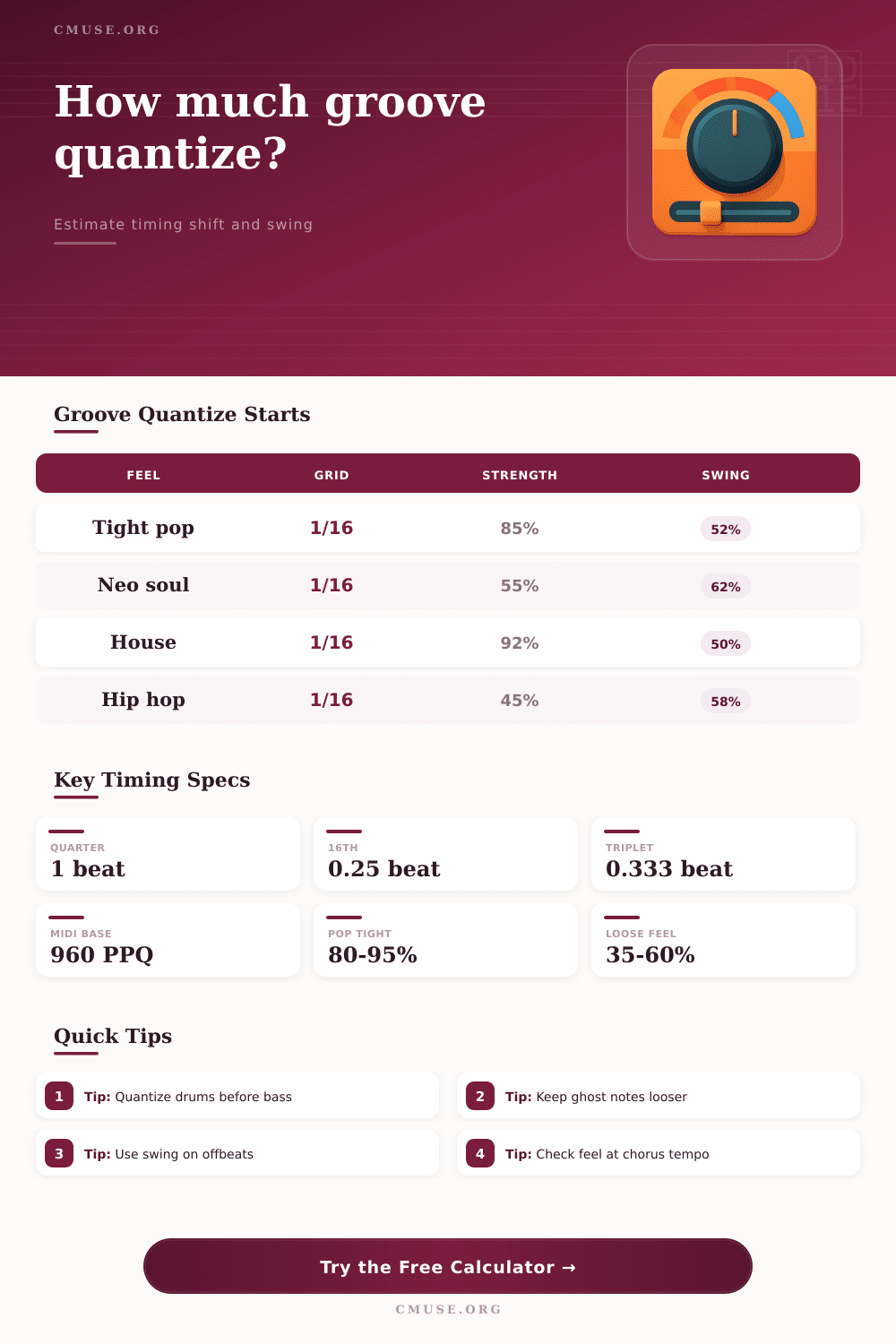
| Tight Pop Drums | 118 BPM, 1/16 | 85% | 52% | Clean transient lock with a small pocket. |
| Neo Soul Pocket | 82 BPM, 1/16 | 55% | 62% | Keep delayed offbeats and soft ghost notes. |
| House Kick Grid | 124 BPM, 1/16 | 92% | 50% | Align kick and clap layers tightly. |
| Lo-Fi Hip Hop | 74 BPM, 1/16 | 45% | 58% | Preserve loose drums while reducing drift. |
| Funk Bass Push | 104 BPM, 1/16 | 50% | 54% | Let bass attacks lean ahead of drums. |
| Trap Hat Rolls | 142 BPM, 1/32 | 78% | 50% | Tighten fast rolls without erasing accents. |
There is a clash between eye and ear. On the one hand, your eyes might see that your waveform are loose. You may want to drag some of those notes closer to the grid to make it look neater but doing so can removes the groove and make your track feel dead. That’s part of the reason why producers will spend hours twiddling percentage sliders instead of a single button to correct timing problems.
Enter in your swing, grid, and tempo, and let the calculator handles the math. You’ll see exactly what number moves across the bar line and exactly where that last offset fall within your desired pocket. This comes in handy because MIDI has wide variation in the number of pulses per quarter note. Different Digital Audio Workstations sets MIDI resolution differently. One hundred pulses per quarter note feels different then nine hundred sixty, which is the industry standard for high fidelity timing data. If you’re working with high-fidelity timing data, you know what I mean.
How to Fix Timing Without Losing Feel
That’s why understanding the tick structure make it easier to grasp what a five millisecond shift means. Five milliseconds doesn’t seem like much until you realize it mean several ticks at typical resolution. That little bump can transform a relaxed backbeat into something sounding like a stiff march. It can also turn a stiff march into a relaxed backbeat.
The least understood parameter in a groove editor are strength, which dictates how strongly notes will align with the grid. But it doesn’t work the same way throughout a performance. A ninety-percent setting may be fine for the snare drum, but probably not the hi-hat that plays behind it. In other words: there’s no one-size-fits-all strength. Fortunately, this is covered in the chart on the page. For example, tight pop production usually calls for near perfect alignment; whereas lo-fi hip hop or neo-soul sounds best with a bit of deliberate drift. So think of these as starting points rather than hard-and-fast rules.
Listen first to how the snare and kick anchor the track and then decide how much freedom to grant supporting percussion. To make the swing even more complex, instead of snapping the offbeat to a fixed grid line, it slide the offbeat by some percentage. For example, a fifty percent swing is mathematically straight where the eighth note hits dead center on the gap between the beats. When swung to sixty percent, those offbeats slides farther toward the end of each bar giving that laid-back shuffle feel characteristic of so many R&B and funk grooves. That’s taken into account in the last step of the offset calculation too. It’ll let you know whether or not your note, even when swung, still strike late.
Swing settings often conflict with the quantize setting and don’t work well together. You may want to tighten a groove but maintain some of the bounce, so knowing how much of that swing delay survives the correction is important. This brings me to the subject of humanizing ranges, which is often treated as an afterthought in most arrangements. They are included at the tail-end to give some spice to otherwise bland midi patterns.
The problem here is that timing correction is seen as a one-way street to perfection forgetting that this is nothing like how human beings would play. Musicians don’t play to the metronome. Depending on the feeling of the phrase, they will lean forward or back into the beat. They push and pull. If the hit comes at high velocity then it may arrive just a touch early due to physical momentum while a quiet ghost note may hang out longer because the performer is being more relaxed. Correcting for such details maintains the performance’s life. Tighten the structure of a tune without losing the character that makes it interesting.
What’s important to know here is what we’re really measuring. Are we talking timing correction in terms of right and wrong notes? No. We’re talking about the relationship between those notes. The bass has to lock with the kick, the hats breathe around the snare. When you begin to see the grid less as a rigid cage and more as a reference point, then percentages is no longer restraints but rather an expressive tool. You can clean up the mess without erasing the soul of the performance. That’s where the difference lies between a good edit and a great edit.