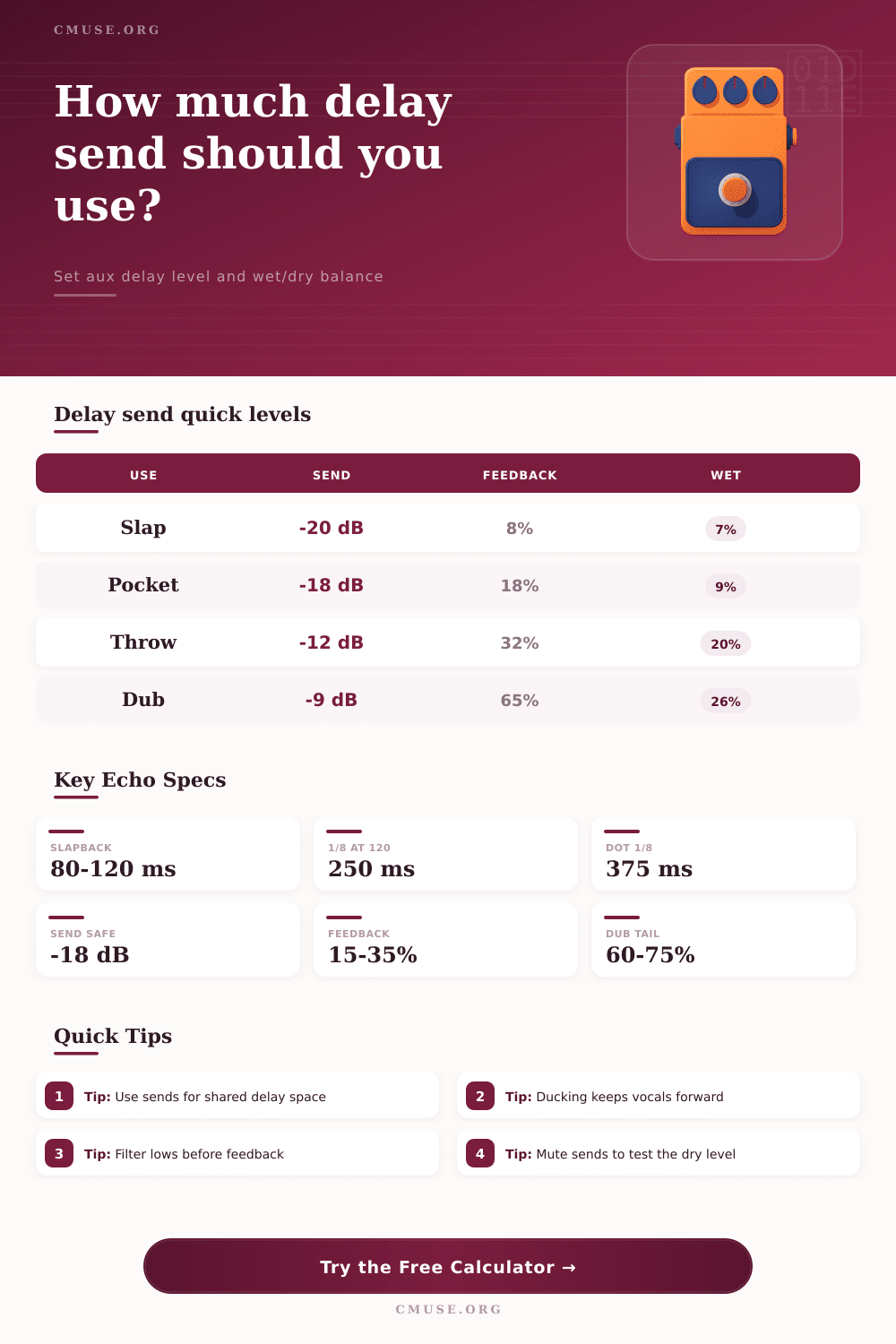
Delay Send Calculator
Calculate aux send level, synced delay time, wet/dry balance, first echo level, and feedback tail length for mix-ready delay effects.
🎚 Descriptive Delay Presets
⏱ Delay Timing Mode
🎛 Send, Return, and Feedback Inputs
📊 Delay Send Spec Grid
📝 BPM Delay Time Reference
| BPM | 1/4 Note | 1/8 Note | Dotted 1/8 | 1/8 Triplet |
|---|---|---|---|---|
| 80 | 750 ms | 375 ms | 563 ms | 250 ms |
| 100 | 600 ms | 300 ms | 450 ms | 200 ms |
| 120 | 500 ms | 250 ms | 375 ms | 167 ms |
| 128 | 469 ms | 234 ms | 352 ms | 156 ms |
| 140 | 429 ms | 214 ms | 321 ms | 143 ms |
🎚 Send Level to Wet Share Comparison
| Aux Send | Linear Gain | Wet Share at Unity Dry | Typical Use |
|---|---|---|---|
| -24 dB | 0.063x | 5.9% | Barely audible depth |
| -18 dB | 0.126x | 11.2% | Vocal pocket delay |
| -15 dB | 0.178x | 15.1% | Guitar rhythmic echo |
| -12 dB | 0.251x | 20.1% | Word throw or hook accent |
| -9 dB | 0.355x | 26.2% | Dub or feature delay |
♻ Feedback Tail Reference
| Feedback | Repeats to -60 dB | Tail at 250 ms | Mix Character |
|---|---|---|---|
| 10% | 3 repeats | 0.75 s | Short tap |
| 25% | 5 repeats | 1.25 s | Controlled pocket |
| 40% | 8 repeats | 2.00 s | Noticeable trail |
| 60% | 14 repeats | 3.50 s | Long wash |
| 75% | 25 repeats | 6.25 s | Dub sustain |
🎶 Preset Comparison Grid
| Scenario | Timing | Send Range | Feedback | Purpose |
|---|---|---|---|---|
| Lead Vocal Slapback | 80-120 ms | -24 to -18 dB | 5-12% | Width without obvious repeats |
| Pop Vocal Pocket | 1/8 note | -20 to -16 dB | 12-24% | Delay tucked behind phrases |
| Dotted Guitar Echo | Dotted 1/8 | -18 to -14 dB | 25-45% | Rhythmic motion between strums |
| One Word Throw | 1/4 note | -14 to -9 dB | 25-40% | Feature echo at line endings |
| Dub Feedback Wash | 1/4 or 1/2 | -11 to -7 dB | 60-75% | Long evolving delay trail |
To achieve the correct delay in a mix, you must control the volume of the delay return and the durations of the delay repeats. Many engineers struggle with creating the appropriate delay effect on a track by simply placing a delay plugin on the track and adjusting the plugin until the track sound good. By setting the track appropriately, however, the vocal and guitar tracks will not necessarily sound distant or as if they are sitting on top of other elements within the mix.
The delay time controls on the plugin, as well as the relationship between the aux sends, the return level, and the dry fader for that track, actualy control the delay effect. By understanding the relationship between these three element, engineers can make better decisions about the delay time for tracks within there song. The first decision that engineers make for all tracks is the send level.
How to Set Delay in a Mix
The send level control how the delay echoes for a track within the mix. If engineers lower the send level, the delay echo will sit further back within the mix. In contrast, if engineers raise the send level, the delay echoes will compete with the source of the track.
The amount of audible delay on a track is dependent upon the send level, the return fader, and the wet knob on the delay plugin. Using a calculator for the track can reveal the mathematical relationship between these three settings for that element. For example, if the send level is lowered and the wet knob is at an appropriate level, but the feedback is high, there will be a noticeable delay echo for the track.
In contrast, if the send level is high, but the feedback is low on the plugin, the delay will be subtlely. Using these relationships, engineers can set the send level to ensure that the echoes for the delay sits appropriately within the mix. Once engineers set the send level, engineers can adjust the delay timing for the track.
For example, if engineers want to create a quarter note delay, and the song is playing at 120 beat per minute, the delay time will be 500 millisecond. A 500 millisecond delay time is often used in pop and rock music tracks. If engineers change the delay to eighth notes, the delay repeats will play at twice the speed.
Dotted delay value can be placed between quarter notes and eighth notes and often work well for guitar tracks. Delay timing can be set to anything, but engineers should consider how often the parts are played on that track. For instance, drums will often use shorter division of delay compared to vocals, which allow for longer delays without removing the focus from the vocal production.
The feedback on a delay can control the number of repeats that play for that track before the delay tail dissapears. If engineers use a low feedback value for a track, there will be one or two delay echoes. These echoes can often be made to sound as if they are emanating from a wider area within the mix.
High feedback settings will create longer tails for the delay repeats. These long delay tails can help wash an entire bar of music. Tails that are too long can, however, turn a busy guitar part into a muddy element within the mix.
To avoid this issue, engineers often use separate delay returns with different feedback settings for their mix. Another method for engineers is to high-pass filter the delay effects to ensure that the delay does not clutter the low end of the mix. Filtering out the low frequencies prior to the feedback loop will prevent the buildup of those low frequencies.
A low-pass filter on the delay return will push the delay effects further back in the mix. This is a helpful effect for engineers who want the delay returns to be distant from the other elements in the mix. By entering filter settings into a calculator for the mix, engineers can view the changes in frequency range.
A second control for engineers is ducking. Ducking settings will reduce the level of the return for the delay effect when the source track is active. For instance, if sidechain ducking is used, the return will be reduced while the source is active.
This makes the delay tail audible only in the gaps between tracks on the source. The amount of ducking is related to how forward the source elements are within the mix. Lead vocals will have more ducking than background elements, for instance, since masking of lead vocals is more noticeable.
Stereo width for the delay return is another setting that engineers can adjust. However, stereo width is often a matter of preference once the engineers have set the level and the timing of the delay return. If the width of the return is narrow, the echoes will be centered within the stereo image.
If the delay return is wide, the echoes will be spread out within the stereo image. Using a wide delay return will make a mono source feel larger in the stereo image, but using one that is too wide will reduce the focus of the main track. The most common workflow for engineers to set up a delay effect is to set the timing and feedback for the delay, then adjust the send level until the first repeat for the delay sits at the desired distance behind the dry signal.
After setting the send level, engineers can adjust the return fader and ducking settings for the delay return. Then, engineers can use the reference tables to ensure that the settings for the delay are common for vocals, guitars, and drums within that genre. These tables are not rules to follow, but they do help engineers to understand where most mixes are located for the vocals, guitars, and other elements in a song.
Another decision is for engineers to focus upon the wet share for the delay rather than the number of delays. For example, if the send level for the delay is -18 dB, the first echo will be around 11% of the dry signal. An echo of 11% is often enough to provide depth to the track.
If the delay contains higher feedback than the initial settings, however, the tail of the delay will become the dominant element within the mix. Using a calculator allows engineers to see this relationship. Another way to think of setting up delay effects is in relation to the wet share and the length of the tail.
Engineers can use delay effects to reinforce the groove for a track, extend a phrase, and create space between sections. While the numbers on the delay calculator will help engineers achieve these goals, the engineer must still make a decision of whether their delay effect return will support the dry track.