Compressor Attack and Release Calculator
Estimate transient capture, recovery, and pumping risk for vocals, drums, bass, synths, and mix bus compression.
VCA
Fast clamp
Clean control for drums, bass, and mix glue
FET
Punchy
Very fast attack and character-rich squeeze
Opto
Smooth
Program-dependent release for vocals
Vari-mu
Rounded
Program material stays musical and thick
| Over threshold | 2:1 | 4:1 | 8:1 |
|---|---|---|---|
| +2 dB | +1.0 dB | +0.5 dB | +0.25 dB |
| +4 dB | +2.0 dB | +1.0 dB | +0.50 dB |
| +6 dB | +3.0 dB | +1.5 dB | +0.75 dB |
| +10 dB | +5.0 dB | +2.5 dB | +1.25 dB |
| Use case | Threshold | Ratio | Target GR |
|---|---|---|---|
| Lead vocal | -18 dBFS | 3:1 | 3-6 dB |
| Bass guitar | -22 dBFS | 4:1 | 4-8 dB |
| Drum bus | -12 dBFS | 6:1 | 2-5 dB |
| Mix bus | -14 dBFS | 2:1 | 1-3 dB |
| Parallel drums | -20 dBFS | 8:1 | 8-12 dB |
| Profile | Crest | Transient | Sustain |
|---|---|---|---|
| Lead vocal | 12 dB | 18 ms | 220 ms |
| Spoken word | 11 dB | 20 ms | 260 ms |
| Bass guitar | 8 dB | 28 ms | 260 ms |
| Snare hit | 16 dB | 8 ms | 120 ms |
| Mix bus | 14 dB | 35 ms | 300 ms |
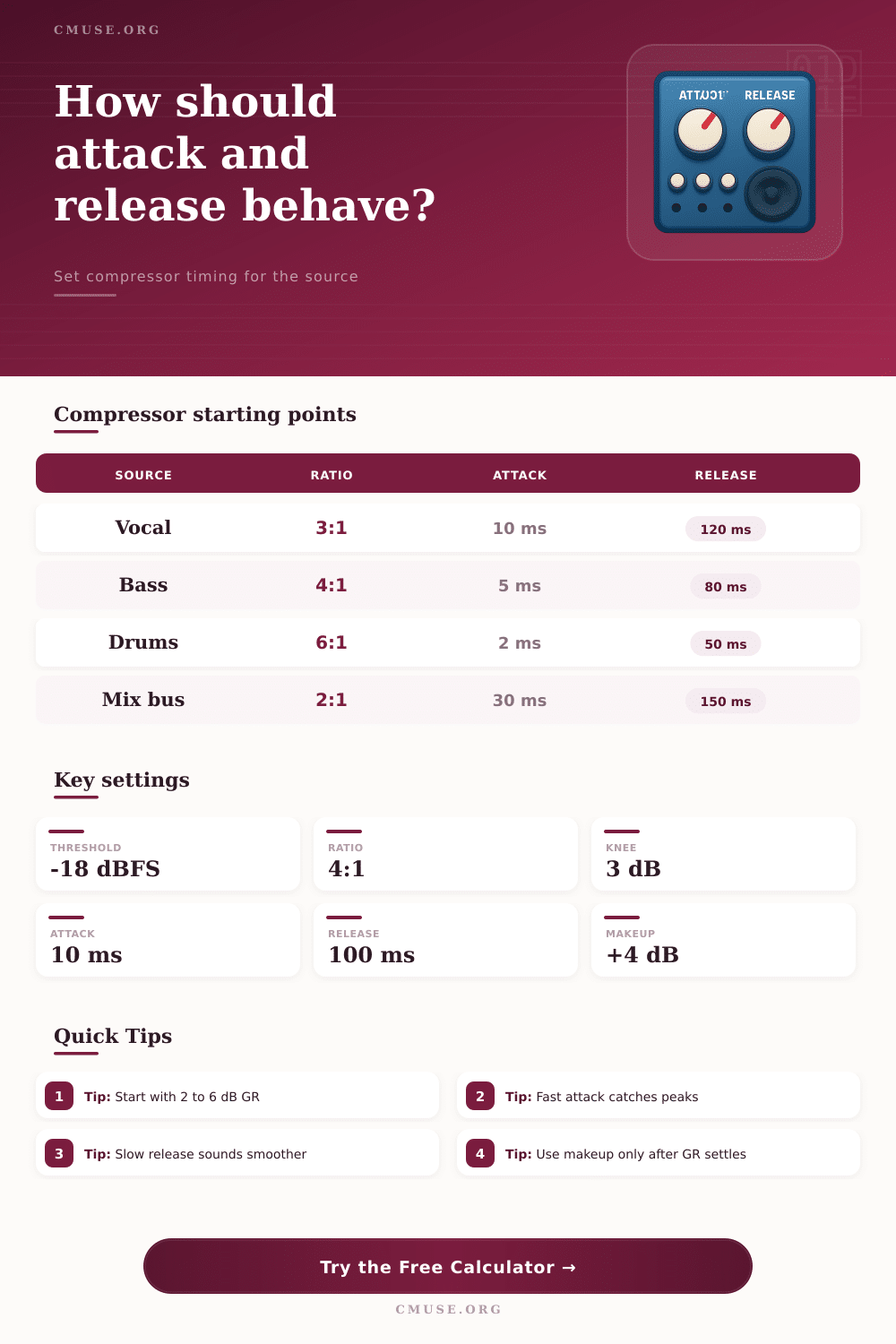
The attack and release settings for a compressor are two controls that determines the behavior of the compressor. The attack setting control the time that passes before the compressor begins to reduce the volume of the signal. The release setting controls the rate at which the compressor stop reducing the volume of the signal.
If you set the attack control to a very fastly setting, the compressor will reduce the volume of the initial transient of the signal. This can make the sound seem like it is losing it’s impact. If you set the attack control to a slow setting, the transient will pass through the compressor without being reduce.
Attack and release settings for a compressor
In this case, you may have to use makeup gain to even out the loudness of the signal. The attack setting should be matched to the rise time of the audio source. The rise time is the length of time that it take for the audio source to reach most of its energy.
For instance, vocals typically has a rise time of around 18 milliseconds, so their attack should be somewhere between 10 and 12 millisecond. Bass instrument have a denser pluck than vocals, so their attack should be more quicker. The release setting controls the rate at which the compressor halts the volume reduction of the signal.
If you do not set the release proper in relation to the decay of the musical note that you are compressing, you may hear the signal breathe or pump. Breathing and pumping are both undesirable effect. Pumping occurs when the volume of the signal rapidly increases or decreases.
Breathing occurs when the release parameter of the compressor is either too fast or too slow. To avoid breathing, set the release time to be 1.2 or 1.5 time the length of the tail of the musical note. There are various type of compressors.
VCAs are very predictable and people often use them to glue buses together because they do not add color to the sound. FET compressors typically has a fast attack time and are used on drums because they will create a punchy sound. Opto compressors have a release time that is dependent on the music being compress.
Vari-mu compressors will add warmth to the sound and maintain the thickness of the signal being compress. The crest factor of a signal is the difference between the peak level of the signal and the RMS level. The crest factor determine the “punch” that a signal will have.
For instance, snaredrums has a high crest factor, and thus require a fast attack setting. Mix bus have a lower crest factor and longer sustain from the musical instruments, so they require slower attack and release settings for the compressor. There are various tools that can be used to control the way in which the signal will react to the compressor.
For example, a peak detector will detect the highest point in the signal, but an RMS detector will measure the average level of the signal. A hybrid detector will measure both the peak and RMS elements of the signal. Using a sidechain high-pass filter allows the user to roll off the low frequencies on a signal so that a kick drum will not affect the compression of a bass instrument.
The ratio control how much the compressor will reduce the signal once it pass through the threshold. For example, a 4:1 ratio means that for every 4 dB of the signal that exists above the threshold, the signal will only receive 1 dB of that value. A 2:1 ratio is a much more gentler ratio and is often applied to mix buses.
The knee parameter controls how smooth the signal will be compressed. Using makeup gain allows the user to restore the volume of the signal that the compressor has reduced. This gain should be used only after the attack and release parameter of the compressor have been set.
In addition to makeup gain, another common tool is known as parallel blending. This allow for the mixing of the untouched initial transient of a signal with the compressed sustain of that signal. Many people makes mistakes when using attack and release settings on compressors.
For example, some may focus too much on the movement of the gain reduction meter. This attention to the gain reduction meter will lead to over-compression of the signal. Additionally, people should always listen to the compressor as it is mixed with the other elements of the track.
If they listen to the track in solo mode, the monitor may not accuratelyly reflect the sound of the signal when it is compressed. Finally, using a compressor calculator will allow people to take into account the different audio profile, compressor types and curves to determine the peak reduction and ratios of the signal.