Clock Drift Calculator
Estimate digital audio clock drift in samples, milliseconds, video frames, pitch pull, and resample ratio for multitrack, field, broadcast, and long-form recording sessions.
Load a realistic sync scenario, then adjust the clock ppm, take length, sample rate, video frame rate, and tolerance. Positive relative ppm means the recording clock is running faster than the reference clock.
Drift Breakdown
relative ppm = device ppm - reference ppmdrift seconds = duration seconds x ppm / 1,000,000drift samples = drift seconds x sample rateratio = 1 - corrected ppm / 1,000,0000.001 ms per second
1 ms at 48 kHz
1 frame at 23.976 fps
10 ppm pitch shift
5 ms at 48 kHz
0.1 percent rate error
Shared word clock target
NTSC pull relationship
| Relative Clock Error | 10 Minute Drift | 1 Hour Drift | 2 Hour Drift | Typical Interpretation |
|---|---|---|---|---|
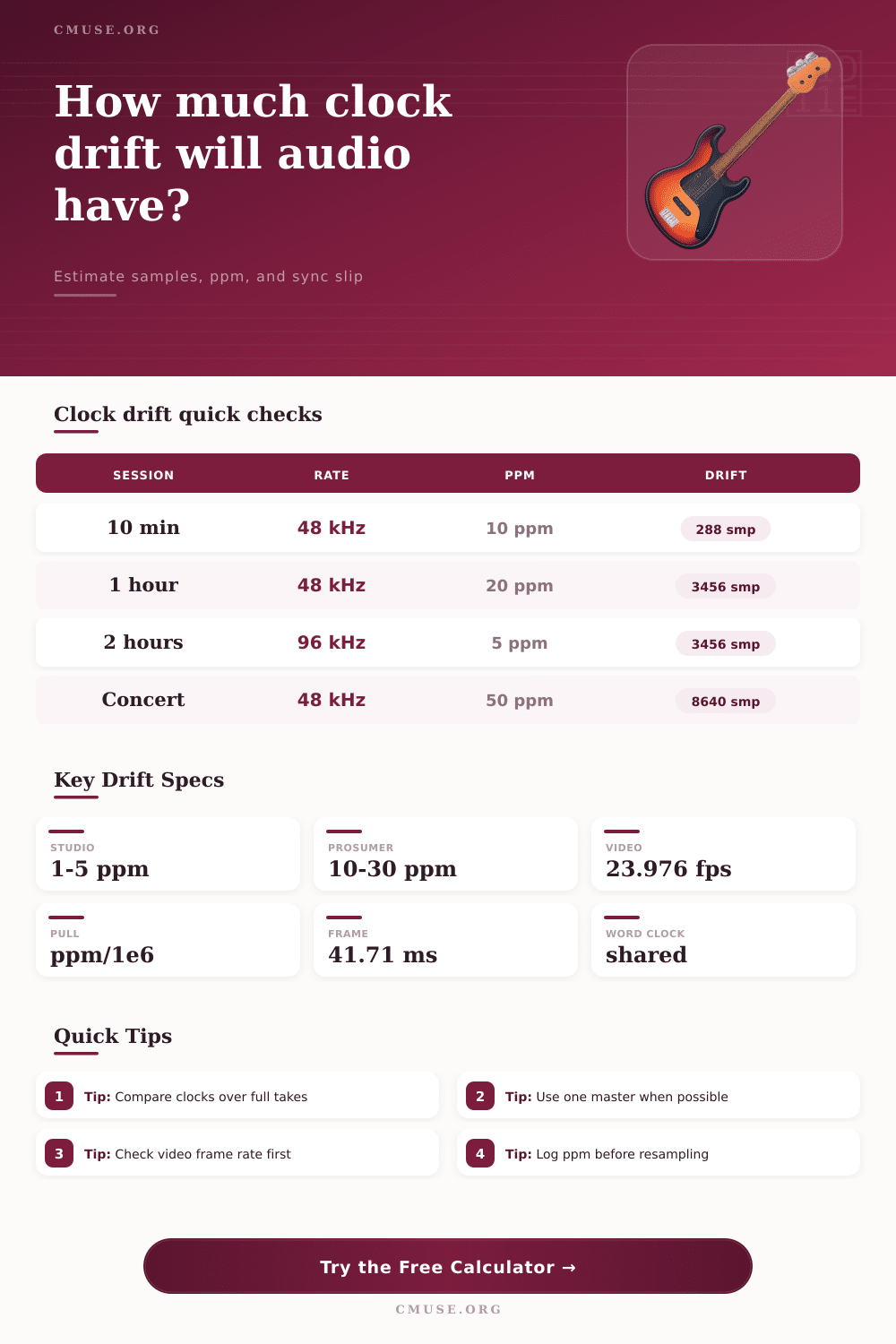
| 1 ppm | 0.60 ms / 29 samples at 48 kHz | 3.60 ms / 173 samples at 48 kHz | 7.20 ms / 346 samples at 48 kHz | Excellent clock agreement for long takes. |
| 5 ppm | 3.00 ms / 144 samples at 48 kHz | 18.00 ms / 864 samples at 48 kHz | 36.00 ms / 1728 samples at 48 kHz | Often acceptable for studio hardware, still visible on long picture sync. |
| 20 ppm | 12.00 ms / 576 samples at 48 kHz | 72.00 ms / 3456 samples at 48 kHz | 144.00 ms / 6912 samples at 48 kHz | Needs correction for music overdubs, dialogue, or camera sync. |
| 50 ppm | 30.00 ms / 1440 samples at 48 kHz | 180.00 ms / 8640 samples at 48 kHz | 360.00 ms / 17280 samples at 48 kHz | Common free-running danger zone for long field recordings. |
| 1000 ppm | 600.00 ms / 28800 samples at 48 kHz | 3.60 s / 172800 samples at 48 kHz | 7.20 s / 345600 samples at 48 kHz | Usually indicates sample-rate mismatch or intentional pull. |
| Frame Rate | Frame Duration | Samples Per Frame At 48 kHz | Samples Per Frame At 96 kHz | Sync Note |
|---|---|---|---|---|
| 23.976 fps | 41.708 ms | 2002.00 samples | 4004.00 samples | Common film and streaming timeline rate. |
| 24 fps | 41.667 ms | 2000.00 samples | 4000.00 samples | True 24 has clean sample alignment at 48 kHz. |
| 25 fps | 40.000 ms | 1920.00 samples | 3840.00 samples | PAL and many broadcast workflows. |
| 29.97 fps | 33.367 ms | 1601.60 samples | 3203.20 samples | NTSC fractional frame rate; confirm drop-frame labeling separately. |
| 59.94 fps | 16.683 ms | 800.80 samples | 1601.60 samples | Half-frame tolerances get tight quickly. |
| Clock Situation | Typical Relative Error | Long-Take Behavior | Best Calculator Use | Correction Clue |
|---|---|---|---|---|
| Shared word clock | Near 0 ppm | No meaningful linear drift between devices. | Confirm that remaining offset is fixed, not growing. | Slip should stay below tolerance after the first alignment. |
| Jam sync only | 1 to 20 ppm | Devices begin aligned but slowly separate. | Estimate when a long take needs a stretch marker. | Correct with linear resample or end-to-end stretch. |
| Free-running USB interface | 10 to 50 ppm | Noticeable drift across podcasts, rehearsals, or concerts. | Compare separate recorders before editing. | Measure a slate at start and end if specs are unknown. |
| Sample-rate mismatch | Hundreds to thousands ppm | Large timing and pitch error appears immediately. | Separate clock drift from 44.1/48 kHz confusion. | Check file headers and DAW import rate first. |
| Intentional pull-up or pull-down | 1000 or 1001 ppm relation | Expected rate change tied to picture workflow. | Verify whether the pull ratio matches the project. | Use documented pull values, not guessed waveform nudges. |
| Session Type | Suggested Inputs | Primary Result To Watch | Secondary Result | Practical Threshold |
|---|---|---|---|---|
| Music overdub against a DAW print | 48 kHz, 5 to 15 min, 5 ppm tolerance | End drift in samples | Pitch pull in cents | Keep below 1 to 2 ms for phase-sensitive layers. |
| Remote podcast double-ender | 48 kHz, 60 to 120 min, 20 ppm estimate | Sync time error | Buffer slip interval | Correct when drift crosses speech edit tolerance. |
| Concert recorder plus camera audio | 48 kHz, 90 min, 30 to 50 ppm estimate | Video frame slip | Resample pull ratio | Anything above a half frame needs attention. |
| Broadcast or live stream chain | 48 kHz, 30 min, shared clock expected | Relative ppm | Time until tolerance | Growing offset points to an unlocked device. |
| Archival transfer to a fixed timeline | 96 kHz, full reel length, measured end slate | Sample drift | Corrected sample rate | Use linear correction before detailed restoration edits. |
When watching a long take of dialog, perhaps you’ll find yourself noticing a slight stutter as you play it back? Or maybe the actors is talking out of sync with their lips? The problem is that your camera runs on a different timebase from your recorder, so they never quite agree. Even with high-end equipment, the tiny flaws in the crystal oscillators still exist. These small errors adds up to a slightly different tick between device over long periods.
With the calculator, you can now predict exactly how badly this mismatch will show before hitting record, transforming what could be a post production nightmare into a manageable variable. To understand what drift is doing, it’s best to think about it in terms of parts per million, or ppm. That’s the number of seconds a clock gains (or loses) for each million seconds of actual time. Ten ppm may sound like nothing but when you’re talking digital audio, it piles up fast.
Why Your Audio Drifts Out of Sync
So if your recorder is set to run at 48,000 samples per second and it has a positive ten ppm offset from your reference, then it’s essentially recording ever so slightly faster than the timeline require. And over the span of an hour, that tiny percentage translate into thousands of additional samples. Those samples equal actual milliseconds of audio data that are now out-of-step with the original event. The tool calculates this total slip… Not only in raw numbers of samples, but also in milliseconds, so you get a concrete idea of how big it is.
But the length of your takes is where things get dangerous. In most digital audio workstations, an edit block size is larger than the total offset caused by short clips of drift. So while you can get away with some serious offset if each clip is short enough to be contained in the edit block, longer ones will cause trouble. Whereas a ten millisecond error may go unnoticed on a thirty second voicemail, it will be catastrophic on a ninety minute concert recording. To put this into perspective, the reference table on the page is helpful; a modest ppm value amounts to no drift in minutes yet massive errors in hours. It’s important to consider the length of your longest continuous take which for a long-form interview or live music recording is the limiting factor.
Another wrinkle: video isn’t continuous, but discrete. There is no stream of frames… There are only individual frames spaced about 42 milliseconds apart at the common 24 fps video framerate. If the drift gets larger than that, the audio will skip from one frame to the next resulting in perceptible jumps; “lip-sync” errors or audible pops. By choosing your video framerate, the calculator translates sample drift into frame slip, so you can determine if your audio will remain in sync with the visual action after an hour’s worth of shooting. This is especially important when working double-system sound, with camera running separately from the recorder.
Does your audio have a chance of falling into step without intervention? Or do you need to use a timecode generator? While you can correct drift, there are trade-offs. One of these involves resampling the sound to make it longer (stretch) or shorter (compress), bringing it back in line. The tool will give you the proper resample ratio to do this, correcting the drift. Resampling can result in slight artifacts, partcularly when the percentage of pull is high.
Often, it’s best not to let your devices go out of sync in the first place, get everything synced up at the beginning and double check specs. Jam sync only brings things in line at one point after which they drift once more. With shared word clocks, all the connected equipment stays in sync. Knowing this allows you to determine which kind of sync will work best for your process.
Free-running systems will always have some amount of clock drift, but it’s all predictable. Plan your recording strategy based off what you know about the estimated slip and either go for shorter takes. Which can keep drift within editable limits, or buy yourself a more robust piece of sync gear if long takes are non-negotiable.
Knowing the numbers means knowing when you’re fighting something and when you aren’t, so you can concentrate on getting great performances rather than wrangling time-correcting later. It becomes a straightforward logistical decision different than a mysterious technical issue, leaving your sound right where it should be relative to picture.