CD Capacity Track Fit Calculator
Check whether an audio CD master, MP3 data disc, WAV handoff, or archived project fits by combining track time, inter-track gaps, CD frames, data size, and safety margin.
Load a real disc-planning situation, then adjust the track count, average length, longest track, pregaps, authoring reserve, codec, bitrate, and buffer before calculating the final fit.
Detailed Capacity Breakdown
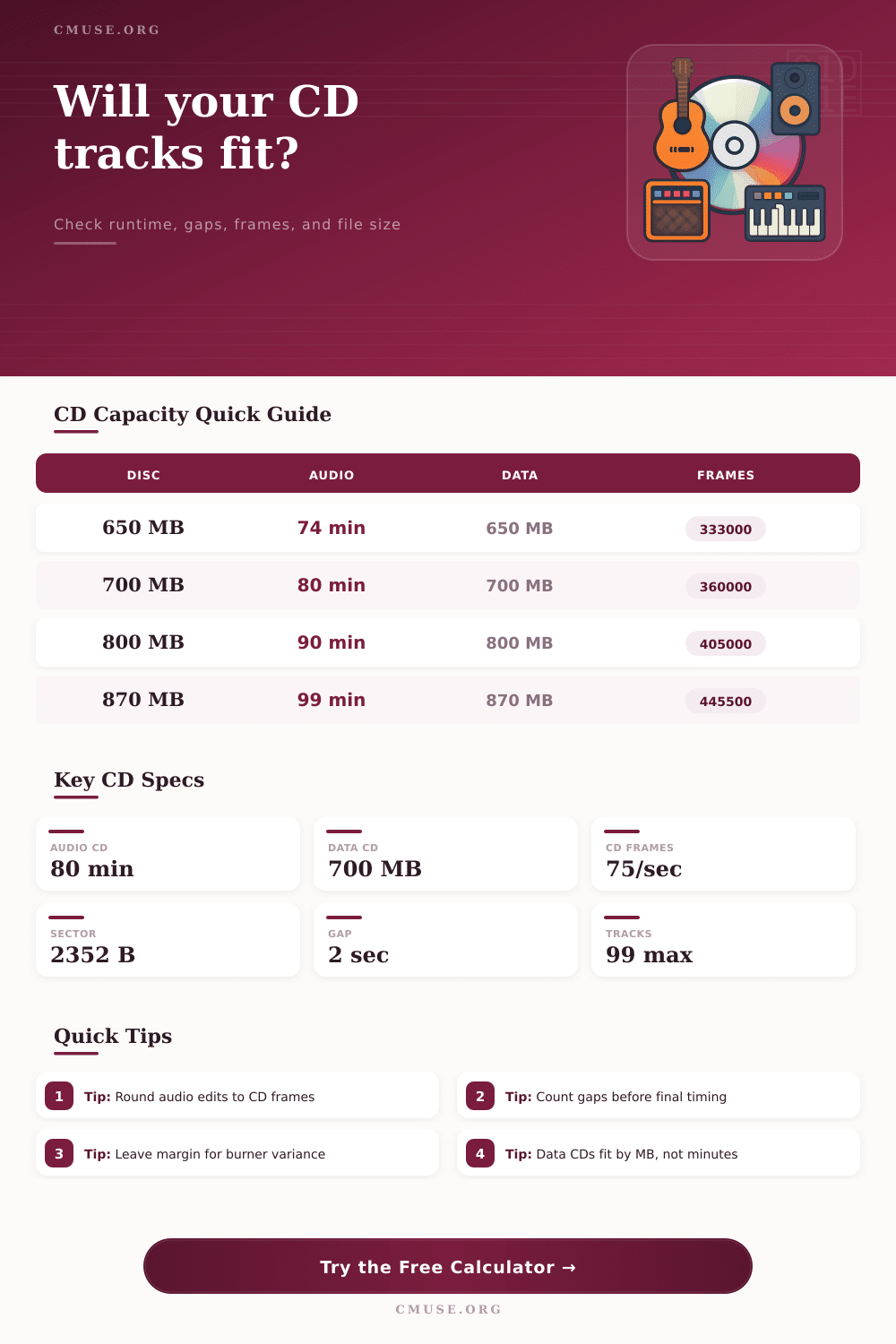
| Media type | Nominal audio runtime | Nominal data capacity | Approx CD frames |
|---|---|---|---|
| Standard 650 MB CD-R | 74:00 minutes | 650 MB | 333,000 frames |
| Common 700 MB CD-R | 80:00 minutes | 700 MB | 360,000 frames |
| Oversize 800 MB CD-R | 90:00 minutes | 800 MB | 405,000 frames |
| Oversize 870 MB CD-R | 99:00 minutes | 870 MB | 445,500 frames |
Oversize CD-R media may require overburn support and can be less compatible than 74 or 80 minute discs.
| Format | Typical use | Sizing formula | CD planning note |
|---|---|---|---|
| CD-DA PCM | Playable audio CD master | 75 sectors/sec, 2352 bytes/sector | Fits by runtime and frames, not file MB |
| WAV or AIFF PCM | Data CD delivery or backup | Seconds x sample rate x bit depth x channels | Large files can exceed 700 MB quickly |
| FLAC | Lossless archive on data CD | Estimated as 55% of PCM size | Capacity varies with music density |
| MP3 or AAC | Long listening data disc | Seconds x bitrate / 8 | Often fits many hours on one data CD |
| Planning item | CD math | Why it matters | Calculator handling |
|---|---|---|---|
| CD frame | 1/75 second | Audio CD indexes land on frame boundaries | Rounds program time up to whole frames |
| Standard pause | 2 seconds | Common gap between album tracks | Multiplies by track count minus one |
| Hidden track pregap | Track 1 index 00 | Consumes disc time before first track | Adds pregap seconds to total runtime |
| Safety reserve | User selected | Leaves space for lead-out and burner tolerance | Adds reserve before buffer percentage |
| Project | Typical tracks | Runtime target | Best fit check |
|---|---|---|---|
| Single album master | 10 to 14 tracks | 38 to 55 minutes | Audio CD with 5% buffer |
| Classical recital | 4 to 8 tracks | 55 to 78 minutes | Longest movement plus gap check |
| Live concert disc | 12 to 22 tracks | 65 to 80 minutes | Track split and applause gap check |
| MP3 spoken archive | 20 to 99 files | 6 to 12 hours | Data CD bitrate and MB check |
Math first: Before burning that disc, you double-check the math to make sure it will fit. Does that archive or album fit on this piece of media? You won’t waste time trying to figrue out why it didn’t work. You won’t waste time feeling frustrated. Runtime + gaps + file size + frames = no problem.
Unlike USB drives, CDs aren’t like that. They’re ruled by Red Book audio standard, which defines capacity in terms of frames and time different than megabytes. There are precisely seventy-five frames per second. No more, no less. Beyond adding to the total length of your music, each additional track require lead-in and lead-out time, as well as any inter-track gaps or hidden pregaps.
How to Make Sure Your CD Fits
The calculator turns your track lengths and numbers into the total number of frames, the same way a real CD is laid out on the disc. What happens during the gaps? Most users don’t remember what happens between song. Even though it might only be two seconds, those seconds accumulate fast when there are 12 tracks on an album.
When dealing with shorter songs in a punk EP versus longer ones in a classical recording, the overhead will vary. Based off how many tracks you have in a playlist, the tool automatically factors this in. If you’d like to account for hidden tracks or have a continuous mix with no gap, you can do that too. Continuous mixes also saves frames that you can apply to actualy audio content.
With data discs, however, it’s all about storage space instead of time. Here, file format is the primary factor. An MP3 encoded at one hundred ninety-two kilobits per second occupies less space than its uncompressed cousin: a lossless WAV file. If you’re saving photos or podcasts, the calculator will estimate overall size based on length and the chosen bitrate. It factors in file system overhead and other extra information that frequently tips the scale, sending a project just past the limit.
In this case, it’s all about that spare capacity: will it go onto one disc, or be divided between two adult-sized sofa? Incompatibility issues occurs with oversized discs. There are such things as eighty-seven hundred megabyte CDs, but older CD players frequently don’t like them. For a summary of the tradeoffs involved when you use either extended-capacity or standard seven-hundred megabyte media, see table of references.
Rather than risk having your disc rejected during playback, you’re sometimes better off leaving unused space on the disc by using a standard disc instead. Better to have a track cut than have a disc that nobody can listen to. A useful planning tool is the safety buffer setting. Media batches vary in tolerance and burners aren’t perfect either. A five percent margin will ensure you don’t comes right up to theoretical maximum on the disc. That avoids sectors on the edge of the disc that might be unreadable or cause write errors. It’s just a few seconds of set-up time for insurance with the buffer.
When planning for CD, think constraints; not possibilities. What are the limits on space? How much can you put in a given piece of media? Each item consume some portion of limited space. Compression ratio reduces space. So does track length. Understanding file sizes, frame counts, and gaps helps you make smart editing choices. Not only do you want it to all fit, but you want it to play. Before clicking Burn, check the fit. When you’re in the car enjoying the music, your future self would of thanked you for the preparation.