Bit Depth Calculator
Estimate dynamic range, quantization noise, and file size for PCM audio before you track, archive, or deliver.
📝 Real Presets
⚙ Inputs
📊 Reference Tables
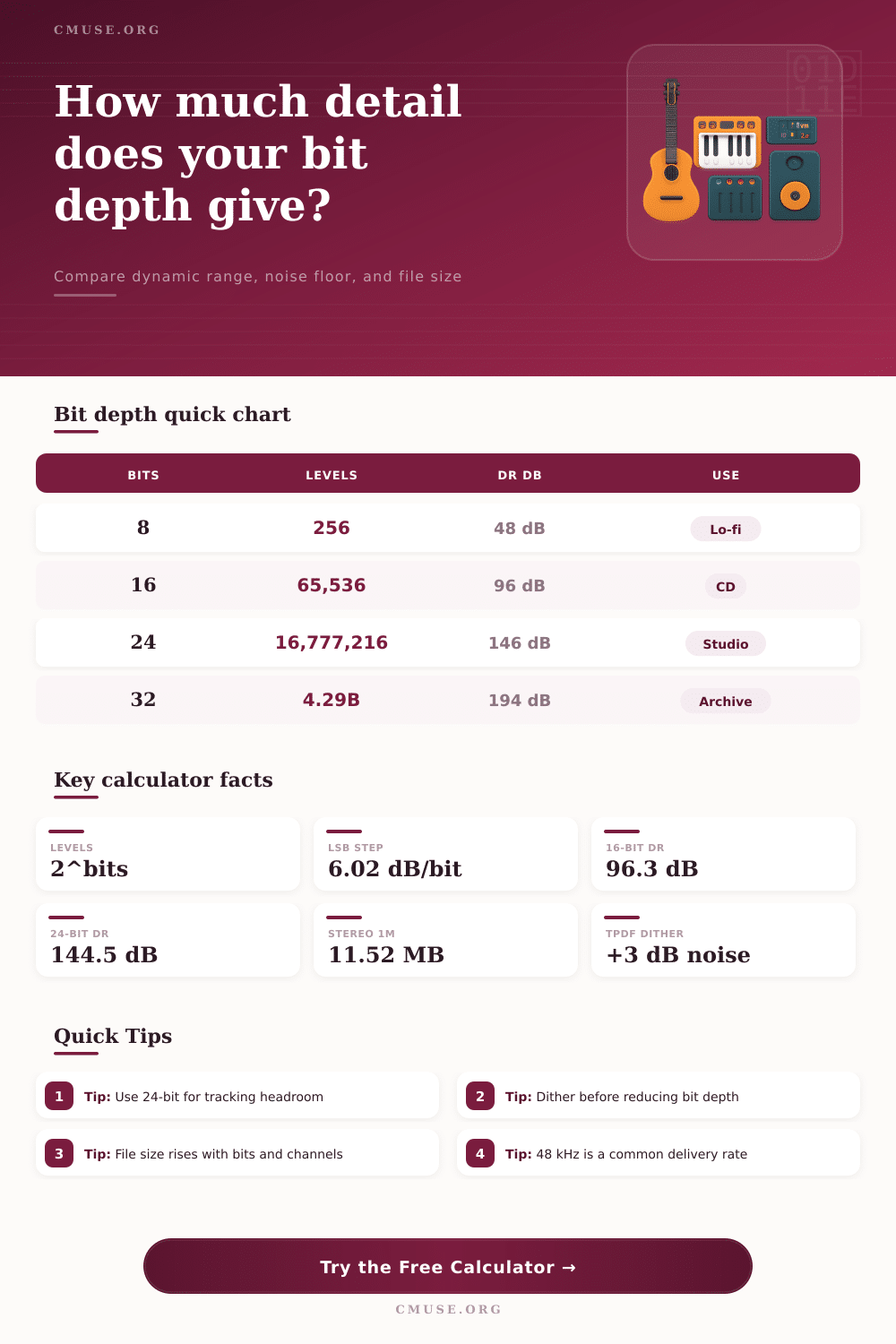
| Bits | Levels | DR dB | Use |
|---|---|---|---|
| 8-bit | 256 | 48.1 dB | Lo-fi |
| 12-bit | 4,096 | 72.2 dB | Sampler |
| 16-bit | 65,536 | 96.3 dB | CD / edit |
| 24-bit | 16,777,216 | 144.5 dB | Studio |
| Bits | 1 Min Mono | 1 Min Stereo | Note |
|---|---|---|---|
| 16-bit | 5.76 MB | 11.52 MB | CD |
| 20-bit | 7.20 MB | 14.40 MB | Archive |
| 24-bit | 8.64 MB | 17.28 MB | Studio |
| 32-bit | 11.52 MB | 23.04 MB | Headroom |
Bit depth measure the systems ability to capture the amplitude of the audio signal. Bit depth determine how much detail is captured in the audio file. More bits mean greater vertical resolution for the file.
Bit depth determines how many step exist between the levels of silence and full volume in the file. Each additional bit in the file increase the dynamic range by 6 dB. Increased bit depth also allow for a lower noise floor in the file.
What Bit Depth Means for Sound Quality
A lower noise floor mean that the quietest sounds in the file are more accurate. If the bit depth is too low for the system to accurately representing the amplitude of the sound, quantization noise will occur. This type of noise make subtle details in sound appear as if they are composed of digital step.
Many people use 16-bit audio files because 16-bit audio is the standard for compact disc. 16-bit audio allow for a dynamic range of 96 dB. This is often enough dynamic range for individuals to enjoy music while there is ambient noise in the environment.
24-bit audio, however, allow for a much larger dynamic range of 144 dB. This is an additional 30 dB of headroom compared to 16-bit audio. People should use 24-bit audio during the tracking process for there projects.
This allows musicians to record at lower levels so that there is no harsh distortion in the quieter parts of the audio file. If individuals try to record at high levels within a 16-bit audio session, there could be harsh distortion in the quieter parts of the audio. This would not happen with 24-bit audio.
Bit depth is also very important within the mixing and archiving stage of a song. Higher bit depths are beneficial at these stages. When mixing, the plugins and the automation of those plugins work more accurately if the file has a higher bit depth.
This prevent digital grit within the mixing stage of creating music. Additionally, within the archiving stage, people want to ensure that the audio files contain a high bit depth so that no nuance to the audio are lost. Additionally, if a streaming service compresses the audio file in the future, the high bit depth will ensure that the audio file remains detailed.
The higher the bit depth of the audio file, the larger the file size of that song. As such, higher bit depths require more storage space on a computers hard drive. People must consider this when selecting a bit depth.
Higher bit depths result in larger file sizes, meaning that there would be a need for more storage space on a hard drive. Dither is a process that people must use when converting files from one bit depth to another with a lower bit depth. If individuals tried to convert a 24-bit audio file into a 16-bit audio file without using dithering software, the audio file would contain truncation distortion.
This type of distortion would sound like digital error. Using dithering software will add a small amount of noise to the audio file. This noise will mask the truncation distortion so that the audio file sounds more naturaly to the listeners.
The dithering process will raise the noise floor of the audio file slightly, but it will keep the signal accurate, especially when playing the cymbals in the song. Bit depths can be chosen based on the task that individuals are to perform within the music production process. For instance, individuals can use 16-bit audio files for podcast audio files because they are smaller in size.
For studio projects, though, individuals should use 24-bit audio files to allow for more detailed audio file. For projects that contain many channels of audio files, such as drums, high bit depths should be used so that the audio files do not become muddy. Some music producer also prefer using 32-bit float audio files because there is nearly infinite headroom for mastering and mastering plugins.
Most hardware device, though, are limited to integer bit depth. It is a common mistake to increase the bit depth of an audio file without considering the signal that comes before the audio recording. Even if the bit depth of an audio file is increased, noise will not be reduced unless the microphones and preamps are of good quality.
Human hearing can detect a maximum dynamic range of 120 dB. Thus, individuals should also consider the quality of their converter and their preamps. The sample rate of an audio file will also impact the file size of that audio.
A deeper noise floor will allow the quieter, detailed aspect of the audio file to emerge without being masked by louder element of the song. This is especially important for ambient and classical music project. For the best quality workflow with audio files, audio should be tracked at a high bit depth, mixed at a high bit depth, and then the final export of audio should be dithered at a lower bit depth.
24-bit audio is the standard for many music project because this bit depth allow for the audio to be future-proofed. This will avoid any loss in audio quality when higher bit depths are converted to lower bit depth for another purpose. When comparing audio file format, it is important for individuals to ensure that all audio files have the same sample rate and the same length of file.
By understanding audio bit depth, individuals can make informed decision regarding audio quality and storage requirement for there audio files.