Audio Latency Calculator
Estimate round-trip, monitor, converter, interface, plugin, and acoustic distance latency for recording, production, and live sound decisions.
🎧 Quick Presets
🎚 Latency Inputs
📊 Latency Target Grid
📈 Buffer Time Reference
| Buffer | 44.1 kHz | 48 kHz | 96 kHz | 192 kHz |
|---|---|---|---|---|
| 32 samples | 0.73 ms | 0.67 ms | 0.33 ms | 0.17 ms |
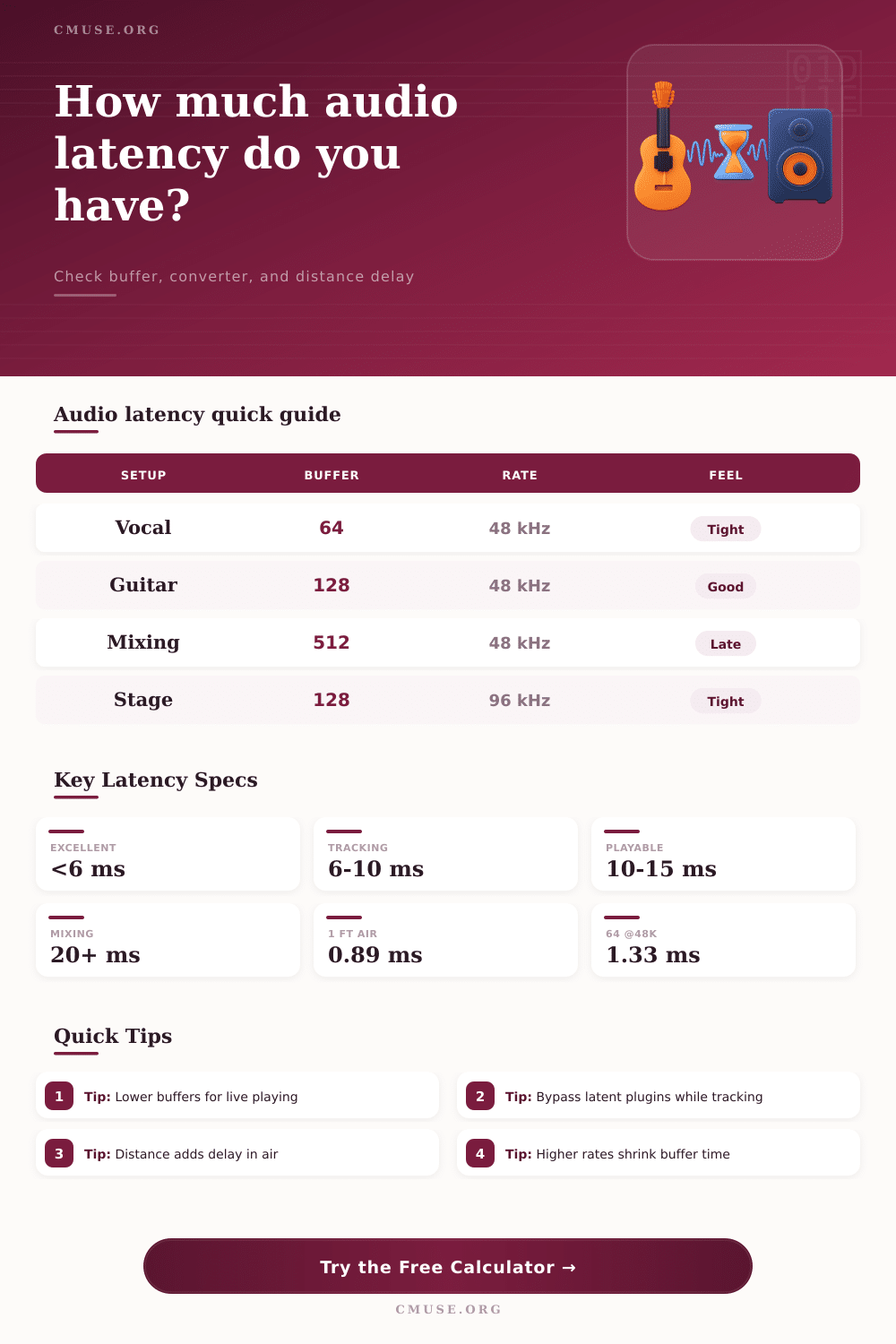
| 64 samples | 1.45 ms | 1.33 ms | 0.67 ms | 0.33 ms |
| 128 samples | 2.90 ms | 2.67 ms | 1.33 ms | 0.67 ms |
| 256 samples | 5.80 ms | 5.33 ms | 2.67 ms | 1.33 ms |
| 512 samples | 11.61 ms | 10.67 ms | 5.33 ms | 2.67 ms |
| 1024 samples | 23.22 ms | 21.33 ms | 10.67 ms | 5.33 ms |
🎙 Monitoring Path Comparison
| Path | Buffer Passes | Converter Use | Typical Use | Latency Risk |
|---|---|---|---|---|
| Direct hardware monitor | 0 performer | A/D + D/A | Vocal tracking | Very low |
| Software input monitor | Input + output | A/D + D/A | Amp sims, effects | Buffer sensitive |
| Software instrument | Output path | D/A only | MIDI keys, drums | Playable if low |
| Wireless monitor | Output + encode | D/A plus codec | Cable-free stage | Often high |
📏 Distance Latency Table
| Distance | Air Delay | Metric | Musical Feel | Typical Placement |
|---|---|---|---|---|
| 1 ft | 0.89 ms | 0.30 m | Immediate | Nearfield desk |
| 3 ft | 2.67 ms | 0.91 m | Tight | Studio monitors |
| 10 ft | 8.89 ms | 3.05 m | Noticeable | Small stage |
| 20 ft | 17.78 ms | 6.10 m | Late feel | Wedge across stage |
| 50 ft | 44.45 ms | 15.24 m | Slap risk | Room fills |
📝 Common Project Sizes
| Scenario | Sample / Buffer | Extra Delay | Target Latency | Best Fit |
|---|---|---|---|---|
| Lead vocal overdub | 48 kHz / 64 | 0 samples | Under 8 ms | Direct or light FX |
| Guitar amp simulator | 48 kHz / 128 | 0 samples | Under 12 ms | Software monitor |
| Virtual piano | 96 kHz / 64 | 32 samples | Under 7 ms | High rate session |
| Dense mix session | 48 kHz / 512 | 2048 samples | No live playing | Playback mixing |
| Stage wedge | 96 kHz / 128 | Distance heavy | Under 15 ms | Close placement |
Audio latency is the delay between the time that sound enters a microphone and the time that that sound returns to a person through headphones or speakers. Audio latency is a measurable quantity, and audio latency can make it difficult for a person to performs their vocals or songs on stage. Many people feels that audio latency creates a sluggishness in the sound that a person hears through their headphones or speakers, which is due to the gap in time between the sound that a person creates with their instruments or vocals compared to the audio latency delay.
These factors can all be calculated using a provided audio latency calculator. The audio latency calculator allows people to determine the total amount of audio latency that is created by simply plugging in variables regarding the sound card and audio setup. The audio latency calculator removes guesswork from the setup of audio software by presenting a specific result from the audio latency equation.
What Is Audio Latency and How to Use the Calculator
Each of the various inputs into the audio latency calculator is important in determining the total amount of audio latency that an audio system creates. The sample rate is one of the factors that determine how finely the sound card’s analog to digital converter slices time into digital data. Higher rates of sample rates allows for less time for the audio data to travel through the buffer, but require more processing power from the computer system.
The buffer size is another of the variables that establishes how many audio samples is collected before they are provided to the sound card’s audio processor to be played through its speakers. Using smaller buffer sizes allows for less audio latency to be created, but provides less time for the audio processor to finish performing its tasks. If the audio buffer size is set to be too small, audio dropouts can occur due to the inability of the audio processor to finish its tasks in time.
The safety buffer field for audio latency accounts for the number of passes that audio drivers may take to prevent audio dropouts. Converter latency relates to the amount of time for analog sound to be converted to digital sound, and for that digital sound to be converted back to analog sound. Audio software plugins introduce plugin delay into the signal chain, and introduces a latency in relation to the number of samples that those plugins use to create the sounds.
Finally, another variable relates to the distance that sound travels from speakers to ears. Sound travels at a specific rate, and the greater the distance between the speakers and the listener, the more greater the amount of time for sound to reach the listener’s ears. It is important for a musician to understand what each of these output numbers from the audio latency calculator mean.
For example, audio latency for monitoring that is under six milliseconds is usually felt as immediate by the listener and the performer. Audio latency under six milliseconds is also beneficial for creating tight tracks with accurate vocal or instrumental performances. Audio latency between six and ten milliseconds is usually comfortable for most performers.
However, if audio latency is established at over fifteen milliseconds, the listener will begin to note the delay in relation to the audio playback device, and struggle with their performances with such audio latency. Furthermore, the audio latency calculator separates the amount of latency for the round-trip of the sound from the one-way path of the sound from monitor to performer. The one-way audio latency is what the performer will experience.
Finally, there are other factors that may be introduced into a live sound recording session that are not accounted for in the calculator. For instance, temperature and humidity can impact the speed at which sound travels, impacting the latency calculations presented by the calculator. Additionally, wireless monitor systems may introduce additional delays in relation to the digital signal, known as encoding delay.
Furthermore, compensation for audio plugins may impact the sound of recorded audio tracks, but may not impact live monitor audio feeds from the sound card. Thus, one should utilize caution in the interpretation of the audio latency calculator results due to the presence of these factors outside the calculation of audio latency. Many people often make mistakes in the attempt to reduce audio latency.
For instance, individuals may attempt to reduce buffer size to reduce audio latency, but fail to account for the latency rates of the audio plugins that they use. Additionally, individuals may focus upon the specifications of the audio interface, but fail to consider the distance between the speakers and the listener. The distance between speakers and listeners does follow the same rules as the other milliseconds in the sound chain.
Overall, people must make choices regarding their audio interface settings based off their individual priorities. For instance, if the sound card will be used to record vocal overdubs, low buffer settings may be used with direct monitoring of the audio device to keep the vocalist locked into the track. However, lower latency settings may be ignored when setting up an audio interface for a guitar player using an amplifier simulator.
Additionally, if the audio interface is to be used with live wedges on stage, the distance between the monitor speakers and the performer must be accounted for in the setup of audio latency settings. Thus, while the audio latency calculator can provide recommendations for setting up audio software, the sound engineer or audio technician’s ears must make the final decision regarding audio latency settings. The goal is not to eliminate all audio latency, but to minimize it enough so that musicians and audio engineers dont have to think about audio latency when they are performing.