Accelerando Tempo Calculator
Plan a gradual speed-up: ramp tempo from a slow start BPM up to a faster end BPM over any span of beats or bars, then time every shortening beat and the rising build-up energy – linear or exponential
Full Calculation Breakdown
| Beat # | BPM | Beat Duration (ms) | Cumulative Time (s) |
|---|---|---|---|
| Run the calculator to map every beat of the ramp. | |||
| Term | Meaning | Direction | Typical Use |
|---|---|---|---|
| Accelerando | Gradually faster | Speed up | Build-ups, climaxes |
| Stringendo | Pressing onward, tighter | Speed up | Tension into a peak |
| Affrettando | Hurrying, anxious | Speed up | Agitated passages |
| Più mosso | More motion (sudden) | Faster | New, quicker section |
| Doppio movimento | Double the speed | Faster | Exact 2× tempo jump |
| A tempo | Return to prior tempo | Reset | End of a ramp |
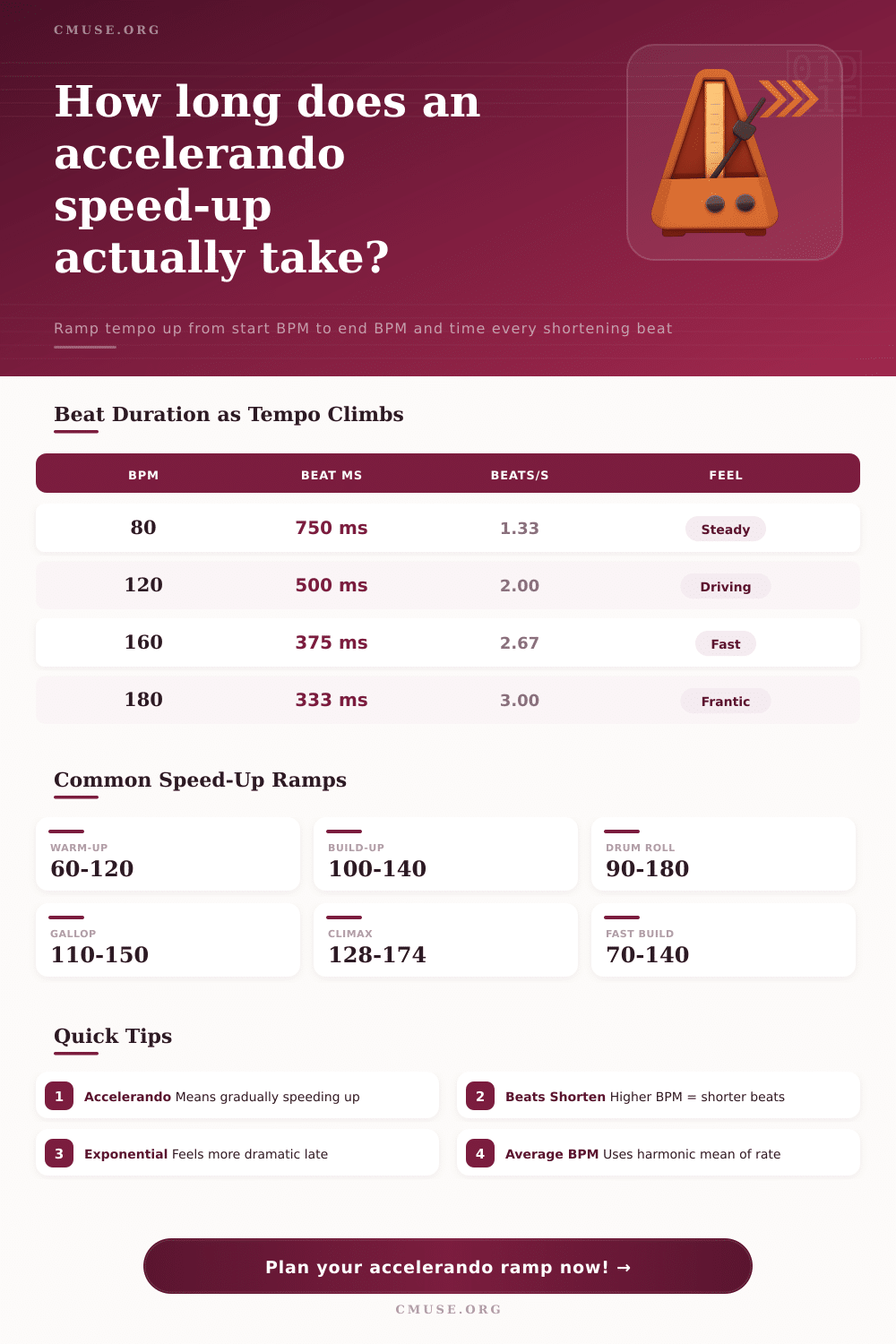
| BPM | Beat Duration | Beats / Second | Feel |
|---|---|---|---|
| 60 | 1000 ms | 1.00 | Slow start |
| 80 | 750 ms | 1.33 | Steady |
| 100 | 600 ms | 1.67 | Walking |
| 120 | 500 ms | 2.00 | Driving |
| 140 | 428.6 ms | 2.33 | Energetic |
| 160 | 375 ms | 2.67 | Fast |
| 180 | 333.3 ms | 3.00 | Frantic |
| Ramp | Span | Avg BPM | Total Time |
|---|---|---|---|
| 60 → 120 | 8 beats | 80.0 | 6.00 s |
| 100 → 140 | 16 beats | 118.9 | 8.08 s |
| 90 → 180 | 16 beats | 124.7 | 7.70 s |
| 120 → 132 | 32 beats | 125.9 | 15.25 s |
| 128 → 174 | 32 beats | 149.5 | 12.85 s |
How far is an accelerando? How quickly does it increase speed and how tense does it need to be? It gets rid of the ‘panic’ effect of asking a drummer to play quicker but not realy knowing by how much. You could use an accelerando as a way to build energy towards a drop or a climax. If you rush the transition before you should then the effect is lost, if you extend it for too long then audience loses interest.
Once you have inputted the tempo at the start and finish then the calculator figures out the rest. You won’t have to guess whether the intended 30 second ramp will hit the mark you imagined. Tempo is often considered a static number among most producers. Set your project to 120 BPM and forget about it.
How to Use Tempo Acceleration Tools
Music, however, is a physical thing that depends on pulse. When you makes music faster, the time between each beat gets smaller which in turn creates pressure. The tool allow for two types of curves: linear and exponential. And this is where the decision becomes more important than the actualy numbers. With a linear ramp, it increase the same number of BPMs per beat. It sounds like a smooth acceleration on a highway.
With an exponential ramp, it multiplies the tempo with a fixed ratio. It sounds lazy at first, and suddenly very urgent. If you want to withhold some energy and then release it all at once go for the exponential curve.
So begin by specifying the number of bars/beat span. For orchestral work, this is simpler as bars correspond to phrases. For electronic music, use beats. Since beats can be divided into smaller parts those divisions is important. In other words, if you’re creating a drum fill that transitions into a kick then you may want to care about each eighth note.
By using the input field, you can exactly set the length of the passage in question to whatever number of units you like. Instead of typing in eight and hoping it sounds good, think about what’s going on harmonically. Perhaps you change chords every two bars so maybe a four-bar ramp makes more sense. The idea is to have your melodic motion matched with the rhythmic acceleration.
As the tempo rises, check out this reference table for changes in the length of each beat. At 60 BPM, there is a full second per beat. At 180 BPM, there is just shy of a third of a second between beats. That is a huge difference in the amount of physical space the sequencer grid or performing hand have to work with. And the shorter the interval, the higher the arousal.
But don’t get carried away with trying to cram things into such short spaces. If your acceleration occurs in less than two seconds most humans will not be able to follow. Use the calculator to find out total time and make sure your ramp is physically achievable. Other helpful outputs include average effective BPM. This isn’t simply the halfway point between the start and end points. Because rate changes distort time, we use a harmonic mean which give us better results in this case.
Jumping up from 100 to 200 beats per minute doesn’t feel as good as jumping up from 50 to 150, despite each of these jumps being an increase of 100 BPM. The calculator takes this into account. The first beat compared to the last beat will be displayed, and if it’s too large, there’s a risk your musicians could stumble. So again, maintain a reasonable ratio unless you want chaos for its own sake.
Custom ramps are great but always try them out in practice first. Go for the subtle build up or go for the drum roll. See which one makes you tap your foot. Where does it accelerate? That’s the sweet spot. By mapping every step of the way, you know precisely when that surge occurs. There’s no guessing what goes where anymore. You won’t have to feel it out; there is just measured time in the arrangement process.
The control is accelerando. It is about control. You give away time slowly and take it back again. A little like dropping a beat in your DAW but also composing a symphony; its all the same thing. Make the listener feel the weight of the speed-up without it arriving too soon. Let the pressure build, plan the ramp and check the duration. The math makes sure that landing is solid.