Songs Needed To Fill A Target Album Length Calculator
Estimate how many more songs your album, EP, side, or deluxe edition needs from target runtime, current music, interludes, intros, fade gaps, bonus tracks, and average song length.
Preset use: Start with a release shape, then replace the current songs and timings with your actual sequence. The calculator estimates the remaining songs needed to reach the target length.
Calculation Breakdown
0:00
Current counted runtime
0:00
Gaps, fades, intros
0-0
Likely song range
0:00
Average side length
| Added Songs | Projected Runtime | Delta From Target | Total Songs | Status |
|---|---|---|---|---|
| Calculate to see song count options. | ||||
| Release Type | Typical Tracks | Typical Runtime | Planning Note |
|---|---|---|---|
| Single or maxi single | 1 to 3 songs | 3 to 12 minutes | Works when the target is a short campaign bundle. |
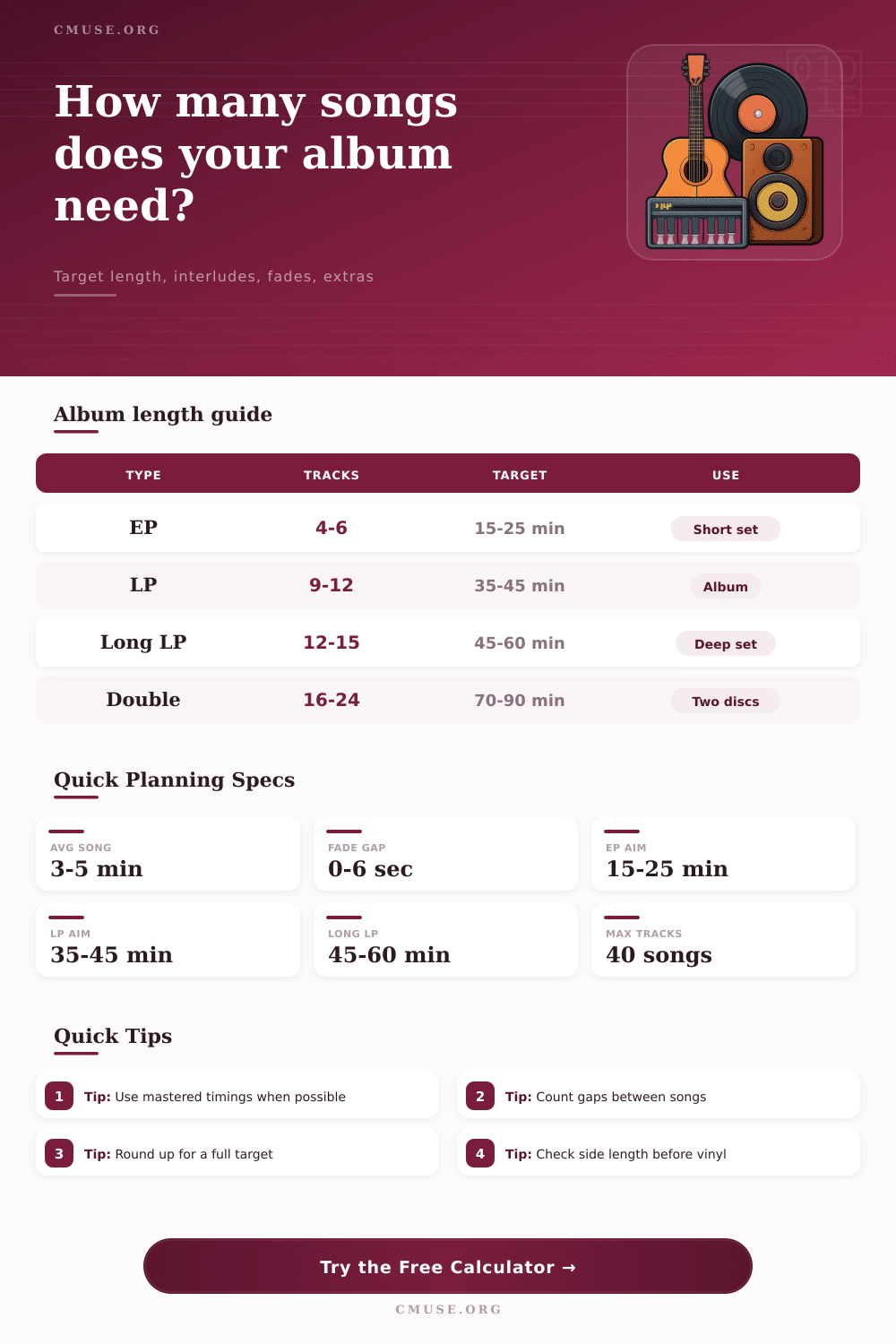
| EP | 4 to 6 songs | 15 to 25 minutes | Usually needs enough songs to feel complete but compact. |
| Standard album | 9 to 12 songs | 35 to 45 minutes | A common modern target for concise album sequencing. |
| Long album | 12 to 15 songs | 45 to 60 minutes | Useful when the songs run longer or the concept needs space. |
| Double album | 16 to 24 songs | 70 to 90 minutes | Best checked by halves, sides, or discs. |
| Preset | Target | Current State | New Song Avg | Best Use |
|---|---|---|---|---|
| Preset rows load automatically. | ||||
| Program Split | Comfort Zone | Common Target | When To Use |
|---|---|---|---|
| One program | 20 to 45 minutes | Digital album | Use when the release is not divided by side or disc. |
| Two halves | 16 to 24 minutes each | Vinyl-style LP | Use for side A and side B balance checks. |
| Four sides | 15 to 23 minutes each | Double album | Use when a longer release needs multiple sections. |
| Short EP side | 7 to 13 minutes each | Cassette or split | Use for short formats with a strong side break. |
| Song Style | Typical Length | Songs For 40 Min | Planning Effect |
|---|---|---|---|
| Short punk or interlude | 1:30 to 2:30 | 16 to 27 songs | Song count rises quickly when tracks are brief. |
| Compact pop song | 2:45 to 3:30 | 12 to 15 songs | A good fit for tight streaming-friendly albums. |
| Standard album track | 3:30 to 4:45 | 9 to 12 songs | Often lands near classic LP track counts. |
| Longform track | 5:00 to 8:00 | 5 to 8 songs | Fewer songs may still fill the target runtime. |
At some point in the last week of mixing an album, something happens where you freak out. You glance over your tracklist and notice that it’s four minutes shy of what you’re looking for, or you’ve got too many tunes and it feels rushed.
That’s when this calculator comes into play, because it takes your vague anxiety about time and makes it actualy math. How much do you need to cut? Write? You can find exactly how many tunes will get you to your runtime goal, down to the very second of all that dead air between the notes.
How to Plan Your Album Time
The empty space between songs doesn’t get any love from most musician. Until it’s too late. Sure, three seconds may seem like nothing in terms of one song, but x12 = 36 seconds added to your total runtime. That is time spent listening to nothing but silence. This is something that matters, and it is what the tool will calculate after you type in your existing list. You won’t have to guess how many minutes are being wasted with all that dead air. It makes you realize that the album relies just as much on the room it breathes between its tracks as it do for those melodies.
Because there are bonuses and interludes (which shift the usual averages), you’ll see places to input them here. Like songs, two-minute-long skits can eat up run time. However, an extended mix of instrumentals fades out and then smoothly connects to another song, shaving off time between tracks. Want to play around with overlapping fades and continuous mixes? Go ahead: the calculator accommodates it all.
When working on vinyl, where physical constraints govern side length (the groove width limits how much you can fit) knowing this is crucial; once your sides hits their maximum capacity, that’s it. Do you want one more second of silence or does a song need to be chopped?
The truth is we tend to let genre dictate our math. A punk band averages a track of about a minute and a half; they can get 20 songs in forty minutes. An acoustic group that takes longer solos may get only eight tracks in their set that still reach forty minutes. Check out the chart above to see what I’m talking about: Song Length vs. It shows the track count.
You can have a sparser album at 60-minutes or a denser album at 40-minutes, depending on what style you’re composing. Long, atmospheric material makes for a sparser album. Tight pop hooks make for a dense album. There’s no right or wrong here… Just be aware which type of album you want when you enter those last studio sessions.
You can use preset scenarios to visualize various release strategies. Deluxe editions have a separate calculation from a standard LP because they often include bonus tracks of older material or B-sides. Turns out that your primary sequence is ideal, but your bonus disc are weighing things down. It parses those issues out so you can focus on making the core experience as good as possible first.
It also alerts you if you’re nearing max song counts. Forty songs on a single release overwhelms listeners and is hard to sequence, so it’s good to know this ahead of time rather than having written filler simply to fill space.
Most projects falter at this point: planning their side lengths. For best audio quality, vinyl side lengths are best kept between 18-22 minutes. Anything longer than that increases risk of both surface noise as well as distortion. The calculator will check your Average Side Length against your Maximum Side Length preference. It’ll warn you if one of your sides is thirty minutes long before sending the files off to the plant. This little check turns abstract timing information into physical manufacturing restrictions, saving you from an expensive remastering session down the line.
At the end of the day, though, an album isn’t a bunch of files. It’s a curated experience. The numbers give it structure, but what you do with those numbers is the art. Get used to the calculator, get comfortabley with its boundaries, and then break ‘em if it fits the music.
Got a sprawling double album in mind? Know your limitations so you can make decisions creatively, instead of just reacting. Need something tight like an EP? Or maybe something sprawling? Knowing where you’re at lets you make those decisions… Not fix ‘em. Stop looking at the clock and go with the flow.