Trombone Slide Position Calculator
Estimate trombone slide position from target note, octave, harmonic partial, valve circuit, tuning reference, temperature, bore, tuning-slide pull, and practical hand reach.
Load a named tenor, bass, or alto trombone scenario, then adjust the note, partial, circuit, room temperature, and tuning offsets. Results show slide travel from first position plus a nearest-position correction.
Calculation Breakdown
Bb1
Tenor open fundamental
F1
Common attachment pitch
3.7 in
Typical average slide gap
7 pos
Standard hand-slide map
The calculator treats the chosen partial as an open-open brass air column, then converts added acoustic length into hand-slide travel by dividing the added path across the two slide tubes.
Real positions are not perfectly equal because each semitone needs a percentage increase in total tube length. Low and valve positions usually spread wider.
Use this as a measured starting point. Mouthpiece, bell flare, room temperature, ensemble pitch, and player embouchure can move the final slide mark.
| Position | Approx slide travel | 2nd partial example | Common tuning note |
|---|---|---|---|
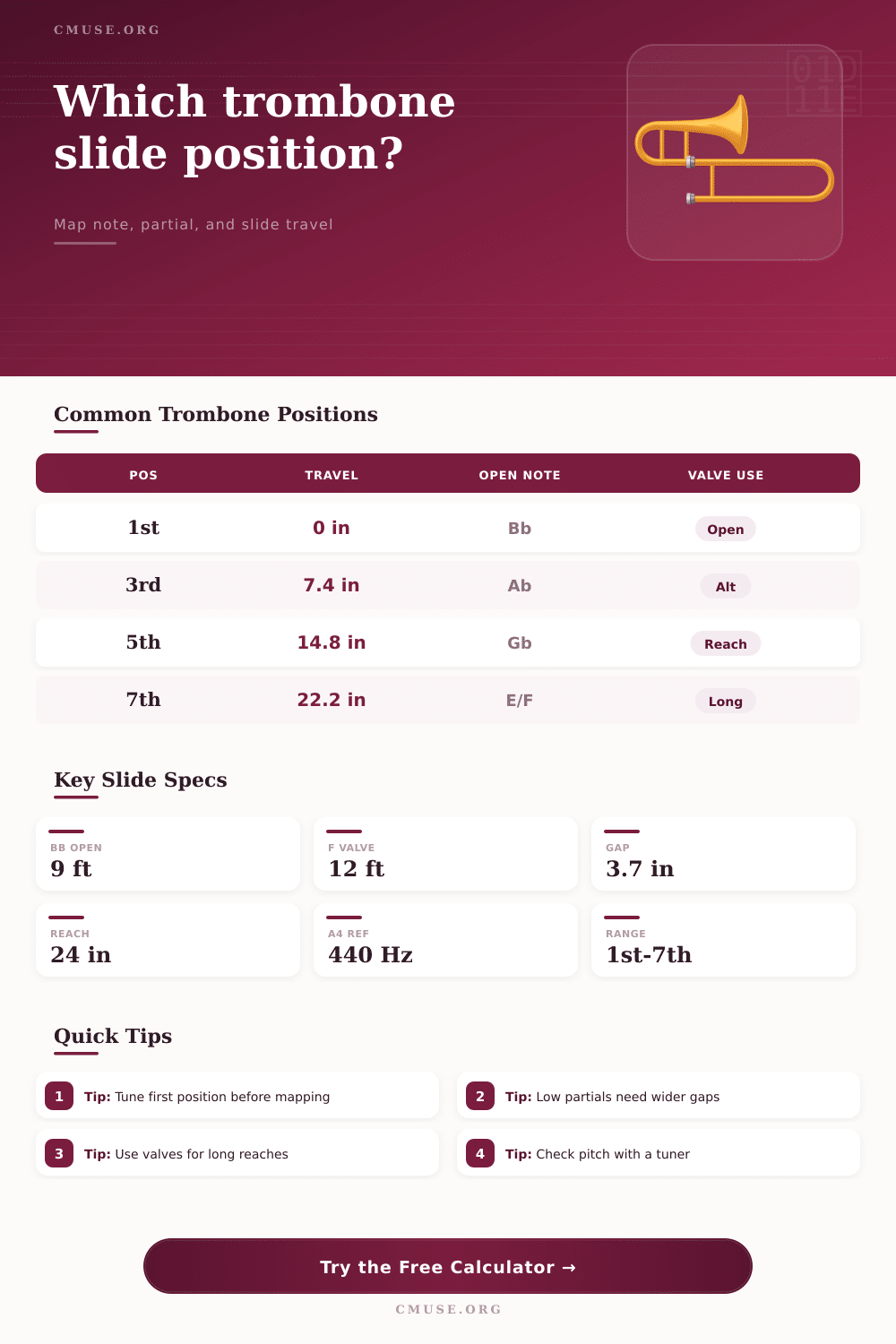
| 1st | 0.0 in / 0.0 cm | Bb2 | Home position; tune here first |
| 2nd | 3.7 in / 9.4 cm | A2 | Often adjusted slightly inward |
| 3rd | 7.4 in / 18.8 cm | Ab2 | Use ears for minor-third context |
| 4th | 11.1 in / 28.2 cm | G2 | Comfortable mid-slide anchor |
| 5th | 14.8 in / 37.6 cm | Gb2 | Watch low-register spacing |
| 6th | 18.5 in / 47.0 cm | F2 | Long-arm position on tenor |
| 7th | 22.2 in / 56.4 cm | E2 | Use F valve if reach is strained |
| Circuit | Fundamental | Approx acoustic length | Slide-position use |
|---|---|---|---|
| Bb open tenor/bass | Bb1, 58.27 Hz | About 9 ft / 2.9 m | Main seven-position map |
| F attachment | F1, 43.65 Hz | About 12 ft / 3.9 m | Low C, B, and long-position alternatives |
| Gb bass valve | Gb1, 46.25 Hz | About 11.3 ft / 3.6 m | Bass trombone dependent-valve work |
| D double-valve | D1, 36.71 Hz | About 14.7 ft / 4.7 m | Low register with shorter hand-slide moves |
| Eb alto | Eb2, 77.78 Hz | About 6.8 ft / 2.2 m | Alto trombone first-position reference |
| C tenor reference | C2, 65.41 Hz | About 8.1 ft / 2.5 m | Useful for comparative slide geometry |
| Partial | Bb open example | Practical use | Slide accuracy note |
|---|---|---|---|
| 1st pedal | Bb1 | Pedal tones and pedal exercises | Wide response; tuner may jump |
| 2nd | Bb2 | Low register position map | Longer physical gaps than upper partials |
| 3rd | F3 | Middle register anchors | Good for checking 1st, 3rd, and 4th |
| 4th | Bb3 | Staff register playing | Usually stable across open positions |
| 5th | D4 | Alternate positions and triads | Natural partial sits slightly low |
| 6th | F4 | Upper register open notes | Small slide moves make larger cents changes |
| 7th | Ab4 low | Special color or alternate fingering | Natural 7th is very flat in equal temperament |
| 8th+ | Bb4 and above | High register alternatives | Use tuner and ensemble context closely |
| Scenario | Circuit | Partial | Expected result |
|---|---|---|---|
| Tenor Bb2 tuning note | Bb open | 2nd partial | 1st position, tune main slide |
| Tenor A2 scale step | Bb open | 2nd partial | Near 2nd position |
| Tenor G2 fourth position | Bb open | 2nd partial | Near 4th position |
| Tenor low E2 with valve | F attachment | 2nd partial | Short valve extension |
| Bass low C2 | D double-valve | 2nd partial | Mid-slide, easier reach |
| Alto Eb3 | Eb alto | 2nd partial | 1st position alto reference |
| High F4 | Bb open | 6th partial | 1st position high slot |
| D4 fifth partial | Bb open | 5th partial | Check slightly raised tendency |
This shows you how the physics of sound translates into actualy inches of slide movement. Before you play a single note, this tool will let you see the issue. It connects the dots from “I know there’s a position somewhere” to “but it’s so far away from first position I can’t feel it”. Just enter the note you want to reach (and choose the partial), and you’ll get a readout of how many inches of tubing correlate to your desired pitch.
Typically we becomes a player by rote memorization/muscle memory of our positions. This is fine for the standard repertoire, but it does not work when you face an unusual transposition or a difficult passage. Understanding physical distances will change your approach to fingerings. The tool can help you break down this process by allowing you to measure instead of guess.
How to Use the Slide Calculator Tool
The variables are derived from actual experiences with playing brass instruments in different settings. For example, the speed of sound within your horn can change as temperature fluctuates. A warm room causes the pitch to rise and the slide to require less extension. To make up for this, the calculator allow you to alter the speed of sound based off the inputted temperature.
Next, you state the type of circuit being played; for example, standard Bb tubing or one like that found in an F attachment. Why does this make a difference? Because how far along the valves travel alters the overall length of the air column and affects distance between note positions. Note the reach status indicator on the result which shows the slide travel relative to the full extent you comfortabley stretch out. The software will flag positions that are too far away to save you from discomfort or bad intonation. Try changing inputs to F valve circuit and see just how much closer the note becomes. Many professional trombone have trigger valves not just for convenience, but because they are acoustically necessary.
If you are using the tool, take care with selection of partials, because higher-numbered partials require smaller changes in tube length to change a semitone different than lower-numbered ones. So if you have a Low BBb the change from one position to another will be longer then say a high G. You can see this on the calculator. What it means is that the lower pitch feels wider because the distance between each step are not evenly spaced out along the instrument’s range. Instead, the calculator shows you how the slide move across the instrument following an exponential curve of acoustic adjustment.
As you understand all of this, it shifts your approach to practicing. Instead of just running scales, you begin analyzing the geometry of particular passages. You realize where long reaches occur and prep your embouchure appropriately. You don’t just pull on the main slide; you tune for the irregularities in the harmonic series, bore size, and temperature.
Verify the results with your ear after you’ve adjusted using the tool. Create a mental map of what your instrument can do. When your physical experience matches the numbers, the slide should of been an exact extension of your musical goal.