Monitor Mix Count Calculator
Estimate unique monitor mixes and real console bus demand for wedges, mono IEMs, stereo IEMs, sidefills, talkback feeds, guest cues, and spare outputs.
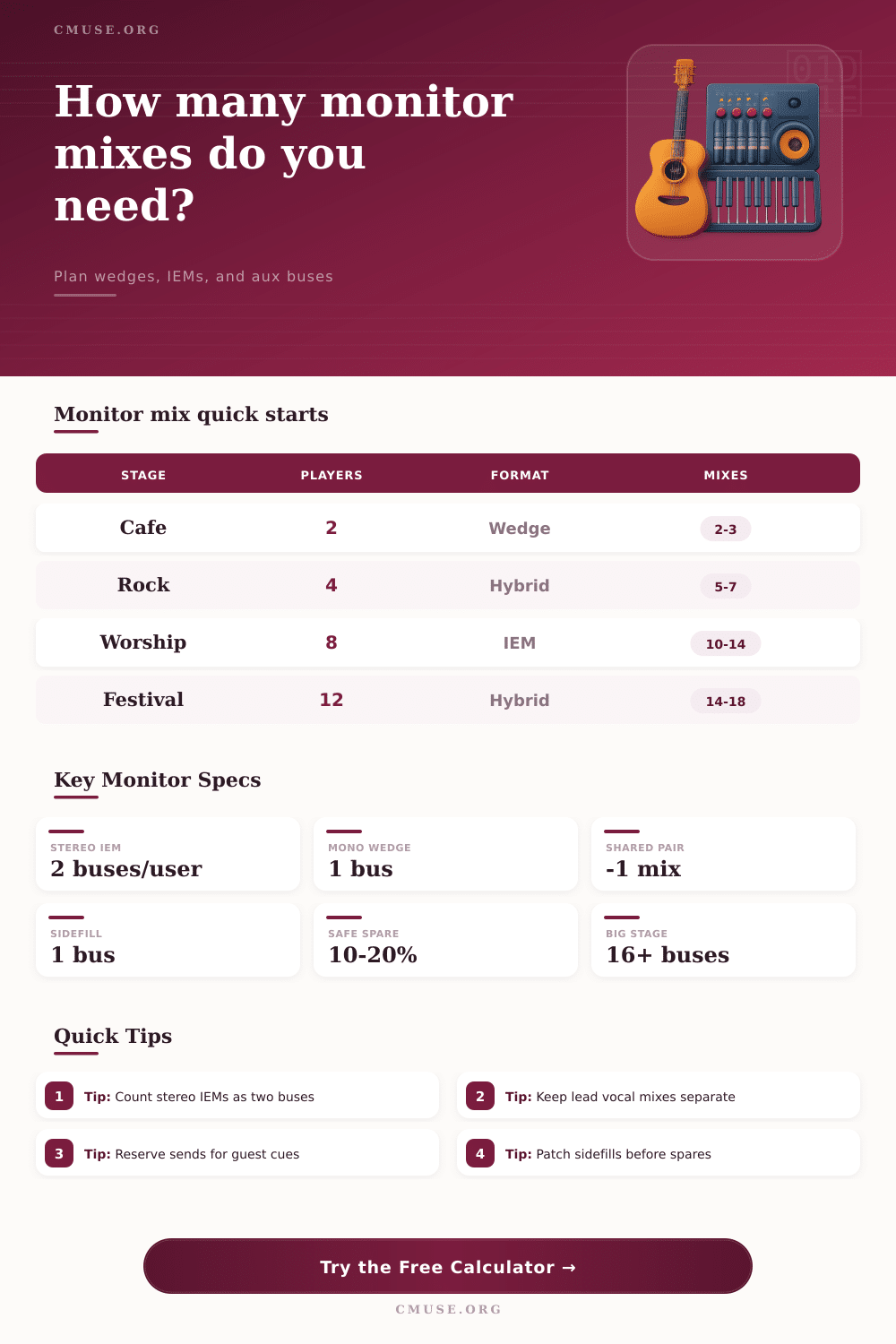
Load a typical show format, then adjust the player count, IEM split, shared wedges, sidefills, and available console buses. Stereo IEM users are counted as one mix but two output buses.
Monitor Mix Breakdown
Personal Mix Base
performers × format density × detail factor, rounded up
Priority Lift
lead vocalists and cue leaders add independent mix pressure
Stereo IEM Load
stereo IEM users count as one mix but two output buses
Spare Buffer
subtotal × spare percent, rounded up to whole buses
1
Bus per mono wedge or mono IEM mix
2
Buses per stereo IEM mix
10-20%
Common spare bus planning range
16+
Typical bus count for larger hybrid stages
| Monitor format | Starting density | Best fit | Planning note |
|---|---|---|---|
| Mostly wedges | 0.58 mix per performer | Small clubs, shared stage areas | Works when rhythm players can share a musical balance. |
| Hybrid | 0.74 mix per performer | Modern bands with some IEMs | Most realistic middle ground for clubs, churches, and festivals. |
| Mostly IEMs | 0.96 mix per performer | Personal monitoring and click tracks | Nearly every performer expects an individual balance. |
| Theater | 0.70 mix per performer | Pits, cast foldback, conductor feeds | Shared zones can work, but cue feeds add utility outputs. |
| Broadcast cue | 1.02 mix per performer | Playback, comms, recording, TV | Expect more independent mixes than the stage count suggests. |
| Available monitor buses | Practical monitor plan | Stereo IEM limit | Risk level |
|---|---|---|---|
| 4-6 buses | Solo, duo, small wedge-only act | 1-2 stereo users | High if guests or sidefills are needed |
| 8 buses | Basic four piece band or small hybrid rig | 2-3 stereo users | Moderate with careful sharing |
| 12-16 buses | Full band, worship team, festival opener | 4-7 stereo users | Good if utility feeds are planned early |
| 24-32 buses | Large IEM rig, theater, playback-heavy show | 10-15 stereo users | Good with dedicated monitor desk workflow |
| Stage type | Performers | Typical outputs | Suggested spare |
|---|---|---|---|
| Acoustic cafe | 1-3 | 2-4 mono wedge or IEM sends | 0-1 spare bus |
| Club rock band | 4-6 | 5-8 mixes plus drum fill if needed | 1 spare bus |
| Worship or corporate band | 7-12 | 10-16 buses with hybrid monitoring | 2-3 spare buses |
| Theater or orchestra cue | 12-30 | zones, conductor feed, click, and IEM cues | 15-20% spare |
| Mix type | Bus count | Use when | Watch item |
|---|---|---|---|
| Mono wedge | 1 bus per mix | Players can share source balance | Open mics may raise feedback risk |
| Mono IEM | 1 bus per user | Bus count is tight but isolation matters | Less spatial separation than stereo |
| Stereo IEM | 2 buses per user | Click, tracks, pitch, and detailed cues matter | Consumes output buses quickly |
| Sidefill or drum fill | Usually 1 bus per zone | Stage coverage or low-frequency feel is needed | Patch before counting spare buses |
Soundcheck. You’ve run out of aux sends. Normally it’s because lead singer requests a click track and drummer has requested a stereo mix of his keyboards. Then, oh no! Bassist decides he doesn’t want to share wedge with guitarist. The lights on the console come on. Everyone panics. Five minutes until show time. That is where monitor mix count calculator comes in.
Before you can plug in single cable, it makes you think about how many outputs you need to feed. It turns a chaotic guessing game into simple math problem.
How to Count Your Monitor Mixes
What’s the problem? How do we tell our actual consoles from unique combinations of them? That sounds like an “actual bus” and a “unique mix” is the same thing. But they aren’t. One person require one custom blend for their In Ear Monitors. That’s considered one mix. Yet physically, it use two output channel on the digital console. Each left and right signal has its own path. The tool will automatically convert for you. So if you’ve got four people who require stereo IEMs then, according to the calculator, your going to need four unique balances. And you’re going to want eight dedicated buses. That ratio become the key in understanding how small boards fill up fast.
On bigger desks, because of that ratio they appear to have plenty of room. Often, though, you run out of hardware output long before you run out of creativity with your mixes.
When you establish your scenario, think about what is being fed into the system. Your first input will be the main monitor format choice which sets the starting point for what each listener focuses on. One shared wedge may suffice for a cafe singer. That yields a small number of mixes per person. Contrast that with full-on rock band or worship team. They want the details. That force the denominator upward.
From there you can tweak it based off who is most important. Lead vocals tend to have a special place. So do other rhythm section anchors. Keyboard players and drummers are often the time-keeping core of the band. Separate mixes ensure no rhythmic errors occurs here. These positions gets a bit of a boost in the calculation. This avoids accidentally mixing their sources with your backing vocalists to save channels.
If done right, shared wedges can really save on your mix and bus count. In most cases, two singer on either side of one another can share a mono mix. You can enter those into the tool. It saves unique mixes down to half the number, maintaining an efficient use of buses along the way.
Headroom problems are caused by things like utility cues and sidefills. Although these don’t feed out to performers, they do use precious aux buses. An output for a drum fill area is necessary. The talkback lines for guest artist cues or director lines also occupy bus space. If you don’t plan for them in advance, they’ll sneak their way into your soundcheck. Then, you would of had to pull someone else’s mix at that point.
By far the most critical number on that page is the spare buffer percentage. On paper, it look like you’re wasting ten or twenty percent by adding some extra capacity. But that’s insurance money, and in reality equipment breaks, people show up late, and set lists shift. If you have two empty buses, you can jump into a cue and be back playing seconds later. If you run full tilt, then you call for assistance. Let’s hope the roadie finds the right cable before the band plays their opening chord.
The reference table on that page makes it crystal clear. How many buses do I typically use? What size is my venue? In a small club, you may only require four to six buses total. At a festival opener, it’s no problem to exceed sixteen. Knowing your limits will guide you through decisions about upgrading gear vs. Sharing wedges.
Timing and Isolation are key elements for good monitoring. If each player is hearing what he or she requires then it all tightens up. Everyone has their fair share and no one takes anyone else’s share. That’s how the mix math works. Plan the buses first, then worry about the EQ curves. It keeps things clear in the mix and calm on the stage. You won’t panic with a full board. Just time to focus on what really matters.
To know how many outputs there are before the music begins is half way toward making the music sound good.