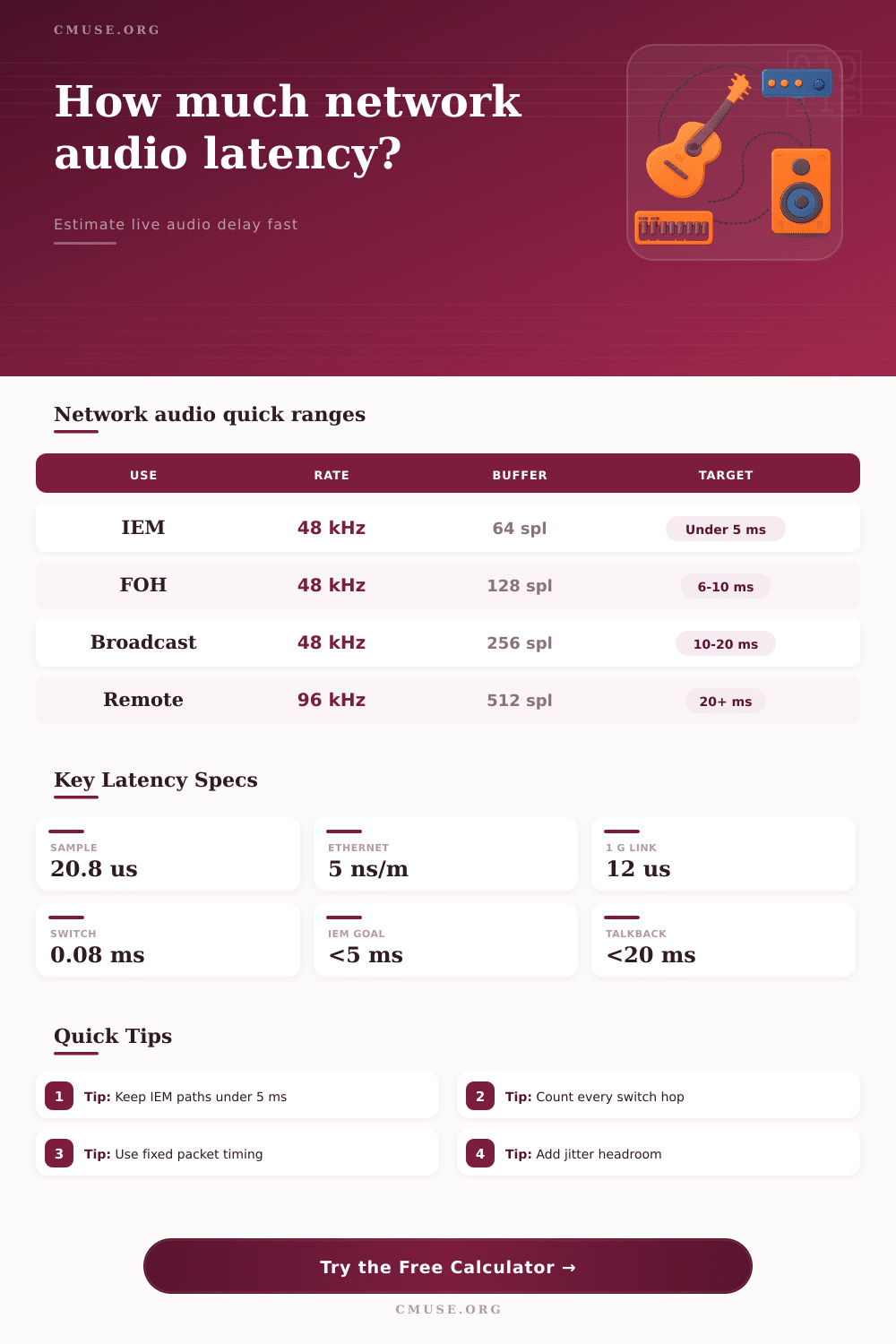
Network Audio Latency Calculator
Estimate end-to-end delay for networked audio from sample rate, buffers, packet timing, switch hops, cable length, jitter margin, and converter latency.
Load a realistic live sound, studio, broadcast, or remote-audio scenario. Each preset fills sample rate, buffer, packet, switch, cable, jitter, and converter values so you can compare usable latency quickly.
Latency Breakdown
Buffer Latency
(buffer samples / sample rate) x buffer stages x 1000
Packet Delay
packet interval + codec frame delay + jitter buffer
Network Transport
switch delay + serialization + cable propagation
End To End
ADC + buffers + packet + network + jitter + DAC
48 kHz
Sample Rate
64 spl
Buffer Size
1.0 ms
Packet Interval
1 Gbps
Link Speed
| Audio Use | Good One-Way Range | Watch Range | Practical Note |
|---|---|---|---|
| IEM in-ear monitoring | Under 5 ms | 5 to 8 ms | Performers often notice combing or feel above this range. |
| Live stage foldback | Under 10 ms | 10 to 15 ms | Works for wedges, sidefills, and many FOH returns. |
| Studio tracking link | Under 8 ms | 8 to 12 ms | Lower is better when direct and monitored sound mix together. |
| Broadcast program path | Under 20 ms | 20 to 40 ms | Usually acceptable when not feeding a performer in real time. |
| Remote collaboration | Under 30 ms | 30 to 60 ms | Feels loose for tight playing unless monitoring is local. |
| Setting | 48 kHz Delay | 96 kHz Delay | Best Fit |
|---|---|---|---|
| 32-sample audio buffer | 0.67 ms per stage | 0.33 ms per stage | Low-latency monitor paths with stable hardware. |
| 64-sample audio buffer | 1.33 ms per stage | 0.67 ms per stage | Live sound and tracking systems that need fast response. |
| 128-sample audio buffer | 2.67 ms per stage | 1.33 ms per stage | Balanced reliability for many stagebox and studio links. |
| 256-sample audio buffer | 5.33 ms per stage | 2.67 ms per stage | Broadcast, playback, and systems with heavier processing. |
| 1 ms packet interval | 48 samples | 96 samples | Common network-audio packet timing for reliable LANs. |
| Network Element | Typical Delay | What Changes It | Calculator Input |
|---|---|---|---|
| Cat cable or fiber propagation | About 0.000005 ms per meter | Path length and velocity factor | Cable or fiber path |
| 1 Gbps packet serialization | About 0.012 ms for 1500 bytes | Packet size and link speed | Packet size, link speed |
| Managed LAN switch | 0.03 to 0.30 ms per hop | Switch design and queue depth | Switch hops, forwarding delay |
| Wireless hop | 3 to 20 ms or more | Retries, congestion, and airtime | Jitter and codec frame delay |
| WAN or internet segment | Varies by route | Distance, routing, and congestion | Jitter and extra frame delay |
| Scenario | Core Settings | Expected One-Way | Secondary Concern |
|---|---|---|---|
| Wired IEM rack | 48 kHz, 64 samples, 1 switch | 3 to 5 ms | Keep jitter buffer small and stable. |
| FOH to stagebox | 48 kHz, 128 samples, 2 switches | 6 to 9 ms | Console and speaker DSP can add more delay. |
| Studio room link | 96 kHz, 64 samples, short LAN | 2 to 5 ms | Low buffers need stable clocking. |
| Broadcast truck return | 48 kHz, 256 samples, 3 switches | 10 to 20 ms | Program delay matters less than foldback delay. |
| Remote rehearsal | 48 kHz, codec frames, high jitter | 25 ms and higher | Local monitoring is usually required. |
In studios or live sound, if audio signal gets there even a little bit later, the performer hears it out-of-sync with their performance on-stage. That’s because actor on stage wants to hear their voice nearly instantaneously. When that doesn’t happen, the illusion falters. Network audio latency isn’t just about time; it’s about the feel of it. This demonstrates why network audio latency are important in studio or live environments.
Practical network audio latency includes codec frames, jitter protection, cable propagation, switch hops, packet timing, buffer times, and converter times. These factors combine into one calculation to show real-world latency for your network. You get one useable timing number and know where the milliseconds is hidden so you can avoid ruining your mix.
What Causes Network Audio Latency
Generally speaking, most engineers are concerned with how far their cabling runs physically. Long = Delay! This is a widely held misconception. The fact is, electricity and light move quite rapidly along copper and fiber optic cabling, adding almost no additional delay to your overall latency budget. The actual culprit is the processing stages within the signal chain. When you take audio data from an analog source and insert it into a digital system, it cross an analog-to-digital converter; this happens again when it enters another device’s buffer until there are sufficient sample to be processed as a block by the computer/interface. These add up quickly, particularly in a complex rig. Each one adds a few milliseconds.
After plugging in the buffer sizes and sample rate, the calculator does the math for you. You no longer have to count samples by hand and convert them to time. If the sample rate is high, say ninety-six kilohertz, then each individual sample captures a shorter amount of time compared than the same buffer size at forty-eight kilohertz. Increasing the sample rate also increases the amount of data that has to be moved around your network links. The more data per second (throughput), the greater the load on your bandwidth. Running several channels over regular gigabit Ethernet will require careful consideration of these balances between lowering delay versus placing a heavier demand on your bandwidth.
Switches matter more than you might realize. The managed switches of today can be pretty speedy, but not instantaneous. As each device forwards your signal, there’s a tiny bit of delay while the switch reads that packet header and decides which port to route it to. So if your signal needs to go through four or five switches before it reaches the monitor world, those tiny delays will stack up. Because individually, numbers sound negligible, it’s easy to forget about this. But all that adds real weight to your total path delay.
There’s one more wrinkle: Packetization. Putting every individual sample on the network will choke your network. Instead, network audio protocols takes each set of samples and bundle them into a packet to be sent at regular intervals. The question is how often? It’s a balance of delay and efficiency. Sending packets with shorter intervals translates to less wait time until you get your data. That leads to lower latency but requires your network gear to process more headers. You want enough headroom so that when the network gets congested occasionally it won’t drop your audio.
That’s where jitter buffers comes into play. Variations in when packets arrive are absorbed by jitter buffers. The jitter buffer smoothes the stream for playback but there is a cost. The bigger the jitter buffer, the more protected from drop outs and other glitches. Greater protection means your audio will be stable even over imperfect networks. It also means a bigger delay because the packets waits longer before being released into the output stage. This is something that if kept small, works well in a controlled local area network. However, over public internet connections or wireless links you’re likely forced to make it much bigger just to avoid audible artifacts. And so you pay the price of increased latency for reliability.
Included within the tool are handy reference tables with benchmark numbers for various situations. In general, a maximum of five milliseconds is safe for in-ear monitoring as it prevents comb filtering: the clash between direct sound and delayed electronic signal. When broadcasting or collaborating remotely, those tolerances stretch significantly since viewers aren’t seeing a performer’s lips moving in real time. Having a sense of where you want to be allows you to adjust specific inputs if your overall delay becomes excessive.
There’s more to managing audio latency on a network than just worrying about individual pieces of the puzzle; it’s also about understanding the entire path, and consciously deciding how much to sacrifice in terms of speed vs stability. Sometimes you would of want to go for rock-solid performance even if it means using a little bigger buffer. A slight delay that most people won’t notice anyway. Other times you’ll want to tune everything for minimums, which increases the risk of glitches should network conditions vary. Consistency is the aim; whatever delay happens needs to be consistent so that musicians can play alongside each other rather than against the system.
If you back away from the details a bit, it becomes apparent that chasing zero delay isn’t so much the goal of latency management as it is keeping a coherent timeline amongst all parties concerned. You have your tools that will show you the numbers. Experience and your ears tells you if those numbers equate to good sound. Watch out for buffer sizes and keep that path clean. Each hop matters.