Sound Check Time Per Band Calculator
Build a stage-ready sound-check schedule from band count, channels, line-check pace, monitor mixes, changeovers, headline order, doors time, total schedule, and buffer.
Calculation Breakdown
| # | Band | Channels | Monitor mixes | Mode | Check window | Stage clock |
|---|---|---|---|---|---|---|
| Run the calculator to build the schedule. | ||||||
| Work item | Quantity | Unit time | Subtotal | Scheduling note |
|---|---|---|---|---|
| Run the calculator to see workload totals. | ||||
| Act type | Typical inputs | Monitor mixes | Reasonable check | Best use |
|---|---|---|---|---|
| Solo acoustic | 2 to 5 | 1 to 2 | 8 to 15 min | Fast openers, songwriter rounds, cafe stages |
| Small band | 8 to 16 | 2 to 4 | 18 to 30 min | Club support with shared drums and amps |
| Full rock band | 18 to 32 | 4 to 8 | 35 to 60 min | Headline or direct support checks |
| Playback-heavy act | 16 to 40 | 5 to 10 | 45 to 75 min | IEM, tracks, timecode, RF, and cue mixes |
| Festival line check | Any | Prebuilt | 8 to 20 min | Patch-confirm only, with monitor files already advanced |
| Stage condition | Changeover target | Buffer target | Watch point | Practical move |
|---|---|---|---|---|
| Shared backline | 6 to 12 min | 10% to 15% | Pedalboards and vocal mics still vary | Pre-label drops and keep amps powered |
| No shared backline | 15 to 25 min | 15% to 25% | Drum moves and amp swaps dominate | Stage cases in lanes, not in front of wedges |
| Rolling risers | 4 to 10 min | 10% to 18% | Patch fanouts must match the input list | Color-code looms by riser |
| Line check only | 3 to 8 min | 20% plus | No time to solve arrangement issues | Advance plots and monitor notes before load-in |
| Headline production | 20 to 45 min | 15% to 30% | RF, playback, snapshots, and guest mics | Lock the headline first, then roll supports through |
| Preset | Band count | Average channels | Order logic | Main pressure point |
|---|---|---|---|---|
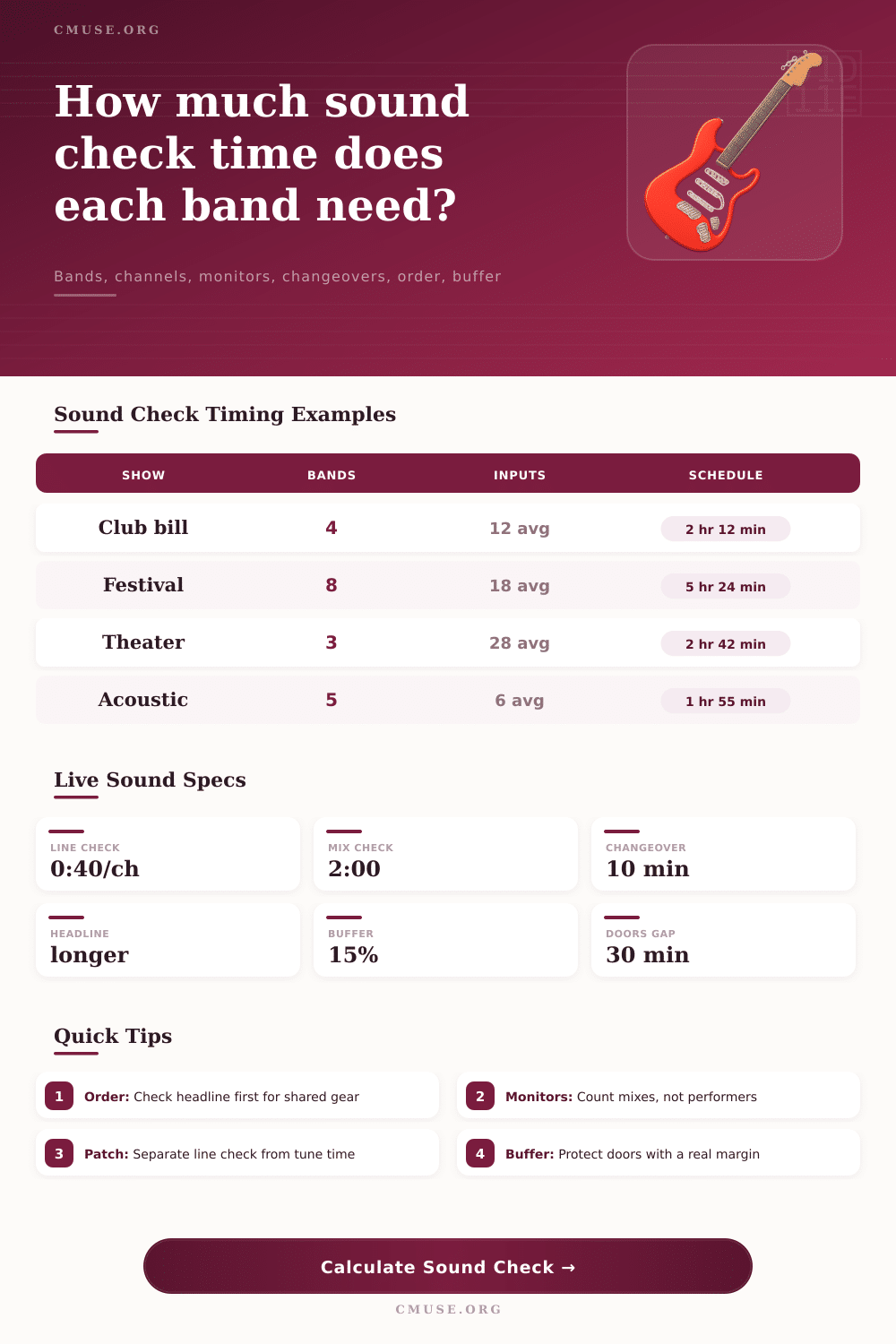
| Club 4-Band Bill | 4 | 14 | Headline first | Changeovers before doors |
| Festival 8 Acts | 8 | 18 | Reverse show order | Rolling riser and line-check pace |
| Theater With Support | 3 | 24 | Headline first | Playback, IEM, and RF checks |
| Acoustic Night | 5 | 6 | Show order | Many short checks and small handoffs |
| Metal Package | 5 | 22 | Headline first | Drum mics, guitar rigs, and vocal wedges |
Why you need a structured way to estimate sound check time As a front-of-house engineer or tour manager you know that stress of the sun dipping down, half the load-in complete and suddeny you’ve got three more bands to patch before doors. This is a fear unique to anyone at FOH. Sound check isn’t just about plugging in some cables; it’s a negotiation between the human nature of artist, crew, and tech people and what the venue wants to do. Get home. So, having a method to estimate this time make sense.
Is sound check just about levels? Wrong. Level is only part of the equation; most people don’t realize it also has to do with set-up. A solo artist demanding multiple monitor mixes and complicated playback may requires more time. A band with 12 inputs requiring fewer changes may take less time. Enter your number of channels and preferred mixes into the calculator and let it crunch numbers. No more juggling coefficients in your head for line vs monitor tweaks.
How to Estimate Sound Check Time
Input your approximate channel count per band and average number of inputs used. Add in the rub: how long does every tech thing realy take? Forty seconds per channel? That might happen at a fest where all files were pre-advanced, but there is no chance at a club where everything’s unlabeled and new.
Then there’s the human element, typically meaning monitor mixes, which is where schedules goes off the rails. That’s where things get derailed by schedules. You think there will be five pieces, so you plan five mixes. But then each one want its own world with a guest vocal send and a drum fill. Use the tool to give each mix minutes. Adjusting a vocal front-of-house balance can happen quickly, whereas creating an in-ear mix from nothing take more time.
And it includes the variable that is changeover time; if the bands all share backline, this will be much quicker or slower than if every band member has their own amps/cabs. On average, having to lug your gear around between sets are going to take fifteen to twenty-five minutes of hands-on work. Sharing a typical kit? Much faster.
Special rules apply here for the headlining act. If they demand extra time for playback cues, RF coordination and snapshot recalls that other acts don’t get, they typically recieve it. It’s a standard industry practice to put the headline first in the calculator. This lets you nail down the main production first and leave the core rig set. You can then move through the opening bands more quickly without having to deal with the chaos of solving critical audio problems five minutes before doors open.
Door times are non-negotiable. Anything will break, so have at least a 15% buffer. Sometimes it’s just a cable. Other times it’s an artist arriving late. Maybe the drummer hates the sound of his snare again, for the hundredth time. If you don’t have the buffer then any little ripple affect the show start time, making both the venue and the crowd angry.
On the page there’s a reference table explaining how various act types relates to a reasonable check window, this lets you see when an estimate might be too optimistic. At the end of the day though, a solid schedule will save that silent period prior to opening up the doors. It is for stage dressing, checking your guest list, or simply allowing the room to calm down.
So don’t skip the line checks because you have a close call in your calculation. First trim back any full band songs you might of planned. You can adjust a bad mix within a set, but not a broken patch. A well thought out technical block will get you started on time with the music. It will also provide some breathing space to actualy listen to what’s going on onstage, rather than simply rushing to make it through.