Key Lock Semitone Calculator
Estimate how a tempo change affects pitch, how many semitones and cents key lock must correct, whether varispeed lands in a harmonic key, and how much artifact or formant risk the move carries.
Presets fill BPM, key, pitch mode, material, formant handling and tolerance. You can still edit any value before calculating.
Calculation Breakdown
Deck Timing
Pitch Processing
| Scenario | BPM | Tempo % | Pitch Shift | Correction | Audible Key |
|---|---|---|---|---|---|
| Original | 120.00 | 0% | 0 st | 0c | A minor |
| Option | Processor Cents | Final Key | Camelot | Use When |
|---|---|---|---|---|
| Preserve source key | 0 | A minor | 8A | Transparent blend |
| Move Size | Typical Risk | Best Material | Watch For | Action |
|---|---|---|---|---|
| 0 to 2% | Low | Full mixes, loops | Small transient smear | Normal key lock is fine |
| 2 to 4% | Low-medium | Modern masters | Hi-hat grain | Use good deck algorithm |
| 4 to 8% | Medium | Instrumentals, pads | Vocal phase and cymbals | Check formants and transients |
| 8 to 12% | High | Creative edits | Warble, pumping, dullness | Consider re-editing tempo |
| 12%+ | Extreme | Special effects | Obvious processing | Render offline or pick another key |
| Semitones | Cents | Tempo Ratio | BPM Example | DJ Meaning |
|---|---|---|---|---|
| +0.50 st | +50c | 1.0293x | 120 to 123.51 | Small varispeed lift |
| +1.00 st | +100c | 1.0595x | 120 to 127.14 | One key step up |
| +2.00 st | +200c | 1.1225x | 120 to 134.70 | Noticeable vocal change |
| -1.00 st | -100c | 0.9439x | 120 to 113.27 | One key step down |
| -12.00 st | -1200c | 0.5000x | 174 to 87 | Half-speed octave drop |
The vocal sounds as though it’s coming through a dodgy telephone line; you throw down a track and that metallic warbling is there to remind you that something has gone wrong with pitch correction. That slight change in tempo went unnoticed on the beat grid but the computer could only do so much with what was given to it. We all gets it when we turn up the key lock algorithm on our decks. You are fighting against the physics of sound while attempting to maintain some semblance of a tune.
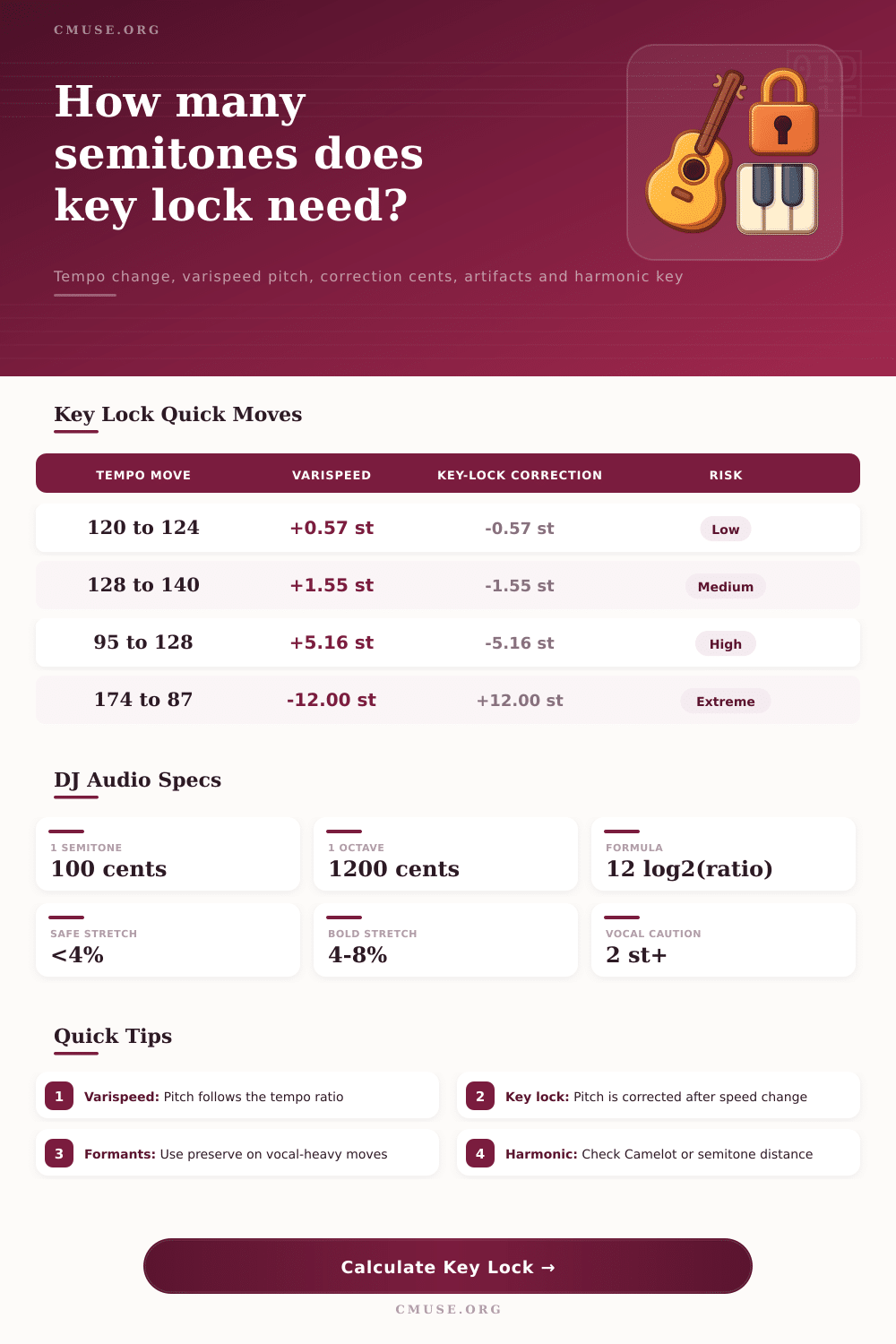
Before committing to that blend, you need to know just how much processing power you’re asking from your piece of kit. The calculator above help you see exactly that. It comes down to some basic math cloaked as an audio engineering problem. Slow a record down? The pitch lowers accordingly. Speed it up? Ditto. Key lock keeps those two factors separate. It maintain the tempo where you set it but somehow magically brings back original pitch. This continues until the stretch percentage gets out of hand, then the artifacts start to appear.
When to Use Key Lock
Know this: The chip in your deck must perform one corrective action for every percent of tempo change. Consider them constraints on your creative process. Not all processors is created equal, which is why algorithm quality setting is important. A simple DJ key lock can manages a gentle house track just fine, but it won’t stand up to the transient density of a drum and bass breakbeat. Studio-grade algorithms generally needs more CPU power or offline rendering, thanks to they’re cleaner time-stretching abilities. Depending on your set-up, it comes down to fidelity vs. Speed.
The type of material input limit you to recognizing what you’re attempting to move around. Because our ears are hyper-sensitive to changes in formants, vocals is the toughest element to stretch. Whether it feels smooth rhythmically or not doesn’t matter if singer’s voice begins to sound overly deep or chipmunk-like; your mix is compromised.
That being said, there is such a thing as too much of a good thing when it comes to tempo change. Four percent is generally enough for most contemporary decks not to notice any unwanted graininess. Go beyond that and into the danger zone, that’s when it becomes hard on the system. Going from say 120 to 124 is a slight bump up whereas going from 128 to 140 is forcing the system further. It isn’t linear; it grows faster and faster in its challenge to the system. In other words, you’re forcing the software to reconstruct the wave form more aggressively.
There is also a second aspect: harmonic mixing. When using varispeed, the key will change along with speed. That can be a bug or a feature depending on your plans. If you want to account for it, then a half-step rise may place you in a harmonically related key which is musically pleasing and feels intentional. Key lock doesn’t let the key naturaly drift and preserve the original key. It maintains the key but raises the possibility of artifacts as the pitch correction must fully offset the varispeed shift.
Formant preservation is your safety net for pushing the limits. This option will allow you to push a song into the danger zone, if you really want to stretch a vocal-heavy song past the comfort zone. It will also maintain a similar sound quality despite minor pitch deviations. Yes, it won’t make a major tempo shift sound unprocessed, but it will prevent the most jarring artifacts. In fact, the tool tells you exactly how much it thinks it’s correcting for in terms of cents, giving you a clear gauge on the work required.
Use your ears, not the grid, if this is high. At the end of the day, technology exist to serve the music, not limit it. Listen for the warble before committing; use the numbers as a measure of risk. A clean blend at a slightly imperfect key are always better than a perfect mix that sounds like it’s underwater.
Don’t let them analyse the DSP algorithms, you want the crowd to feel the energy. Keep the stretches conservative where possible and respect transparency of your source material. Invisibility is the goal. Nobody should of noticed you’ve moved the tempo at all if done right. This is the true test of a seamless mix.