Plugin Latency Sum Calculator
Add up the reported latency of every plugin in your chain, convert samples to milliseconds, fold in round-trip I/O buffer delay and read the total in beats at any BPM
Full Calculation Breakdown
| Plugin # | Samples | ms (current SR) | Share of Total |
|---|---|---|---|
| — | — | — | — |
| Plugin Type | Typical Samples | ms @48k | Cause |
|---|---|---|---|
| Minimum-phase EQ | 0 | 0.0 ms | No look-ahead |
| Compressor (no LA) | 0 | 0.0 ms | Real-time |
| 2x Oversampled sat | 64 | 1.3 ms | Resampling filter |
| 4x Oversampled clip | 256 | 5.3 ms | Resampling filter |
| Linear-phase EQ | 1024–4096 | 21–85 ms | FIR filter |
| Lookahead limiter | 1024–2048 | 21–43 ms | Peak look-ahead |
| Convolution reverb | 2048+ | 43+ ms | FFT block |
| Mastering loudness | 4096+ | 85+ ms | Long FIR |
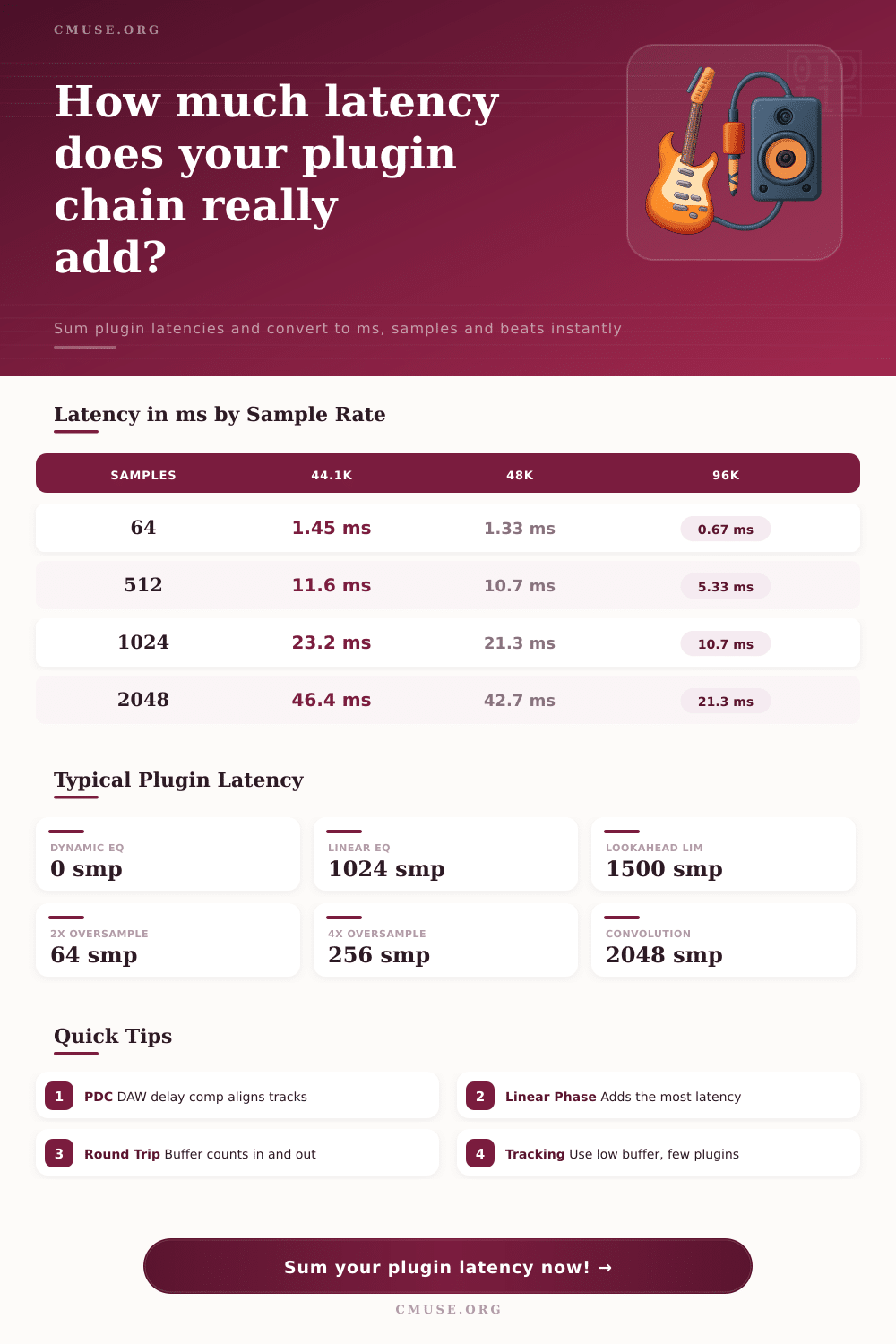
| Samples | @44.1 kHz | @48 kHz | @96 kHz |
|---|---|---|---|
| 64 | 1.45 ms | 1.33 ms | 0.67 ms |
| 128 | 2.90 ms | 2.67 ms | 1.33 ms |
| 256 | 5.80 ms | 5.33 ms | 2.67 ms |
| 512 | 11.61 ms | 10.67 ms | 5.33 ms |
| 1024 | 23.22 ms | 21.33 ms | 10.67 ms |
| 2048 | 46.44 ms | 42.67 ms | 21.33 ms |
| 4096 | 92.88 ms | 85.33 ms | 42.67 ms |
| Buffer | One Way @48k | Round-Trip @48k | Round-Trip @44.1k |
|---|---|---|---|
| 32 | 0.67 ms | 1.33 ms | 1.45 ms |
| 64 | 1.33 ms | 2.67 ms | 2.90 ms |
| 128 | 2.67 ms | 5.33 ms | 5.80 ms |
| 256 | 5.33 ms | 10.67 ms | 11.61 ms |
| 512 | 10.67 ms | 21.33 ms | 23.22 ms |
| 1024 | 21.33 ms | 42.67 ms | 46.44 ms |
Add a linear-phase equalizer to your mix bus, and you might find monitoring seems lagged. The vocals gets out of time with the grid. Snare drums hits behind beat zero. And it’s not necessarily immediately apparent as a blatant glitch. Rather, it might be a slight smear that clouds your creative spark until you follow the trail of breadcrumbs back to the plugin chain.
Most producers believe their digital audio workstation has all bases covered. After all, they think, plug-in delay compensation should compensates, right? Correct. This happens only in post-processing, not during recording or live performance.
What Is Latency?
Milliseconds matter, the difference between hearing yourself instantly and hearing a ghostly echo is measured in milliseconds. Some compressors may claim to have no latency at all. Some saturation plugins might be two times oversampled, which adds up to mere fractions of a millisecond. However, when you start combining things like a limiter with lookahead and a convolution reverb the combined delay time can end up being fifty or one hundred milliseconds.
Fortunately there’s a page with a handy little calculator that will do the math for you. More importantly though, knowing how and why this matters helps you make better choices before recording. You want to know what kinds of latency affect the phase alignment and what kind affects your ears in real-time.
This has a lot to do with round trip input/output buffer latency. In order for your audio interface not to drop out, it require a buffer size. A big one like 1024 samples makes it so there’s some time involved in getting the signal from your mic into your computer and then back out into your headphones. That’s just the I/O delay and that comes before the plugins has touched the audio at all.
Add to that the latency introduced by the plugins themselves, and it can go over threshold where people notice a disconnect between what they’re doing and what they’re hearing. If you need to be able to track accurately to yourself, you cannot get away without tracking with low buffer sizes, which keeps everything very tightly timed together.
See the table above to see how sample rate affects how many samples correspond to a certain amount of time. The point is that high sample rates don’t decrease latency in and of themselves; rather they adjust the ratio of samples to time. When reading through plugin specifications on different platforms, keep this distinction in mind, as a plugin with ‘512 samples’ of latency will be more than ten milliseconds of delay on normal studio sample rates.
In most cases, the largest offender will be found in the form of a linear-phase equalizer. These types of equalizers employ what’s called finite impulse response filters that produces a zero phase shift throughout the frequency spectrum; the catch? It produces a massive amount of latency. This happens because the algorithm has to look ahead at the future of audio signal. For mixdown workflow this is huge. But if you aren’t after linear-phase precision, turn on zero-latency or minimum-phase modes and you’ll get back tens of milliseconds. This gives you more room to work with when setting buffer sizes and keeps your monitoring more responsive.
Similarly, lookahead limiters listen out for forthcoming peaks so they can gain-reduce before the transients hit. A clever way of doing this is with a delay line feeding back previous data into subsequent processing frames. Although a great trick to apply transparently, it adds time too. The compromise here is not to shy away from using these types of tools but to understand that real-time monitoring won’t reveal the true peak response. Instead, turn the effect off when recording things like drums or vocals that rely heavily on timing. Turn it on during mixing, where delay compensation handles phase alignment.
The overall latency is further increased by plugins like saturation which oversample. A higher oversampling ratio result in more sophisticated anti-aliasing filters, with their small delay too, but two-times oversampling is rarely noticeable while four-times or even eight-times might be noticeable if you stack several saturators. This is where it becomes most important to grasp what you’re actualy measuring: It’s not about how many plugins you count, it’s about how deep you need to go into processing to reach your desired sound.
Latency management is a compromise. Tight timing, low noise, and high quality tend to go in opposite directions. Adding your I/O buffer delay to the sum of your plugin latencies shows how much time passes before you hear what you’ve just done. When you have a tangible number… In beats or milliseconds. You know precisely where to hit the button to drop the buffer size, replace a linear phase EQ with something else, or simply live with the delay for a better sound.
Zero latency is impossible in the digital domain; that’s not the goal. You can have too little or too much latency; the goal is to have just enough to achieve the sound you want while still feeling like you can play it. Many times they will chase the perfect timing and end up with poor performance as a result. Don’t be discouraged by these great tools, but know their limitations.
You should of checked your buffer size before starting.