Project File Size Calculator
Estimate the total storage of a multitrack audio session from sample rate, bit depth, track count, length and channels – with WAV, FLAC and MP3 format comparison
Full Calculation Breakdown
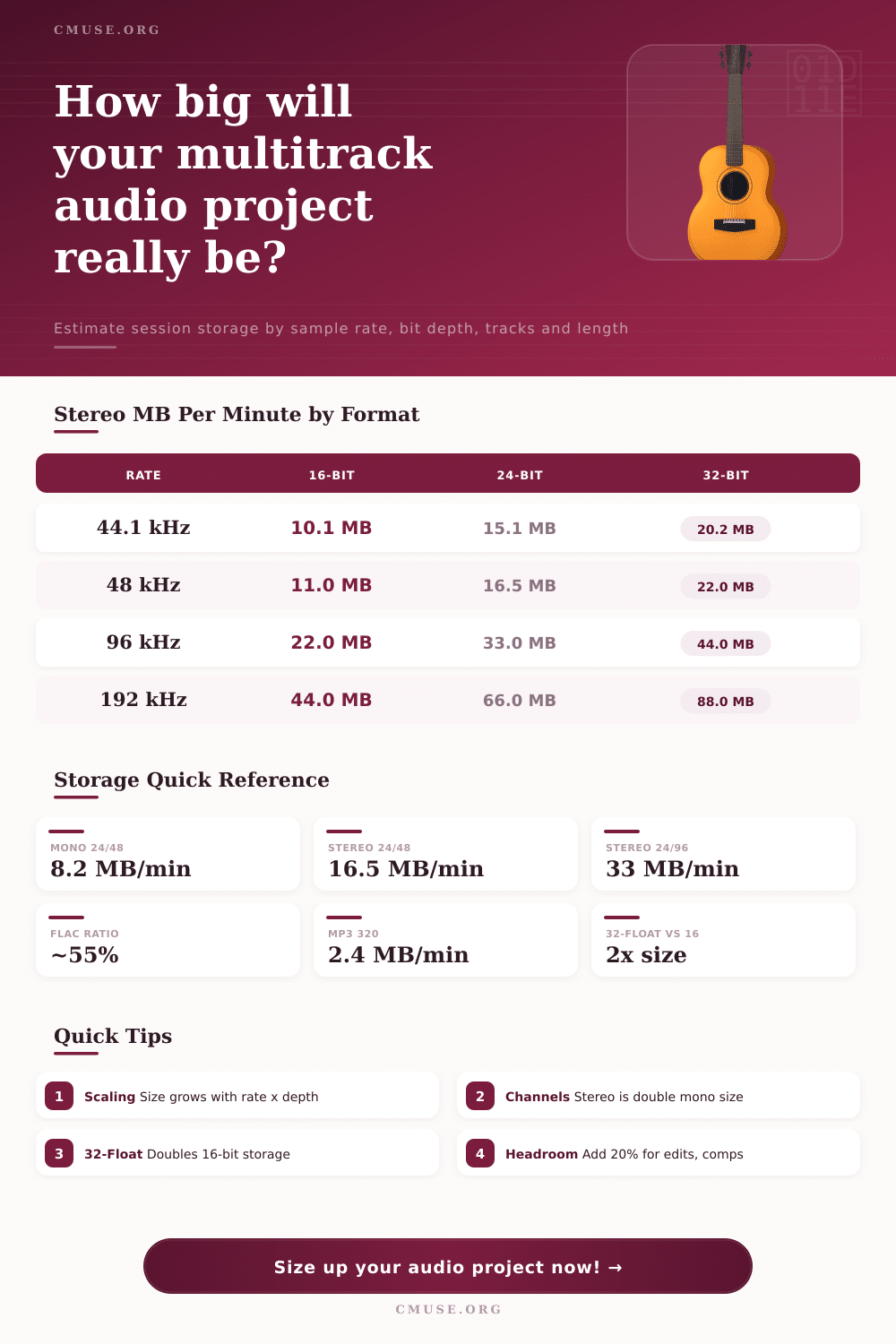
| Sample Rate | 16-bit | 24-bit | 32-bit float |
|---|---|---|---|
| 44.1 kHz | 10.1 MB | 15.1 MB | 20.2 MB |
| 48 kHz | 11.0 MB | 16.5 MB | 22.0 MB |
| 88.2 kHz | 20.2 MB | 30.3 MB | 40.4 MB |
| 96 kHz | 22.0 MB | 33.0 MB | 44.0 MB |
| 192 kHz | 44.0 MB | 66.0 MB | 88.0 MB |
| Format | Approx Ratio | MB / Minute | MB / Hour |
|---|---|---|---|
| WAV / AIFF | 100% | 16.5 MB | 990 MB |
| FLAC (lossless) | ~55% | 9.1 MB | 545 MB |
| ALAC (lossless) | ~58% | 9.6 MB | 574 MB |
| MP3 320 kbps | fixed | 2.4 MB | 144 MB |
| MP3 192 kbps | fixed | 1.4 MB | 86 MB |
| Tracks | Per Track | Project Total | Stereo Total |
|---|---|---|---|
| 8 tracks | 41.2 MB | 329 MB | 659 MB |
| 16 tracks | 41.2 MB | 659 MB | 1.29 GB |
| 24 tracks | 41.2 MB | 988 MB | 1.93 GB |
| 48 tracks | 41.2 MB | 1.93 GB | 3.86 GB |
| 64 tracks | 41.2 MB | 2.57 GB | 5.15 GB |
With a good interface and new perspective, you begin working on your debut LP, but by the time you’re mixing the drums your hard drive has dissapears. At some point along the way, each engineer experience this particular sort of panic attack. In real time, it seems like the session is manageable, but when you see the sum total of all the 24-bit files rolling along at high sample rates, there’s a silent crisis brewing on your storage array.
Knowing how much space you have is less about remembering complicated equations and more about finding where the data come from. Once you input your set up into the calculator above (above), it do all of the work for you; no more wondering if you has enough head room to handle all those comp edits.
How to Know How Much Space Your Audio Files Need
The basic concept is this: Four things directly affect the size of an audio file. First, the sample rate are the number of times a second the analog signal gets recorded. Second is bit depth, which is the level of resolution each point is recorded with. Third, the track count is how many microphones is open at the same time. Multiply that by the load. Fourth, duration, stretching it out over time. Alter one of these variables and the total change with it.
Bit depth is sometimes the quiet culprit in storage bloat, while sample rate recieve all the attention. You’re capturing an additional three bits with every sample when moving from sixteen to twenty-four, which is a considerable chunk of data. While higher resolution does preserve more subtle noise floor characteristics and dynamics that are important in mastering, it also result in much larger files. Jumping up to thirty-two-bit float will double the storage requirement over sixteen-bit, though this format provide insane headroom for processing before things clip. It also requires some serious disk capacity. The page’s reference table makes this clear, showing just how rapidly those megabytes stack into gigabytes with increased specs.
Engineers also tend to overlook track count. Four tracks of acoustic demos may be easy to squeeze onto your small external drive. However, record a full band performance or include an orchestra section and all of a sudden you’re dealing with dozens of simultaneous channel. Adding each stereo track will double the number of channels per instrument group. Factor in longer durations and the math isn’t pretty. Before you make one undo state or hit one effect button, that ninety-minute live session captured at forty-eight kilohertz could easily surpass twenty gigabytes.
There’s a little relief via compression formats, though with caveats. For example, if you’re looking to transfer a massive session from one studio to another, or archive your project, lossless codecs such as FLAC will knock down the size approximately 45% over their uncompressed WAV counterpart… No sound quality is lost in the process.
But what if you want to use something like MP3? That’s a whole other ballgame. Yes, an MP3 file will shrink down to a fraction of its original size, but once bounced, you can’t do much else with it in a DAW. You can no longer tweak levels, rephase tracks, or make EQ tweaks. In short, active editing on compressed files is usualy a bad plan; it leads to generational loss and very limited creative options.
The last component in this puzzle most people forget about until they’re out of room: overhead. Digital audio workstations are not static. Each plugin you insert with its own buffer requires a growing project file every time you automate, comp a vocal take, or otherwise edit something into the timeline. Save multiple mixes and it add up fast. Twenty percent is a good rule of thumb for how much additional space to allow for expansion. Having this buffer will also prevent your system from choking while rendering heavy projects where temporary files spike.
Because if you plan out your storage strategy before you begin working, you avoid getting interrupted in the middle of your creative process by migrating data at the last second. You can purchase just as much fast SSD space for working on things and less slow HDD space for archiving them. And when you know precisely how large your project is going to be, it go from being a potential disaster into something that’s easily solvable from a logistics standpoint. No more stressing over red drive lights. Just concentrating on mixing.
So then, the bottom line on file size management. Embrace the physicality of digital audio. Yes, data doesn’t weigh anything (at least, not yet), but that doesn’t mean it’s not heavy. Learn how the bits and bytes add up (how track count), bit depth, and sample rate affect each other. Let those figures help you decide when enough is enough. Know what a project will realy cost you in storage space. And use that knowledge to make better decisions regarding your audio files’ archival status and resolution.
Knowing is power. That awareness transforms storage angst into creative confidence. You can then focus on the music instead of the file manager.