Compressor Makeup Gain Calculator
Enter your threshold, ratio, knee and input level to find gain reduction, the compressed output and the exact makeup gain in dB needed to restore your level
Full Calculation Breakdown
| dB Over Threshold | Gain Reduction | Output Over Thr | Compressed dBFS |
|---|---|---|---|
| — | — | — | — |
| Ratio | Ratio Factor | Gain Reduction | Output Over Thr |
|---|---|---|---|
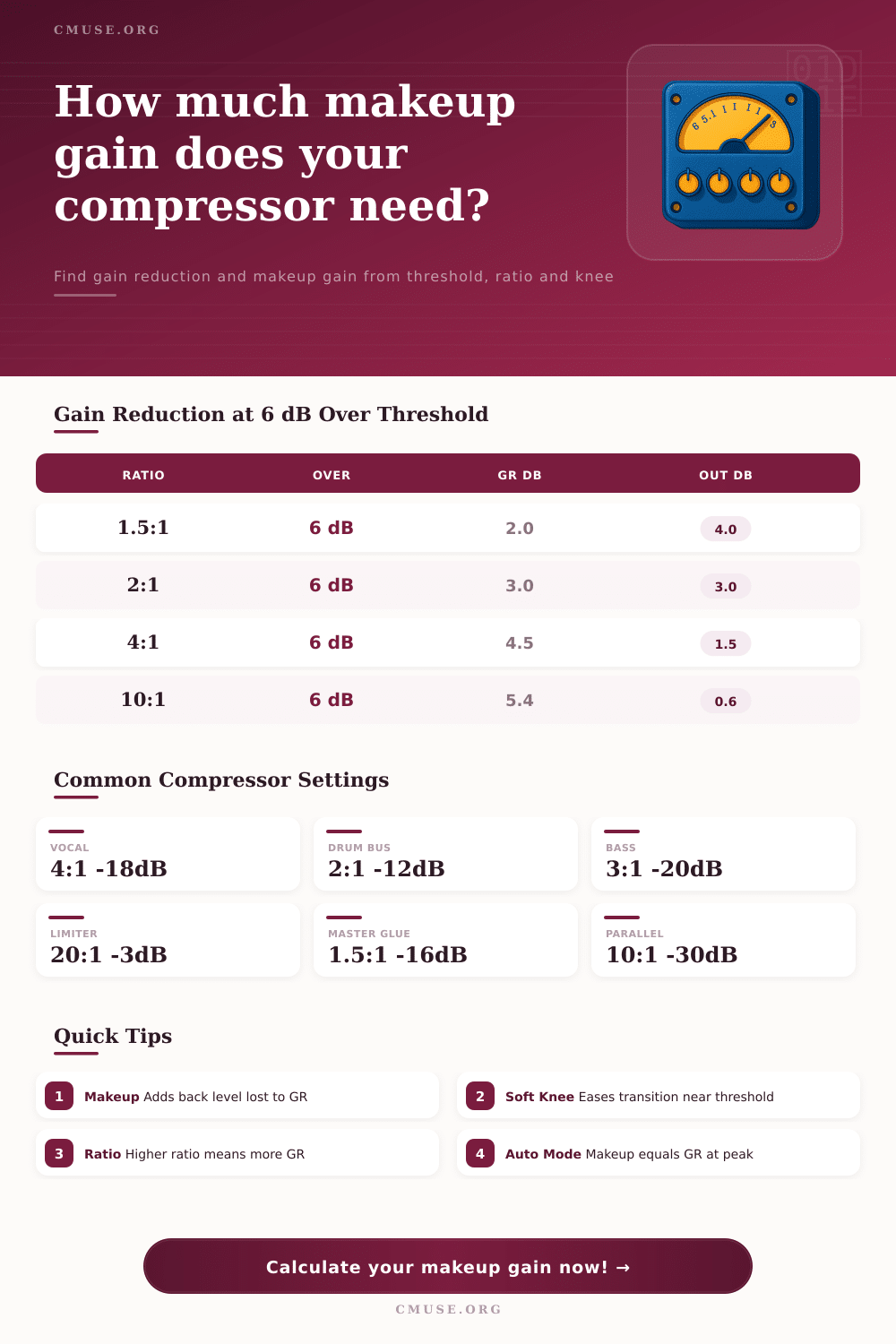
| 1.5:1 | 0.333 | 2.0 dB | 4.0 dB |
| 2:1 | 0.500 | 3.0 dB | 3.0 dB |
| 3:1 | 0.667 | 4.0 dB | 2.0 dB |
| 4:1 | 0.750 | 4.5 dB | 1.5 dB |
| 6:1 | 0.833 | 5.0 dB | 1.0 dB |
| 10:1 | 0.900 | 5.4 dB | 0.6 dB |
| 20:1 | 0.950 | 5.7 dB | 0.3 dB |
| Source | Ratio | Threshold | Typical GR |
|---|---|---|---|
| Lead Vocal | 3:1 to 4:1 | -18 dBFS | 3 to 6 dB |
| Bass | 3:1 to 5:1 | -20 dBFS | 4 to 8 dB |
| Snare / Drums | 4:1 to 8:1 | -15 dBFS | 4 to 10 dB |
| Drum Bus | 2:1 to 4:1 | -12 dBFS | 2 to 4 dB |
| Parallel Smash | 8:1 to 20:1 | -30 dBFS | 10 to 20 dB |
| Mix Glue / Master | 1.5:1 to 2:1 | -12 dBFS | 1 to 3 dB |
| Brick Limiter | 20:1 to inf | -3 dBFS | 1 to 6 dB |
| Knee Type | Width | Transition | Best For |
|---|---|---|---|
| Hard Knee | 0 dB | Abrupt at threshold | Drums, limiting, control |
| Light Soft | 3 to 6 dB | Gentle bend | Vocals, bass |
| Medium Soft | 6 to 12 dB | Smooth curve | Mix bus, glue |
| Wide Soft | 12+ dB | Very gradual | Mastering, transparent |
Maybe your vocals sounds great on their own but blend out as you add bass and drums. Once you use compression to smooth out the harsh “s” sounds and control the sharp peaks, your track feel less powerful overall. That’s because compression compresses but doesn’t necessarily make things louder again. Enter the makeup gain calculator which give you a starting point based off peak reduction so you don’t have to guess how much boost is required. No guessing required!
Compression reduces peaks; most engineers understand this. Few people consider how crushing the peaks affects overall level of compressed signal. The ratio setting dictate how much the compressor will reduce any signal riding above the threshold. So if a ratio is set at 4:1, then one decibel comes through for every four decibels above the threshold. This represent the gain reduction (three dB). Without adding this back in yourself, your compressed sound will be softer than un-compressed source.
How to Calculate Makeup Gain for Compression
Many make this error as they assume that compression adds weight, when it actualy removes volume unless compensated for. So now we get into where ratio comes in. Since only what is over the threshold gets the gain reduction, input level matter too. Say you have a threshold of -18 dB and your input is +5 dB so you are 20dB above threshold (four times). With a 4:1 ratio on your compressor, there would be significant reduction because four times the input compared to the threshold means you’ll have some serious gain reduction.
That’s where the ratio factor comes in. The closer your input is to the threshold, the less gain reduction occur; this mean you need more make-up gain to match the perceived volume of the compressed signal. It’s straight-forward arithmetic, but I think it makes sense once you can see actual numbers.
Hard Knee vs Soft Knee Adding some complexity to all this, we have the issue of soft knees, which harder-knee calculation tend not to take into account. A hard knee begins compressing right away at the threshold. A soft knee transition gradually from nothing to the full amount of the ratio within a specified range of dBs. This make it much less noticeable during an audio transition, but it changes how much gain is reduced depending on where signal sits on the curve.
Below are some reference tables demonstrating various ratios and their behavior as the level crosses the threshold. Even moderate ratios such as 1.5:1 begin reducing gain significantly with a hot input, whereas extreme ratios such as 20:1 barely let anything through once you pass the point of no return.
Volume isn’t everything; it’s all about context in terms of makeup gain. Raising the makeup fader to compensate for original loudness will also raise the noise floor and any artifacts caused by compression. Numbers are just part of the story. What realy counts is how it sounds to your ears. The calculator starts with a peak-reduction-based estimate, but then you have to listen and make sure sustain isn’t distorted or pumped.
Auto mode give you a suggested makeup based on the gain reduction at your loudest input. A reasonable starting place for most mix. Target mode lets you specify an output level if you want, such as when chaining compressors together or adjusting loudness of your master bus. Presets are a good benchmark for common applications such as drum bus glue @ 2:1 or vocal compression @ 4:1. These ratios represent what engineers has proven works to balance transparency and control.
You can use a higher ratio on a snare to eliminate ring, but a lower ratio might be needed on your master bus to keep your mix together without squashing energy out of it. Knowing these tradeoffs will allow you to pick your parameter intentionally instead of guessing blindly.
There’s more to compression than making something louder, though it is largely about compressing the dynamic range. Calculating your makeup gain takes the guesswork out of restoration so you can spend less time dialing in levels and more time getting the timing and tonalities right. You should of known this sooner. Your ears will make it sound right while the math keeps everything level. Follow what the math says, then tweak based on feel. Be confident that the technical parts are already set.