Attack Time Calculator
Convert envelope and compressor attack time in milliseconds into samples, signal cycles, beat fractions and tempo-synced note values at 44.1k, 48k or 96k sample rates
Full Calculation Breakdown
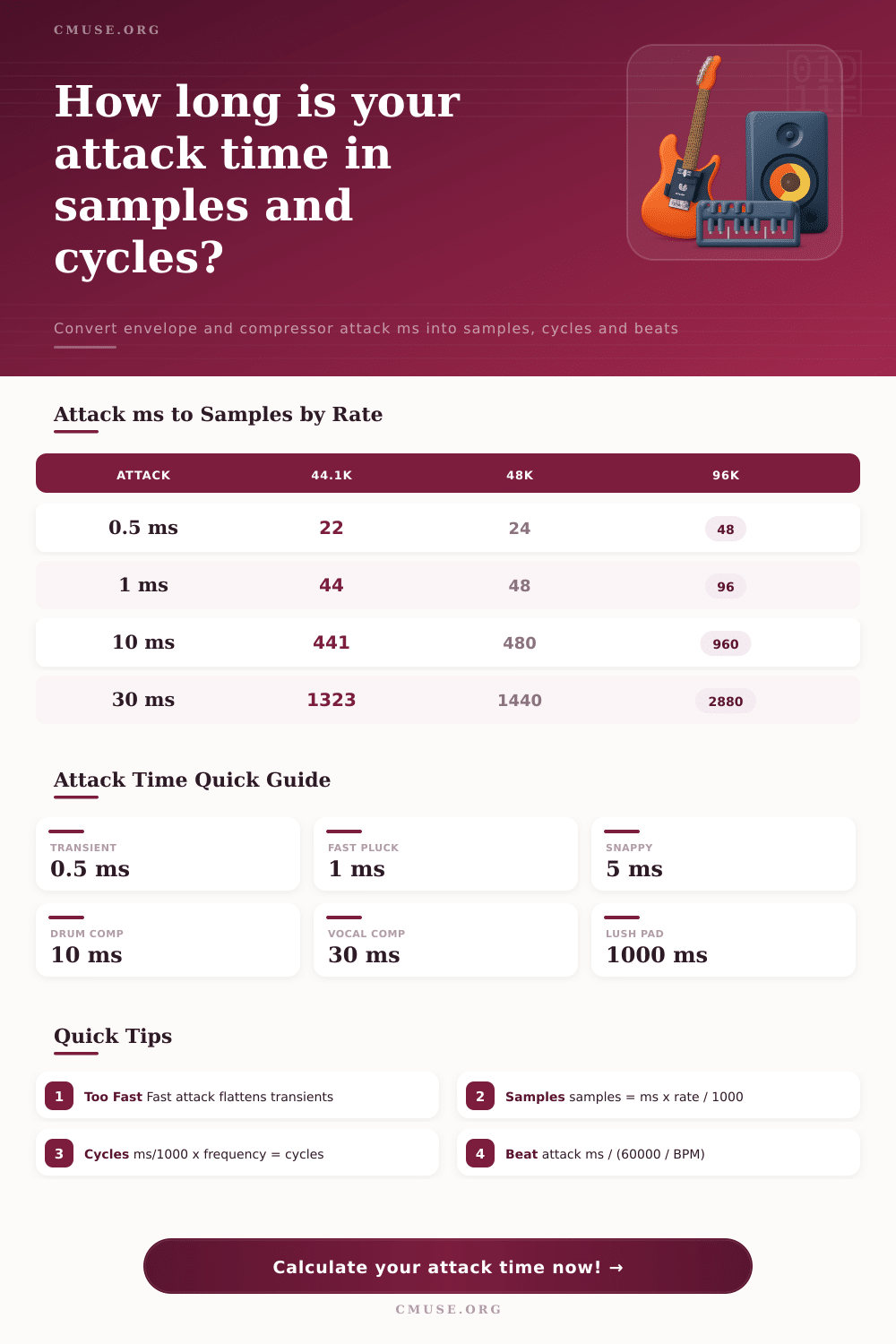
| Attack (ms) | 44.1 kHz | 48 kHz | 96 kHz |
|---|---|---|---|
| 0.5 ms | 22 | 24 | 48 |
| 1 ms | 44 | 48 | 96 |
| 5 ms | 221 | 240 | 480 |
| 10 ms | 441 | 480 | 960 |
| 20 ms | 882 | 960 | 1920 |
| 30 ms | 1323 | 1440 | 2880 |
| 100 ms | 4410 | 4800 | 9600 |
| 500 ms | 22050 | 24000 | 48000 |
| 1000 ms | 44100 | 48000 | 96000 |
| Frequency | ms / Cycle | Cycles In 10ms | Notes |
|---|---|---|---|
| 40 Hz | 25.000 ms | 0.40 | Sub bass |
| 60 Hz | 16.667 ms | 0.60 | Low bass |
| 80 Hz | 12.500 ms | 0.80 | Bass fundamental |
| 100 Hz | 10.000 ms | 1.00 | Kick / bass |
| 250 Hz | 4.000 ms | 2.50 | Low mids |
| 440 Hz | 2.273 ms | 4.40 | A4 reference |
| 1000 Hz | 1.000 ms | 10.00 | Mids |
| 5000 Hz | 0.200 ms | 50.00 | Presence / air |
| Note Value | 100 BPM | 120 BPM | 140 BPM |
|---|---|---|---|
| Whole note | 2400.0 ms | 2000.0 ms | 1714.3 ms |
| Half note | 1200.0 ms | 1000.0 ms | 857.1 ms |
| Quarter note | 600.0 ms | 500.0 ms | 428.6 ms |
| Eighth note | 300.0 ms | 250.0 ms | 214.3 ms |
| Sixteenth note | 150.0 ms | 125.0 ms | 107.1 ms |
| Thirty-second | 75.0 ms | 62.5 ms | 53.6 ms |
| Use Case | Attack | Samples @48k | Behaviour |
|---|---|---|---|
| Transient detail | 0.5 ms | 24 | Kills attack peak |
| Fast pluck | 1 ms | 48 | Sharp, clicky onset |
| Snappy synth | 5 ms | 240 | Punchy with bite |
| Drum compressor | 10 ms | 480 | Keeps some snap |
| Bass compressor | 20 ms | 960 | Passes low cycles |
| Vocal compressor | 30 ms | 1440 | Smooth, natural |
| Slow pad | 500 ms | 24000 | Gentle swell |
| Lush pad | 1000 ms | 48000 | Long fade-in |
Once you input your frequency and sample rate into the calculator above, math will be done for you. No more guessing at how many signal cycles or samples exists within one millisecond of audio.
So you’re laying down a drum track. Hit it, and it’s flat. Like you’re playing through wet cardboard. Check the levels. Try different plugin settings. Change sample library. Still, there is no punch.
Why Attack Time Matters for Better Sound
In most cases, issue isn’t with the source material. The issue is typicaly the attack time on your envelope generator or compressor. Attack time is considered to be a vague setting that most engineers dial-in by ear until it sounds about right. While this can work for generalized mixing, it doesn’t do anything if you’re looking for precision.
Why does it matter? Because you have to think in terms of cycles rather then milliseconds. Milliseconds is just an arbitrary measure of time that doesn’t have any physical meaning to a waveform. Cycles do. So when you’re compressing at 80 Hz (for example) with a bass guitar, there’s roughly 12.5 milliseconds per full wave. Now if you use an attack setting of say, 10 ms, by the time the gain reduction begin kicking in, the wave hasn’t completed its first oscillation. What you’ve got is a muted, lifeless low end that fails to provide any transient definition.
This dynamic shift will depend on what you are trying to process. You may wish to keep initial click on a snare drum. That’s a high-frequency thing that contains lots of very short cycles. A quick attack of 1 to 2 ms could flatten the sound of a bass tone but would of be ideal for taming peak of a vocal sibilance while preserving the consonants.
On this page, the relationships between all this is broken down into tempo-synced values and beat fractions. So you can visualize the relationship between your chosen attack time and the grid of the song. This is especially helpful when working in electronic music that requires the envelope to line up with 16th or 32nd note division so they feel rhythmic instead of random.
Sample rate also becomes a big factor in all of this. A 1 ms attack window represents around 44 samples @ 44.1 kHz and close to 100 samples @ 96 kHz. In other words, at high rates, your plugin calculates the attack curve with more resolution, which equates to smoother transitions. But there’s a price to pay: increased latency and more CPU load. Pick your rate accordingly if you’re recording slow-moving pads or transient-heavy drum stuff. The reference table shows it clearly so you can quickly compare.
On a synth pad, for example, you’d like your attack to be long enough to eliminate any audible hint that there was a MIDI trigger, but not so long as to lose musicality of the swell. That could be several hundred milliseconds (200 ms or more). However, for things like percussive hits and very quick plucking of an instrument, you’re fighting nature. Make the attack too slow and the note doesn’t peak until it starts to die out, transforming a crisp strike into a sort of muffled thud.
Most of it’s getting your head around what it is that you’re measuring. It’s not simply a delay, it’s specifying precisely how much of the waveform can get through before process kicks in. One common mistake is to set all attacks at a uniform value (always fast). You then end up with a mishmash, where each source compete in the same transient window and none of them breathe.
Think about it in cycles; how does this relate to proportion? A 5 ms attack on something with a frequency of 100 Hz lasts for just half a cycle. Ouch. A 50 ms attack on the same thing last for five whole cycles. That’s generous. So then what? Well, it all comes down to the kind of source material and its place in the mix.
Take the equations for what they are… Points of reference to give you some idea of magnitude. Beyond that, rely on your ears to adjust the feeling. How much can you get into the space? Math will tell you. How should that space feel: Loose or tight? That’s the stuff of artistry. And once more you strike the drum… and it cuts across the mix, clear and distinct.