Frame Rate Timecode Calculator
Convert HH:MM:SS:FF timecode between any frame rates, handle 24 to 23.976 pull-down, PAL speedup and frame-count copies – with the real-time math shown
Full Conversion Breakdown
| Frame Rate | Common Name | Region / Use | NTSC Sibling |
|---|---|---|---|
| 23.976 fps | NTSC Film | US film-to-video | 24 (1000/1001) |
| 24 fps | Cinema / Film | Theatrical worldwide | 23.976 |
| 25 fps | PAL | Europe / Australia TV | — |
| 29.97 fps | NTSC | US / Japan broadcast | 30 (1000/1001) |
| 30 fps | NTSC Whole | US drop-free / web | 29.97 |
| 50 fps | PAL HFR | Europe high frame rate | — |
| 59.94 fps | NTSC HFR | US 60i / 720p60 | 60 (1000/1001) |
| 60 fps | HFR Whole | Web / gaming / HFR | 59.94 |
| Conversion | Factor | Speed Change | Direction |
|---|---|---|---|
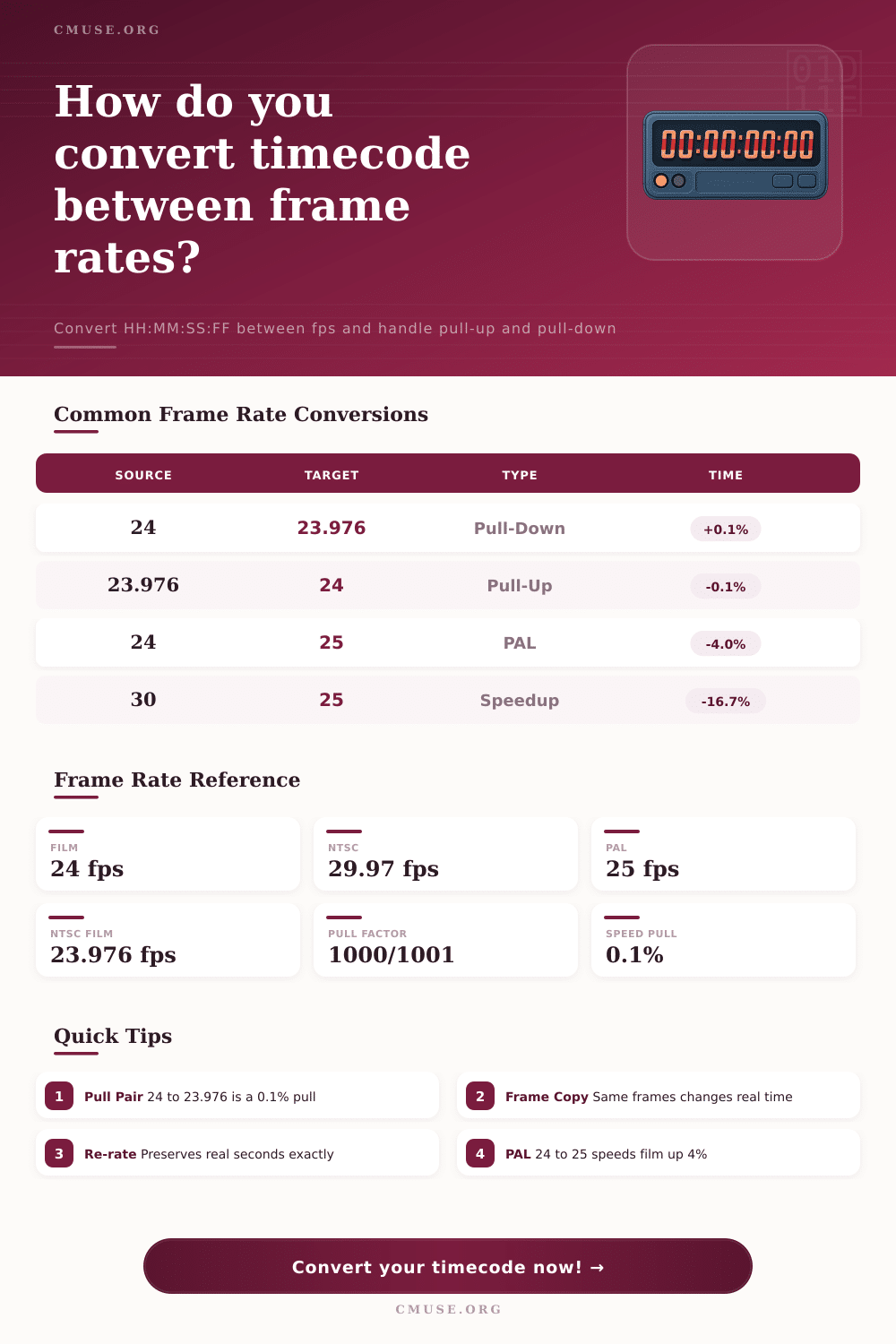
| 24 → 23.976 | 1000/1001 | -0.1% slower | Pull-Down |
| 23.976 → 24 | 1001/1000 | +0.1% faster | Pull-Up |
| 30 → 29.97 | 1000/1001 | -0.1% slower | Pull-Down |
| 29.97 → 30 | 1001/1000 | +0.1% faster | Pull-Up |
| 60 → 59.94 | 1000/1001 | -0.1% slower | Pull-Down |
| 48 → 47.952 | 1000/1001 | -0.1% slower | Pull-Down |
| Frames Copied | At 24 fps | At 25 fps | At 30 fps |
|---|---|---|---|
| 24 frames | 1.000 s | 0.960 s | 0.800 s |
| 1440 frames | 60.00 s | 57.60 s | 48.00 s |
| 3600 frames | 150.0 s | 144.0 s | 120.0 s |
| 86400 frames | 3600 s | 3456 s | 2880 s |
| Target fps | Type | 1 Hr Becomes | Speed |
|---|---|---|---|
| 23.976 | Pull-Down | 01:00:03.6 | -0.1% |
| 25 | PAL frame-copy | 00:57:36.0 | +4.2% faster |
| 25 | PAL re-rate | 01:00:00.0 | same time |
| 30 (29.97) | Re-rate | 01:00:00.0 | same time |
Sync problems can cause panic, especially if they arise close to deadline. That’s when you render a project and realize the sound is out-of-sync. Or the timecode markers you relied on fails to line up with the actual frames for unknown reasons, causing a glitch every few seconds.
There are no technical problems here, rather, it’s an oversight about how our brains hear rhythm and how computer media store time. When you enter your source and target frame rates into the calculator, it do the math for you, so there’s no guesswork about whether a conversion will stretch your clip or shrink it unexpectedly.
Why Frame Rates Matter for Sync
To understand what all those digits mean, though, you need to go beyond the interface to the medium’s clock speed. Twenty four frames per second is the speed at which film always runs. Theaters project in twenty-four because it’s inexpensive enough to make film stocks go further and because it is smooth enough so that our eyes don’t notice it too much.
TVs, on the other hand, had its own set of rules. Broadcast systems like NTSC in North America agreed on something around thirty frames per second. This was because it worked with the way they was going to encode color. But when they went down to convert to analog color signals they didn’t want to change the luminance of black and white part of the signal, so they tweaked the rate down just a hair to an exact number: twenty-nine point nine seven frames per second.
That little fraction adds up though. Running an hour of movie at twenty-three point nine seven six frames per second instead of twenty-four would increase its runtime by about three and a half seconds. Not much, right? Except if you’re trying to cut your movie to the beat.
In parts of Europe and Australia, where PAL regions dominate, they used twenty five frames per second. Four percent is an incredibly small speed difference. But it’s enough to noticeably increase pitch and make dialogue higher (and faster) when you convert footage from twenty four frames per second over to twenty five. That’s why some call it the Mickey Mouse effect: Voices sound cartoonishly squeaky.
Editors can prevent that using re-timing tools that stretch or interpolate new frames, maintaining the same length in real world. You just have to ensure you’re not copying frame count without adjusting the playback rate. The calculator lets you see if you’ve preserved those seconds or changed them altogether.
That’s where people make their mistake; they think they’re preserving time, when really they’re just copying number of frames. Twenty four frames per second times one hundred equals four point one six seconds. Thirty frames per second times one hundred equals three and a third seconds. So you rush right through the content faster and it dissapears.
You really need to find a way to get from one rate to another while keeping the original duration intact. That means calculating how many frame there are according to real world time. An hour long interview should of be exactly an hour, no matter what the frame rate, twenty five or twenty nine point nine seven.
Another source of confusion is NTSC pull down factors. You’ll often see a thousand to one thousand and one ratio used in the math. That’s the exact mathematical correction required when converting whole number frame rates into their fractional counterparts. A pull down would be going from thirty to twenty nine point nine seven, which results in a slow down in playback of zero point one percent. The opposite direction would be a pull up.
Though imperceptible to most viewers, they’re critical to meeting digital delivery specifications and broadcast compliance. The included reference tables shows all these details so you can confirm that your workflow meets industry expectations.
What is the bottom line? Timecode is nothing more than a coordinate system. It is a way to indicate where you are in the sequence, but not necessarily how long that moment will be in real life. Depending on your project, do you want to preserve visual length of a moment, or is it more crucial to maintain the integrity of the frame count? Making this decision correctly keeps you from drifting out of sync and ultimately allows your final edit to play back as intended.
The technology vanishes when the numbers match your creative intent, and all that remains is the story you wanted to tell.