MIDI Pitch Bend Calculator
Convert 14-bit pitch bend values into cents, semitones, frequency and MSB/LSB bytes – or reverse a target pitch back into a bend value
Full Calculation Breakdown
| Bend Value | Normalized | Cents | Semitones |
|---|---|---|---|
| — | — | — | — |
| Bend Value | Range ±2 | Range ±5 | Range ±12 |
|---|---|---|---|
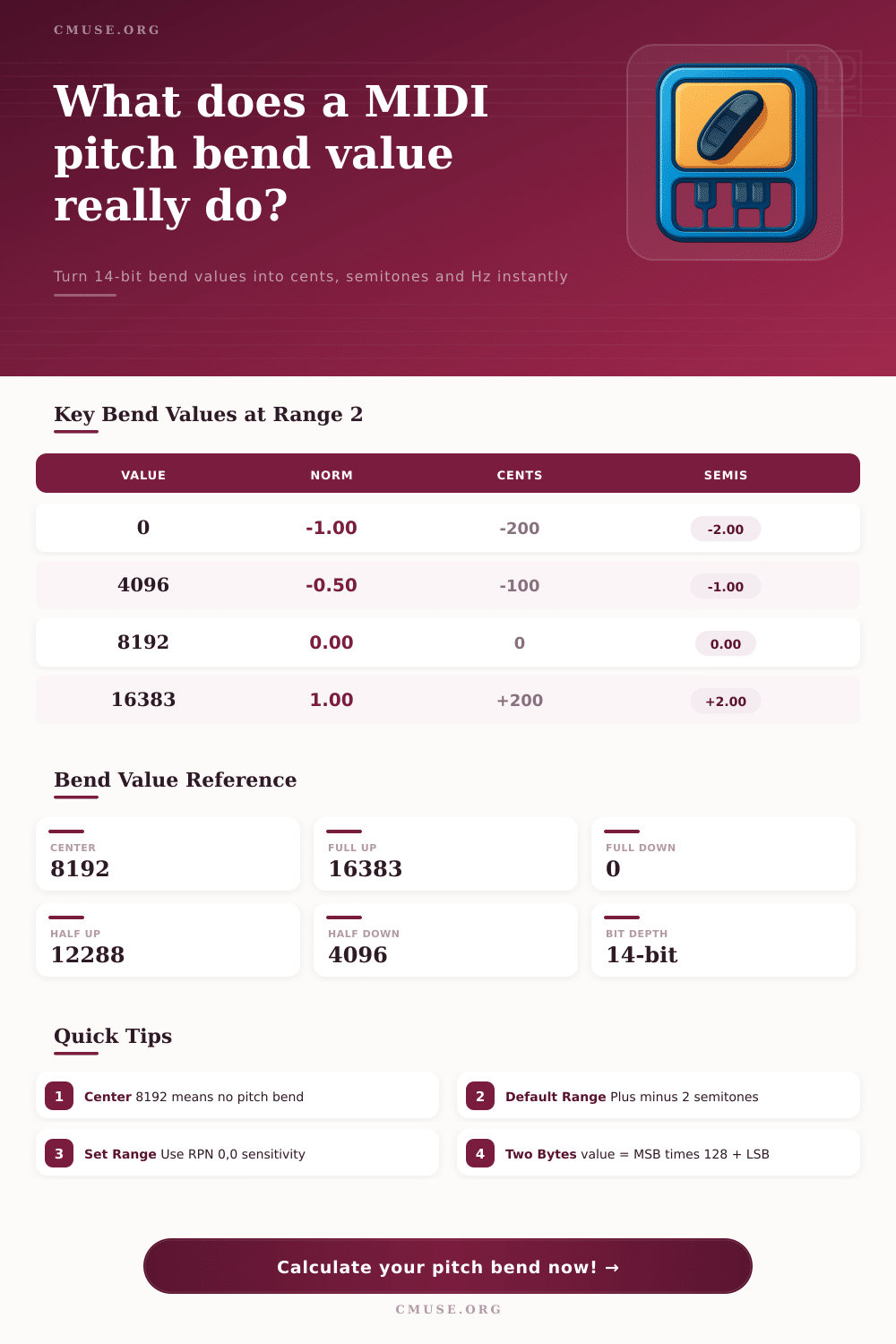
| 0 (full down) | -200 cents | -500 cents | -1200 cents |
| 4096 (half down) | -100 cents | -250 cents | -600 cents |
| 8192 (center) | 0 cents | 0 cents | 0 cents |
| 12288 (half up) | +100 cents | +250 cents | +600 cents |
| 16383 (full up) | +200 cents | +500 cents | +1200 cents |
| Value | MSB (>>7) | LSB (&0x7F) | Meaning |
|---|---|---|---|
| 0 | 0 | 0 | Full bend down |
| 4096 | 32 | 0 | Half bend down |
| 8192 | 64 | 0 | Center / no bend |
| 12288 | 96 | 0 | Half bend up |
| 16383 | 127 | 127 | Full bend up |
| Interval | Cents | Semitones | Ratio |
|---|---|---|---|
| Quarter tone | 50 | 0.5 | 1.0293 |
| Semitone | 100 | 1.0 | 1.0595 |
| Whole tone | 200 | 2.0 | 1.1225 |
| Minor third | 300 | 3.0 | 1.1892 |
| Perfect fifth | 700 | 7.0 | 1.4983 |
| Octave | 1200 | 12.0 | 2.0000 |
When you press down on your keyboard’s middle C, it rings out in perfect tune. Turn that pitch bend wheel for a sweepy string or wavering vocal sound, and it just doesn’t feel right. Instead of sliding smooth up to D, the note turns sour and goes out of tune. You didn’t strike the wrong key; however, chances are you misunderstood how much motion that lever ask for.
Learning the mathematics behind pitch bend in MIDI shifts from spreadsheet stress to musical mastery. Usually the confusion centers on the fact that pitch bend values do not directly represent hertz or cents; they sends a 14-bit integer value between zero and sixteen thousand three hundred eighty-three. That’s a lot of granularity, all controlled by a spring-loaded wheel under your hand.
Understanding Pitch Bend Math
Fortunately, the system turns this into a range where eight thousand one hundred ninety-two is the center point, which means absolutely nothing to the pitch at all. Values below that pulls the frequency down, and values above push it up. Once you plug your raw value or your target pitch into the calculator above, it takes care of the math for you, saving you from having to guess how many steps are equivalent to a quarter tone if your synth happens to have an unusual sensitivity range.
By default, most sound modules and synthesizers arrives with a bend range of plus or minus two semitones. That’s a twist of the full wheel up that will only increase the note’s pitch one whole step. To get a sweeping sound that covers multiple octave requires diving in to the System Exclusive or Global Editor settings. There you’ll find the bend sensitivity control via RPN messages. It’s a pain unless you know where to look.
Many producers just stick it on two semitones and leave it there, assuming the wheel isn’t going any higher. They don’t realize how much they’re hampering their own expressiveness.
You put in a particular bend value. It explains how that value relates to something easier for humans to understand. It is measured in cents, which is the traditional measure of microtonal adjustment and it will break it down to match. A semi-tone is made of a hundred cents. If you’re looking to make a really accurate half tone adjustment as found in some Indian or Middle Eastern music scales, you would of being seeking out an adjustment of fifty cents in either direction.
The tool then displays this sound request in bytes so that your MIDI interface can send the appropriate information. It also displays the LSB and MSB breakdown. This is important when you are troubleshooting why a bend message isn’t being sent successfully on some hardware controllers that deal with 14-bit different from moddern software instruments.
Knowing what the frequency output is also has a useful application. It can be applied to understanding the way an exponential function called pitch bending work. When we bend a note higher or lower on a keyboard, for example, that pitch bend is not linear; it’s exponential. That means that if I raise a note by five cents (cents being one hundredth of a semitone), at low pitches there will be significantly fewer hertz raised than if I raise the same amount at a high pitch. However, our ears hear the two intervals as having the same size. This oddity trips many people up when they try to program pitch bends into digital audio workstations with linear automation curves. It ends up sounding like the bend speeds up unnaturally as it travels upward. Knowing the hertz that results allow you to see the curve before committing to mixing it.
This might come into play if you use more vintage gear or modular synths that don’t follow pitch bend standards. Some items simply see the wheel as an analog voltage instead of a digital midi message and need modules to translate between them. This would be when the cent offset can help you perfect the calibration of your outboard equipment so they lines up exactly with your soft synths. A well patched chain of plugins needs the same attention as a well patched piece of hardware.
In conclusion, the fact that the pitch bend wheel needs careful adjustment so that it feels natural makes it one of the least used expressive devices in electronic music. If you don’t know which bytes it’s sending or what range settings have been made then you’re really flying blind here. Spending some time mapping out the range you want and checking the relevant MIDI data turns this generic controller input into a detailed performance instrument. The single note you played at the start remains in tune because you’ve decided where it will go next.