Nearfield Monitor Distance Calculator
Calculate nearfield speaker spacing, listener distance, room clearance, and tweeter height alignment for a balanced studio monitoring position.
🎧 Nearfield Studio Presets
⚙ Monitor Distance Inputs
📐 Nearfield Spec Grid
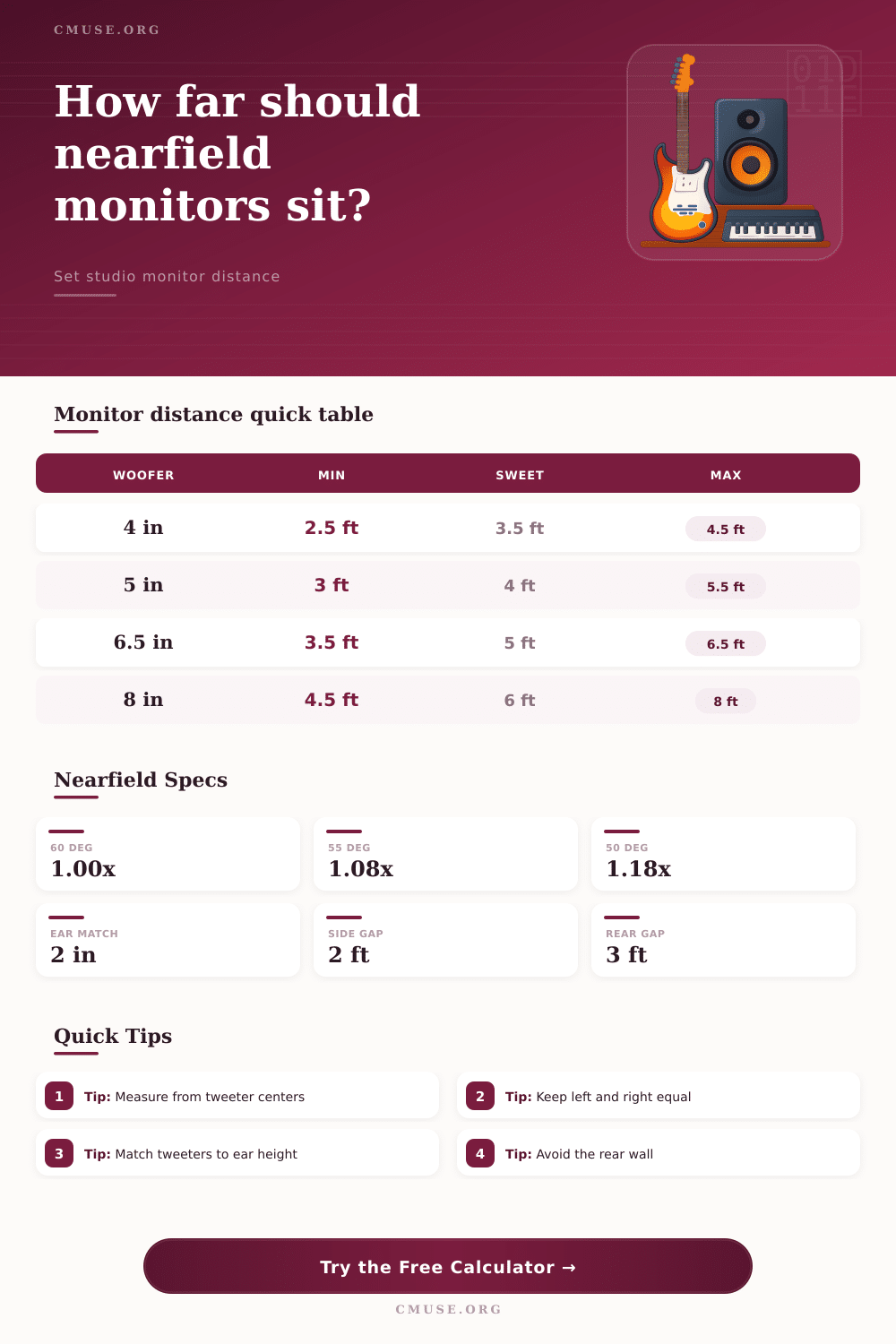
📊 Monitor Size Distance Guide
| Monitor Type | Practical Distance | Sweet-Spot Target | Typical Use |
|---|---|---|---|
| 4 in compact nearfield | 2.5 to 4.5 ft / 0.76 to 1.37 m | 3.5 ft / 1.07 m | Desktop editing, small writing rooms |
| 5 in nearfield monitor | 3.0 to 5.5 ft / 0.91 to 1.68 m | 4.0 ft / 1.22 m | Bedroom studios and vocal production |
| 6.5 in project monitor | 3.5 to 6.5 ft / 1.07 to 1.98 m | 5.0 ft / 1.52 m | Project studios and mix rooms |
| 7 in two-way monitor | 4.0 to 7.0 ft / 1.22 to 2.13 m | 5.5 ft / 1.68 m | Medium desks with deeper rooms |
| 8 in larger nearfield | 4.5 to 8.0 ft / 1.37 to 2.44 m | 6.0 ft / 1.83 m | Larger project rooms and mastering checks |
Distances are practical working ranges for nearfield geometry, not brand-specific manufacturer limits.
🎼 Triangle Angle Comparison
| Listener Angle | Distance Formula | Seat Depth Formula | Best Fit |
|---|---|---|---|
| 50 deg | 1.183 x spacing | 1.072 x spacing | Wider desks or slightly longer rooms |
| 55 deg | 1.080 x spacing | 0.957 x spacing | Compact control rooms with good center image |
| 60 deg | 1.000 x spacing | 0.866 x spacing | Reference nearfield mix decisions |
| 60 deg with 4 ft spacing | 4.0 ft listener distance | 3.46 ft behind speaker line | 5 in or compact 6.5 in monitors |
| 55 deg with 6 ft spacing | 6.48 ft listener distance | 5.74 ft behind speaker line | 7 in or 8 in monitors in a deeper room |
🎙 Common Nearfield Setups
| Setup | Spacing | Distance Target | Room Check |
|---|---|---|---|
| Compact desktop pair | 3.0 to 3.5 ft / 0.91 to 1.07 m | 3.0 to 3.8 ft / 0.91 to 1.16 m | Needs a low stand or isolation lift |
| Bedroom production desk | 3.8 to 4.5 ft / 1.16 to 1.37 m | 3.8 to 4.9 ft / 1.16 to 1.49 m | Often fits before the room midpoint |
| Project studio mix spot | 4.8 to 5.8 ft / 1.46 to 1.77 m | 4.8 to 6.3 ft / 1.46 to 1.92 m | Check rear gap before widening |
| Small mastering position | 6.5 to 7.5 ft / 1.98 to 2.29 m | 7.0 to 8.9 ft / 2.13 to 2.71 m | Needs more room length than a desk setup |
| DJ or beat-making booth | 2.8 to 3.5 ft / 0.85 to 1.07 m | 3.0 to 3.8 ft / 0.91 to 1.16 m | Keep monitors clear of controller height |
🔍 Placement Fit Checklist
| Check | Target | Calculator Uses | Why It Matters |
|---|---|---|---|
| Nearfield distance | Inside monitor size window | Monitor type and triangle geometry | Keeps direct sound stronger than room sound |
| Side clearance | About 2 ft / 0.6 m or more | Room width and monitor spacing | Limits early side-wall reflections |
| Rear listener gap | About 3 ft / 0.9 m or more | Room length, front offset, seat depth | Prevents the seat from hugging the rear wall |
| Tweeter height | Within 2 in / 5 cm | Ear height and tweeter height | Maintains center image and treble balance |
| Left and right match | Equal distance to listener | Assumes centered seat and equal spacing | Reduces image pull and timing offset |
Placing nearfield monitors in a room requires take precise measurements of the room because the placement of the monitors are going to affect how the sound that comes from the monitors reaches your ear. Many people will try to place there nearfield monitors by moving the speakers and chair position, but such movements may not result in even bass from the monitors. The distance between the monitors, the angle of the monitors, and your distance from the monitors are all relate to one another.
For these reasons, using a nearfield monitor distance calculator is a helpful tool in determining whether your monitor placement is within an appropriate range. Nearfield monitor placement works due to the fact that you place your monitor close enough to where you are sitting that the sound from the monitor reach your ears before it reflect off the walls of the room and reaches your ears. The nearfield monitor distance calculator takes into account the spacing of the monitors and the angle of the monitors to calculate the distance at which you should be sitting.
Set Up Your Nearfield Monitors with a Distance Calculator
Furthermore, the calculator can take into account the size of the monitors so that it can determine the distance at which you should be sitting based on the diameter of the monitor’s driver; small drivers will have different recommended distance than large drivers. When the monitor distance calculator calculates the distance is the same as the design of the monitors, the geometry of the monitor and yourself is set up correct. The dimensions of the room are important in determining how the monitors will sound.
The monitor distance calculator can take into account the side and rear clearance of the monitors and the listening position. The side clearances are important to prevent the sound waves from reflecting off the side walls of the room at the same time that they enter your ears. Furthermore, the rear clearances are important to avoid sitting too close to the back of the room; too close to the back wall cause bass within the room to become uneven.
If the side or rear clearances are too small, the calculator will provide a message that the space is insufficient. Height is another factor that you must take into consideration when placing your nearfield monitors. The height of the monitors is one factor that affects the sound that reaches your ears.
The nearfield monitor distance calculator can compare the height of your ears to the height of the tweeters on the nearfield monitors. If the heights are not equal, the center image from the monitors will be pulled to one side of your monitor. You should use the monitor distance calculator after any change to your chair height or placement of isolation pad under your chair.
In addition to helping you to establish an appropriate distance between you and your monitor, the monitor distance calculator cannot take into account some factor related to your room. For instance, the calculator will not measure the presence of modal buildup within your room, nor will it measure the potential for side walls to create frequency suck-outs in your listening area. Thus, you will still need to perform some listening test.
Using reference tracks, you can move your chair forward or backward from your calculated distance to see if the bass or other frequency balance is improved. The monitor distance calculator will help you in this process by narrowing the areas in which you must test to find the best spot. The nearfield monitor distance calculator can help to make the decision of angle of your monitors easier.
An angle of 60 degrees is the most common for monitor placement. Narrower angles may be necessary if you room is small; however, changing the angle will change the distance at which you should be sitting. Wider angles require more space at the rear of the room; however, changing the angle will also change the distance recommendation for monitor placement.
Thus, using a distance calculator help to show you how changing the angle will change the distance between you and the monitors. Many people may make mistakes when positioning their monitors using a distance calculator. For example, some individual may place their chair in a locked position due to the distance calculated by the calculator, even though the monitors may sound better at a different distance.
Other individuals may neglect the clearances of the monitors and the reflections of the sound waves created by these walls. Thus, while the nearfield monitor distance calculator is not a replacement for your own judgement, it can remove the arithmetic calculations from your consideration when positioning your monitors. The value of a nearfield monitor distance calculator is that you can adjust one variable at a time.
For instance, you can plug in your measurements. Based on these measurements, the calculator will tell you the listening distance, the side clearance, and the rear clearance of the monitors. If the listening distance is less than the monitors suggest, you can always increase the distance between the monitor speakers.
If the side clearances are too small, you can always increase the angle of the monitor speakers. Thus, each adjustment will change the calculations provided from the monitor distance calculator. Thus, you should establish a habit of using a nearfield monitor distance calculator whenever you change your monitor equipment.
Whenever you get new monitor equipment, you will need to verify the placement of your monitors using the distance calculator. Furthermore, whenever you use a different chair, the height of your sitting position has change, so you will need to use the calculator to verify that the geometry of the monitor and yourself is set up correctly. Thus, by using the monitor distance calculator regularly, you can maintain the accuracy of your monitor placement.