Tick to MS Calculator
Convert MIDI ticks to milliseconds and samples using PPQ, BPM, note value, tempo-map changes, start tick, and sample rate for DAW editing.
🎹 DAW And MIDI Presets
Preset names load typical DAW or MIDI timing scenarios. Confirm the PPQ value against your session before using the result for exported edits.
⚙ Tick Timing Inputs
Conversion Breakdown
📊 Current Timing Spec Grid
🧮 Tempo Segment Table
| Segment | Tick Range | BPM | Ticks Used | Milliseconds |
|---|---|---|---|---|
| 1 | 0 to 960 | 120 | 960 | 500.000 |
⏱ PPQ And DAW Timing Reference
| System Or DAW Context | Typical PPQ | 960 Ticks At 120 BPM | Best Use |
|---|---|---|---|
| MIDI clock pulse reference | 24 PPQ | 20 quarters | External clock sync and hardware pulse timing. |
| Legacy sequencer grid | 96 PPQ | 5 seconds | Older MIDI files and low-resolution groove data. |
| Cubase style editing | 480 PPQ | 1 second | Clear piano-roll edits with moderate tick resolution. |
| Ableton, Logic, Pro Tools style | 960 PPQ | 0.5 seconds | Common modern DAW calculations and bar grids. |
| High-resolution MIDI editing | 1920 PPQ | 0.25 seconds | Dense quantize grids, tuplets, and fine timing offsets. |
🎵 Note Value Tick Reference
| Note Value | PPQ Multiplier | Ticks At 480 PPQ | Ticks At 960 PPQ | 120 BPM Duration |
|---|---|---|---|---|
| Whole note | 4.000x | 1920 | 3840 | 2000.0 ms |
| Half note | 2.000x | 960 | 1920 | 1000.0 ms |
| Quarter note | 1.000x | 480 | 960 | 500.0 ms |
| Eighth note | 0.500x | 240 | 480 | 250.0 ms |
| Sixteenth note | 0.250x | 120 | 240 | 125.0 ms |
| Dotted eighth | 0.750x | 360 | 720 | 375.0 ms |
| Eighth triplet | 0.333x | 160 | 320 | 166.7 ms |
💿 Milliseconds To Samples Reference
| Time | 44.1 kHz | 48 kHz | 96 kHz | 192 kHz |
|---|---|---|---|---|
| 1 ms | 44.1 samples | 48 samples | 96 samples | 192 samples |
| 5 ms | 220.5 samples | 240 samples | 480 samples | 960 samples |
| 10 ms | 441 samples | 480 samples | 960 samples | 1920 samples |
| 100 ms | 4410 samples | 4800 samples | 9600 samples | 19200 samples |
| 500 ms | 22050 samples | 24000 samples | 48000 samples | 96000 samples |
🔀 Tempo Map And Formula Reference
| Calculation Step | Formula | Input Used | Result Meaning |
|---|---|---|---|
| Quarter length | 60000 / BPM | Base or segment tempo | Milliseconds per quarter note. |
| Tick length | Quarter ms / PPQ | PPQ value | Milliseconds represented by one tick. |
| Tick to ms | Ticks x tick length | Tick count | Duration before swing or offset. |
| MS to samples | MS x sample rate / 1000 | Audio sample rate | Equivalent audio samples. |
| Tempo map | Sum each segment | Change ticks and BPM | Accurate stepped-tempo total time. |
📝 Preset Scenario Table
| Preset | PPQ | Tempo Shape | Sample Rate | Typical Task |
|---|---|---|---|---|
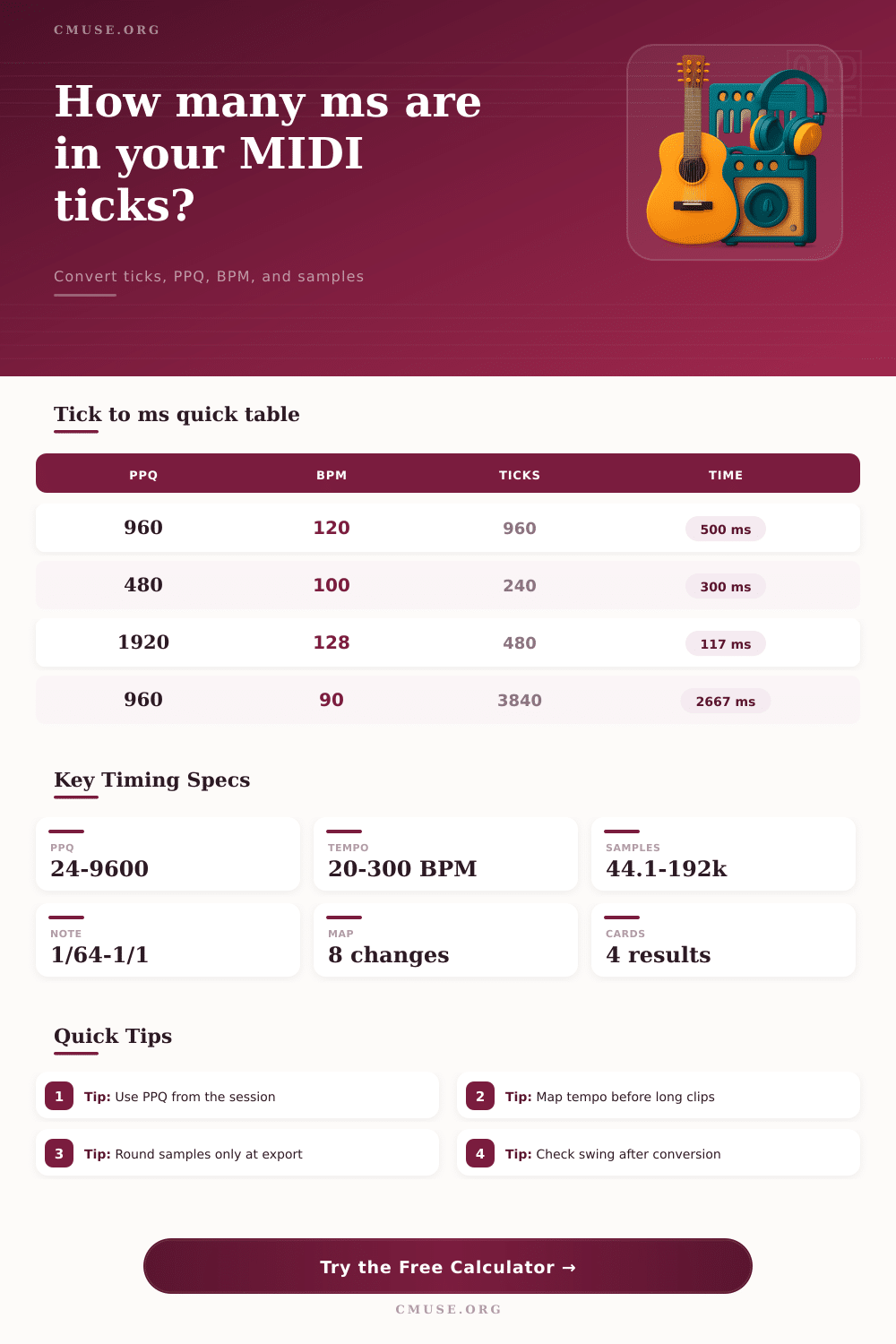
| Ableton 960 PPQ | 960 | 120 BPM constant | 48 kHz | Convert one quarter-note clip length. |
| Cubase 480 PPQ | 480 | 100 BPM constant | 44.1 kHz | Translate half-beat MIDI grid offsets. |
| MIDI Clock 24 | 24 | 120 BPM constant | 48 kHz | Relate hardware clock pulses to time. |
| 1920 PPQ Edit | 1920 | 128 BPM constant | 96 kHz | Check fine quantize and nudge timing. |
| Tempo Map Cue | 960 | 120 to 128 to 96 | 48 kHz | Measure a cue across stepped tempo changes. |
💡 Timing Tips
Timing error occur in a Digital Audio Workstation (DAW) when the musical event dont align with the expected beat of the song. Timing error can happen when the notes played via MIDI sound earlier than they should, or if the sampled sound dont match up with the arrangement of the song. These types of errors happen due to a mismatch between the tick grid used by the sequencer and the millisecond that the audio engine use to play the sound.
To avoid these types of error, it is essential to understand the relationship between the tick grid and the milliseconds used by the DAW. The concept of tick was used when creating MIDI to allow for compact description of the musical events. MIDI dont use the concept of time for these compact description.
Why Timing Errors Happen in a DAW and How to Fix Them
Each quarter of a note is divided into a number of pulses. The number of pulses per quarter of a note is referred to as the pulse per quarter note, or PPQ for short. Different type of sequencers use different value of PPQ.
For instance, older system may use 96 or 480 PPQ, but moddern DAWs typical use 960 PPQ. The tempo of the song determines the relationship between ticks and milliseconds. For instance, if the tempo is set at 120 beats per minute, each quarter of a note will last for 500 millisecond.
If the PPQ is set at 960, each tick will be slightly more than half of a millisecond. If the tempo or PPQ value are changed, however, the relationship between ticks and milliseconds will change. A calculator can compute the number of milliseconds for a given number of ticks based off the PPQ and tempo settings.
The tempo map for a session is another factor to consider when calculating milliseconds from ticks. Sessions can contain numerous tempo changes. If long region of MIDI are sequenced with different tempos, using the base tempo for calculation will result in inaccuracies of the timing of the events.
Using a tempo map to determine the relationship between milliseconds and ticks will result in accurate calculation of timing of events in the MIDI sequence. Another factor that has an impact upon the calculation of milliseconds to audio sample is the sample rate. For instance, sample rate of 48 kHz indicate that there are 48 thousand samples per second, or 48 samples per millisecond.
If aligning musical element to specific points in a sequence, the rounded value of the number of samples per point is essential to ensure that musical element land in the desired location. There are rounding option in the calculator to make sure that the number of samples calculated align with expectation of the audio engine. The value of the note that are to be played in a session relate to the PPQ of the session.
For instance, in a piano roll editor, if the grid shows sixteenth note, the number of ticks that are required to play those sixteenth notes relates to the PPQ. If the PPQ is 960, then each sixteenth note will have 240 ticks. However, if the PPQ is 480, the same sixteenth note has 120 ticks.
Using a reference note value, the number of ticks that take place for a specific type of note can be viewed. This information is useful for anyone trying to translate a groove from one sequence to another, or for anyone creating automation feature within the DAW. Finally, swing have an impact upon the calculation of milliseconds to ticks.
Swing features a percentage offset that is applied after the conversion of milliseconds to ticks. The swing offset will impact the calculated time in which each note should play. The calculation software sets the swing after the determination of the number of milliseconds for each note.
This allows for the decision to be made as to whether the groove should become bake in to the MIDI file or remain a variable for the DAW to adjust. To avoid timing error, there are several step that a DAW user can take. First, the PPQ of the source file should be remembered.
Second, the tempo map should be reviewed prior to applying the calculations to long region of MIDI data. Third, any rounding of samples should only occur at the stage of exporting the audio from the DAW. Following these step will help to ensure that the relationship between the data stored by the DAW and the audio that is heard by the listener is maintained.