Swing Percentage Calculator
Convert straight timing, MPC-style swing percentage, first-to-second note ratio, BPM, subdivision, triplet reference, PPQ ticks, and delay offsets for grooves and programmed drums.
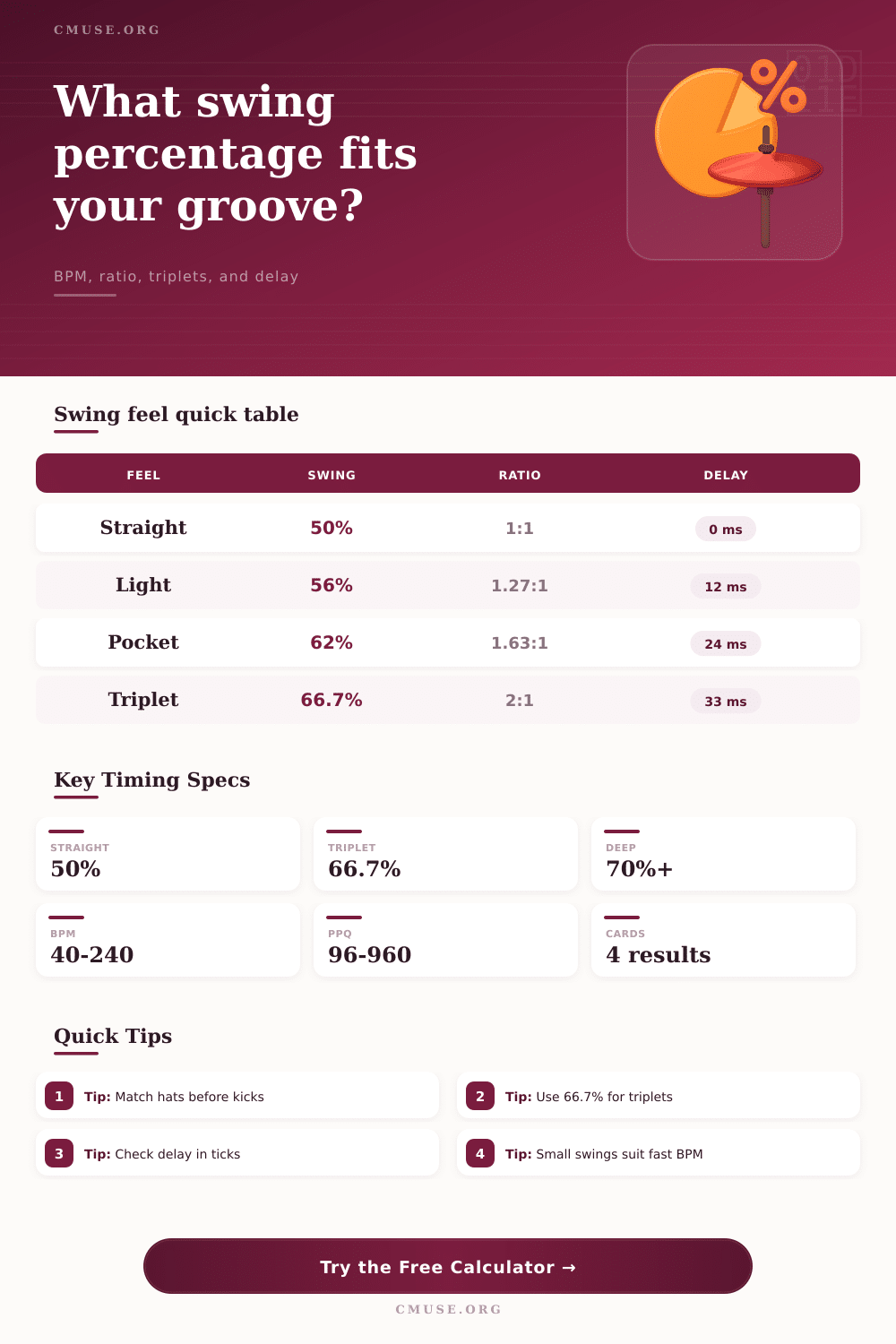
Preset use: Load a groove feel, then adjust BPM, subdivision, and PPQ for your sequencer. The calculator treats 50% as straight and 66.7% as a triplet swing reference.
Swing Timing Breakdown
Quarter Note
Swing Cell
Triplet Target
Delay Ticks
| Grid Point | Position | Millisecond Time | Tick Position | Musical Meaning |
|---|---|---|---|---|
| Note 1 | 0% | 0 ms | 0 ticks | Pair start |
| Swing Percent | Ratio | Delay at Current BPM | First / Second | Feel Note |
|---|---|---|---|---|
| 50% | 1:1 | 0 ms | Equal | Straight |
| Subdivision | Cell Length | Straight Midpoint | Selected Delay | Triplet Delay |
|---|---|---|---|---|
| 16th | 326 ms | 163 ms | 26 ms | 54 ms |
| Preset | BPM | Subdivision | Swing | Use Case |
|---|---|---|---|---|
| Straight Pop | 118 | 16th | 50% | Clean pop, EDM, tight rhythm guitar edits. |
| Light Funk | 104 | 16th | 56% | Small push for hi-hats, clav, muted guitar, and shaker. |
| MPC 16A | 92 | 16th | 54% | Subtle drum-machine timing with only a little late offbeat. |
| MPC 16C | 92 | 16th | 58% | Classic sampled-drum pocket without full shuffle timing. |
| Neo Soul | 76 | 16th | 62% | Laid-back keys, hats, and ghost notes with a deeper lilt. |
| Jazz Triplet | 132 | 8th | 66.7% | Triplet-based ride pattern and walking-line reference. |
| Blues Shuffle | 112 | 8th | 67% | Backbeat shuffle, boogie rhythm, and swung comping. |
| Dilla Drag | 88 | 16th | 64% | Late hats and snares that sit close to, but under, triplet feel. |
| Trap Hats | 140 | 32nd | 57% | Fast hat rolls where the delay must stay small in milliseconds. |
| House Lift | 124 | 16th | 53% | Gentle movement for percussion loops that still feel grid-tight. |
Swing timing is a difference between a swing pattern that is on the grid and one that have a sense of movement. In order to establish swing timing, the producer moves the second note later than midpoint between the two notes. Most producer are aware that swing timing involve moving the second note later than the midpoint between the two notes.
The swing percentage calculator makes it easy to establish swing timing by calculating the mathematics behind swing timing with the three parameter of your BPM, subdivision, and swing entry mode. The percentage of swing timing that you choose will determine the feel of the swing pattern. If you choose a 50% swing timing, the pattern will be even throughout the track.
How to Use the Swing Percentage Calculator
Any swing percentage that is established at a value higher than 50% will move the second note of the pair later within the track. For example, a swing percentage of 62% will create a groove within the track. Additionally, a swing percentage of 66.7% will allow the second note of the pair of note to be place on the triplet grid.
Any percentage established at 70% or higher will result in a swing pattern that feels as if it is very late within the track. Additionally, the groove will feel sluggishly if they contain complex arrangement of tracks. Swing is the relationship between two notes within a repeating cell of a song or track.
If you change the subdivision within the track, the same swing percentage will have a different number of millisecond between the two notes. For example, a swing percentage of 60% at 92 BPM for sixteenth notes will have a different number of milliseconds compared to 60% of swing for thirty-second notes at 140 BPM. The swing percentage to milliseconds and sequencer ticks calculator will help you to convert the swing percentage to milliseconds and ticks in your specific tempo.
It is easy to establish a swing percentage for a particular session of music but then to apply that same percentage to another session. The millisecond and number of sequencer ticks that the tool calculate allow you to see the delay between the two notes within the track. Your hardware sampler or digital audio工作站 (DAWs) may feel different at the same percentage of swing because there internal timing isnt the same.
Seeing this value in the field will allow the timing to become visible to you. Swing interact with the other element of the kit. For example, the hi-hats can have a swing percentage that is higher than the kick or snare drum.
For example, if the hi-hats are set to 60% swing and the backbeat is even throughout the track, the track will have swing timing without losing it’s center or focus on the backbeat. Although the calculator will not make any musical decision for you, it will allow you to see the swing percentage prior to finalizing your arrangement of the track. Real world swings within a track also include slight inconsistencies in the placement of the eighth and sixteenth notes.
For example, a drummer will not always hit the same offset on each beat within a bar. Additionally, breakbeat are sampled in a way that they have their own swing timing within the beat. You may want to add a few millisecond of humanize to compensate for the swing timing that is calculate.
The humanize field within the swing percentage to milliseconds and swing ticks calculator includes a range of values to allow for more variety to the swing timing. The reference table will allow you to compare different percentage of swing without having to calculate each one. For example, the tables will allow you to compare a swing percentage of 56%, 62%, or 66.7% at different tempo for the track.
These tables will allow you to get a sense of how a particular percentage of swing will sound when produce into a track. With frequent use of the calculator, you will have a good understanding of how each percentage of swing will sound. The swing percentage between the two notes within the kick and snare will allow you to place the musical intention of your song into the technical capability of your computer.
The calculator will help to remove the mathematics from your mind so that you can focus on the decision of whether or not the second note feels good within the context of your song. Although you must make the decision yourself, the calculator will make your decision much fasterer because it includes the numbers that you need to make your decision.