Streaming Audio Bandwidth Calculator
Estimate stream bitrate, raw PCM baseline, upload capacity, protocol overhead, listener transfer, and monthly data usage for podcasts, internet radio, live sets, and lossless music streams.
🎧 Named Streaming Presets
⚙ Stream, Codec, and Listener Inputs
📊 Current Stream Spec Grid
🎵 Streaming Preset Reference
| Preset | Codec Target | PCM Source | Typical Use |
|---|---|---|---|
| Voice Livestream | Opus 48 kbps mono | 48 kHz / 16-bit / mono | Spoken word, lessons, talk streams |
| Podcast Mono | MP3 64 kbps mono | 44.1 kHz / 16-bit / mono | Archive-friendly speech with broad support |
| AAC Radio Station | AAC 96 kbps stereo | 44.1 kHz / 16-bit / stereo | Music radio where bandwidth is limited |
| MP3 Music Channel | MP3 128 kbps stereo | 44.1 kHz / 16-bit / stereo | Legacy-compatible internet radio |
| DJ Set Broadcast | AAC 192 kbps stereo | 48 kHz / 24-bit / stereo | Live music with stronger transient detail |
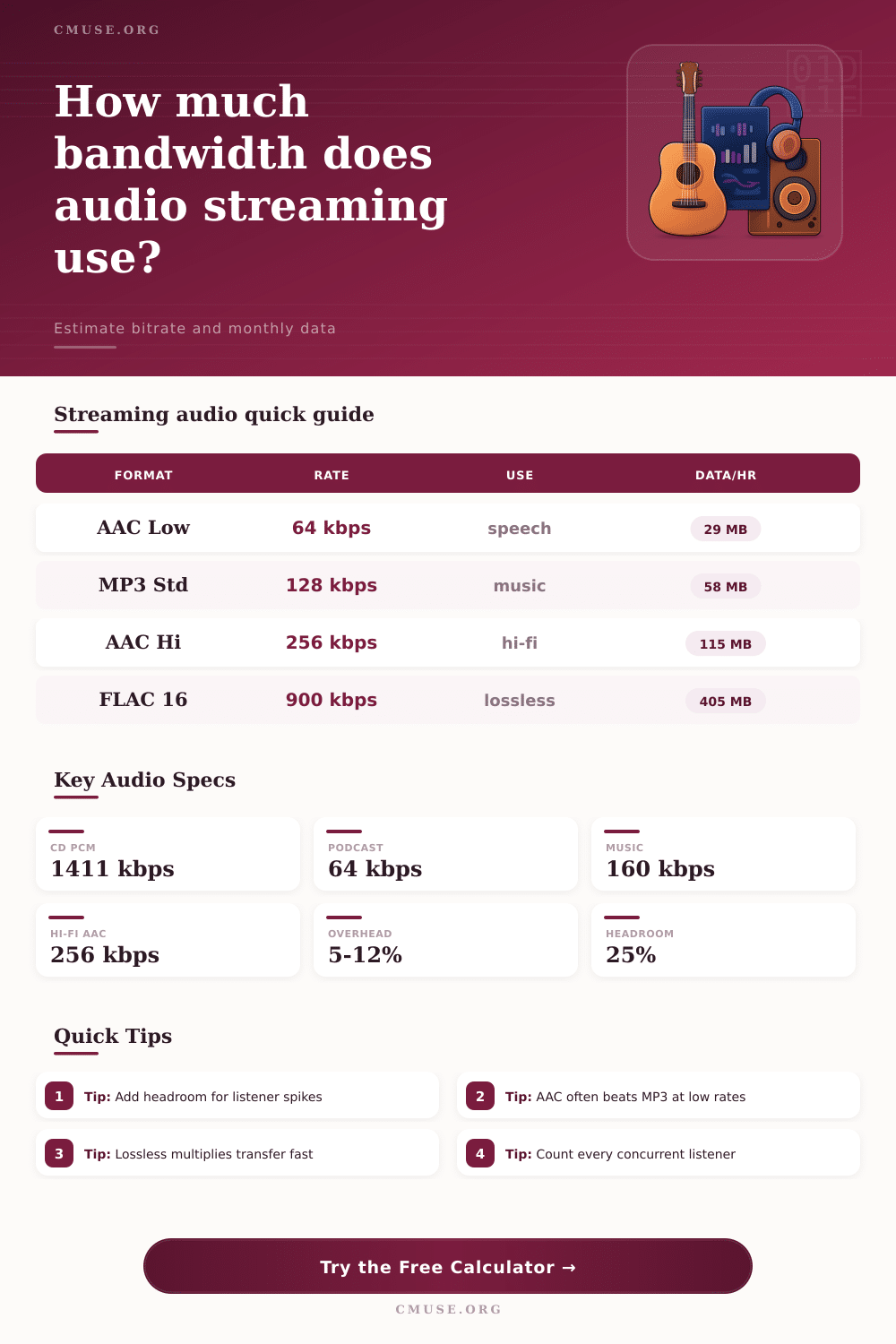
| Hi-Fi AAC Stream | AAC 256 kbps stereo | 48 kHz / 24-bit / stereo | High-quality music stream planning |
| Concert FLAC | FLAC about 900 kbps | 48 kHz / 24-bit / stereo | Lossless relay or premium archive feed |
| Studio PCM Monitor | PCM 4608 kbps stereo | 96 kHz / 24-bit / stereo | Uncompressed private monitoring paths |
🎙 Codec Comparison and Efficiency Grid
| Codec | Common Bitrate Range | PCM Percent Guide | Best Planning Note |
|---|---|---|---|
| Opus | 32 to 160 kbps | 2% to 8% of CD PCM | Excellent for speech and efficient music delivery at lower rates. |
| AAC-LC / HE-AAC | 48 to 320 kbps | 3% to 15% of CD PCM | Strong compatibility and quality for music streams. |
| MP3 | 64 to 320 kbps | 5% to 23% of CD PCM | Useful when old players or radio directories matter. |
| FLAC | 500 to 1500 kbps | 35% to 70% of PCM | Lossless quality, but concurrency and monthly data rise quickly. |
| PCM / WAV | 705 to 9216 kbps | 100% of PCM | Best for controlled studio links, rarely efficient for public streams. |
💾 PCM Source Format Bandwidth
| Source Format | Raw Formula | Raw Stereo Rate | Data Per Hour |
|---|---|---|---|
| 44.1 kHz / 16-bit / stereo | 44100 x 16 x 2 | 1411 kbps | 635 MB per listener |
| 48 kHz / 24-bit / stereo | 48000 x 24 x 2 | 2304 kbps | 1037 MB per listener |
| 96 kHz / 24-bit / stereo | 96000 x 24 x 2 | 4608 kbps | 2074 MB per listener |
| 48 kHz / 24-bit / 5.1 | 48000 x 24 x 6 | 6912 kbps | 3110 MB per listener |
🌐 Monthly Transfer Examples
| Scenario | Listeners | Hours / Month | Estimated Transfer |
|---|---|---|---|
| 64 kbps podcast relay with 5% overhead | 25 | 80 | 60 GB |
| 128 kbps music radio with 8% overhead | 100 | 160 | 995 GB |
| 256 kbps hi-fi stream with 8% overhead | 250 | 120 | 3732 GB |
| 900 kbps FLAC stream with 6% overhead | 40 | 60 | 1030 GB |
| 48 kHz 24-bit PCM with 5% overhead | 8 | 20 | 174 GB |
💡 Streaming Bandwidth Tips
Audio streaming involve the transfer of data from a server to a users device over a network. The data transfer is limited by the data capacities of that network. When individuals stream audio from services like Spotify or Netflix, they are essentially pulling data from a server and transfer that data over a network to the listener’s device.
While many believe that the bitrate of audio files determine the quality of those audio files when streamed, there are actualy many different factors that influence both audio quality and the load of the network on which the audio is streamed. Bitrate is a measurement of the amount of data used per second of audio. Higher bitrates results in audio files that contain more data than files with lower bitrates.
What Affects Audio Streaming Quality and Data Use
Additionally, files with lower bitrates allow for more individual to connect to a network at the same time. The bitrate of the audio codec is not the only element that must be considered when calculating the total data load of an audio stream. The total data load include the bitrate of the audio file as well as the data load created by protocol overhead, packet headers, and encryption of the audio file.
These elements of protocol are necessary to be accounted for when calculating the total data load of the audio file that is streamed. An individual can lose data quality if they dont account for this extra data. Audio files are typically compressed to allow for them to be easy to stream.
Audio files that are uncompressed, such as PCM files, contain a very large amount of data. Compression codecs, such as MP3 or AAC codecs, work to reduce the size of the audio file by removing data from the audio file that the human ear is unlikely to detect. The amount of data that can be removed from audio files depends upon the type of audio file that is being streamed.
Speech files contain less data then music files because speech has less variables and data that can be represented in audio waves. To ensure that audio quality is maintained during streaming, individuals must choose the proper bitrate for the type of audio that is to be streamed. The number of individuals that are listening to audio files at the same time has a critical impact on audio streaming.
The number of listeners will determine the amount of upload capacity that is required for the audio file to be streamed. A single stream of audio will require very little upload capacity from the network. However, numerous listeners will require a significant amount of upload capacity.
For instance, if there are one hundred listener to a single audio stream, the upload capacity will have to support all one hundred listeners at once. Another factor to consider with audio streaming is the monthly transfer total. The bitrate of the audio file multiplied by the number of listeners and the number of hours that those listeners stream the audio file each month determines the monthly transfer total for an audio stream.
Many individuals may make the mistake of only calculating the amount of data for a single listener. However, the total amount of data that all listeners use each month must be accounted for to determine the total cost of streaming audio files to those listeners. The codec that is used for the audio file is another primary factor in streaming audio files.
For instance, the Opus codec is used for speech files because it maintains the clarity of speech at low bitrates. Additionally, audio codecs like AAC and MP3 maintain a higher quality audio files than MP3 codecs at the same bitrate. However, both of these codecs are compressed formats of audio files.
FLAC is another codec that maintains the quality of audio files by being a lossless codec. FLAC codecs will preserve every bit of the original audio file. However, to do so, it requires a higher bitrate than the other compressed audio codecs.
Thus, FLAC will create an increased data load for audio files and limit the number of listeners for those audio files. Finally, the conditions of the network upon which the audio files are streamed and any task performed on the data will impact the total capacity for that audio stream. Network jitter will cause issue for the audio stream being streamed.
To account for this, many network operators will add a buffer to the total amount of data that they plan to use for audio streaming. Additionally, if archive copies of the audio file are created, that will impact the amount of data that must be allocated to that audio stream. The archive data will travel over the network at the same time as the live audio stream.
To operate an audio stream efficient, individuals must find the proper balance of bitrate and codecs based off the type of audio that is being streamed and the number of listeners that are expected. For instance, speech files will have a lower bitrate so that there is less cost and more listeners can stream the song. For music files, there will be a higher bitrate so that the quality of audio files is preserved.
However, higher bitrates will result in an increased amount of data that must be streamed and, thus, fewer individuals can listen to the audio files. Testing various bitrates for different audio files and codecs will allow individuals to find the proper range of settings for their network connection and budget. Additionally, the bitrate and the number of audio file listeners will impact the total cost of streaming audio files in a linear fashion.
Thus, individuals must first determine how many listeners they would like the audio files to support. Once they have a concept of the data and cost of audio streaming, it can be incorporated into their overall plan and budget.