Dotted Eighth Delay Calculator
Convert tempo into dotted eighth delay time, stereo tap spacing, repeats per bar, and feedback tail length.
🎶 Dotted Eighth Presets
⏱ Delay Timing Inputs
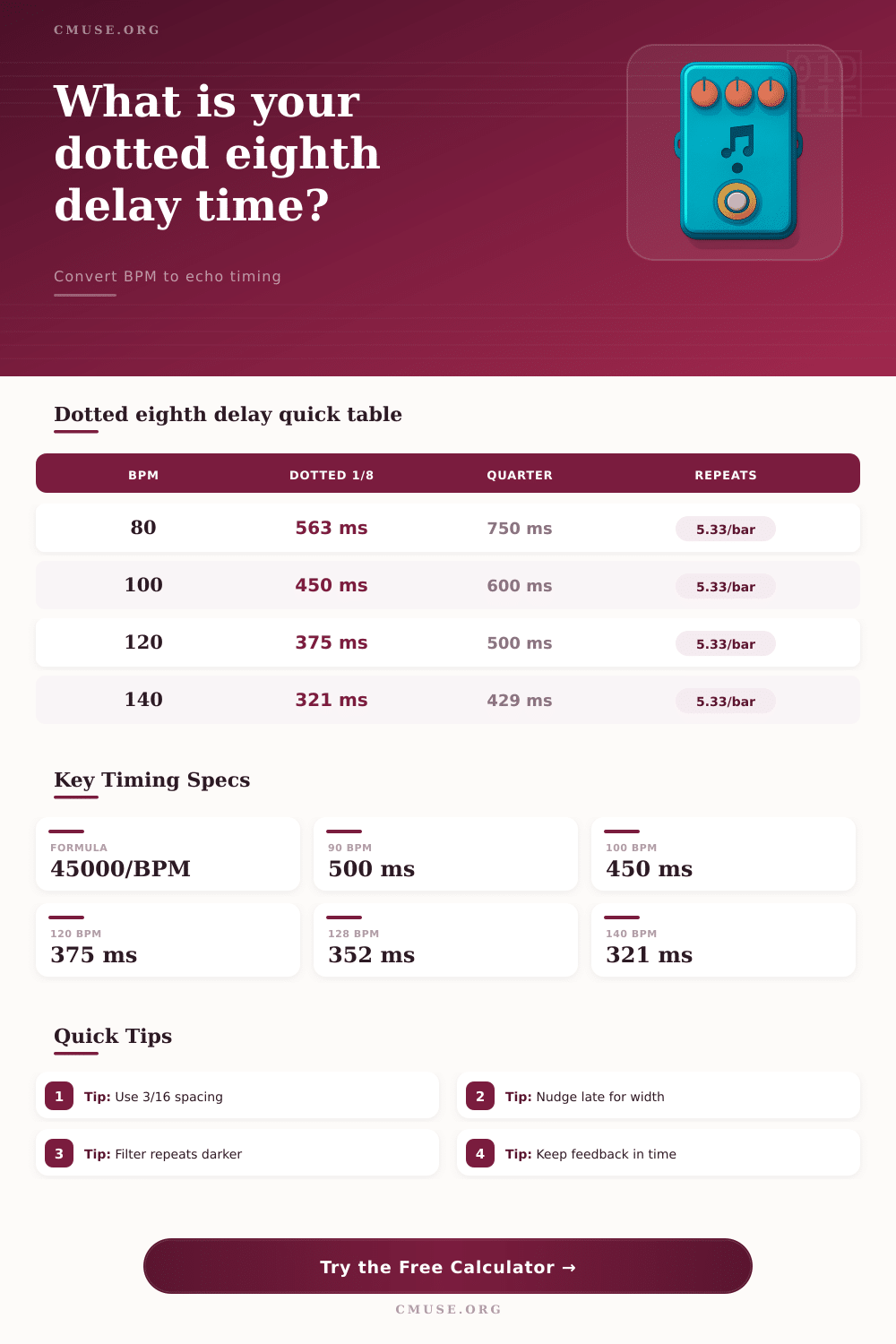
The core dotted eighth formula is quarter note milliseconds multiplied by 0.75, which is the same as three sixteenth notes or 45000 divided by BPM.
📊 Dotted Eighth Spec Grid
🎼 Note Value Timing Comparison
| Delay Value | Formula from Quarter | 90 BPM | 120 BPM | 140 BPM |
|---|---|---|---|---|
| Straight Quarter | Quarter x 1.00 | 666.67 ms | 500.00 ms | 428.57 ms |
| Straight Eighth | Quarter x 0.50 | 333.33 ms | 250.00 ms | 214.29 ms |
| Dotted Eighth | Quarter x 0.75 | 500.00 ms | 375.00 ms | 321.43 ms |
| Triplet Quarter | Quarter x 0.6667 | 444.44 ms | 333.33 ms | 285.71 ms |
| Dotted Quarter | Quarter x 1.50 | 1000.00 ms | 750.00 ms | 642.86 ms |
🎙 Common Dotted Eighth Settings
| Use Case | Typical BPM | Dotted 1/8 | Feedback Range | Filter Starting Point |
|---|---|---|---|---|
| Clean guitar pattern | 80-110 | 563-409 ms | 32-45% | 150 Hz to 5 kHz |
| Lead guitar repeat | 110-145 | 409-310 ms | 28-42% | 180 Hz to 4.8 kHz |
| Vocal throw | 85-125 | 529-360 ms | 18-32% | 140 Hz to 6.5 kHz |
| Synth pulse | 115-135 | 391-333 ms | 30-48% | 120 Hz to 7 kHz |
| Ambient wash | 60-90 | 750-500 ms | 45-65% | 220 Hz to 4.2 kHz |
📐 Meter and Bar Relationship
| Meter | Quarter-Note Beats per Bar | Dotted 1/8 Echoes per Bar | One Bar at 120 BPM | Timing Note |
|---|---|---|---|---|
| 3/4 | 3.00 | 4.00 | 1.50 sec | Lands evenly each bar |
| 4/4 | 4.00 | 5.33 | 2.00 sec | Crosses the beat grid |
| 5/4 | 5.00 | 6.67 | 2.50 sec | Cycles over longer phrases |
| 6/8 | 3.00 | 4.00 | 1.50 sec | Matches two dotted quarters |
| 7/8 | 3.50 | 4.67 | 1.75 sec | Creates off-grid motion |
🎚 Stereo Spread Comparison
| Spread Setting | Tap Difference | Best For | Watch For |
|---|---|---|---|
| 0-3% | Very tight | Mono-safe guitar and vocals | May feel narrow |
| 4-8% | Subtle width | Rhythmic guitar parts | Check center focus |
| 9-15% | Clear stereo motion | Ping-pong and synth repeats | Can distract from lead timing |
| 16-30% | Wide offset | Ambient layers and transitions | May blur fast passages |
Setting a delay pedal by ear is notoriously difficult for a person who is attempting to set it up. The reason for the difficulty is that the delay’s repeats may either fall ahead of or drag behind the beat. If the delay repeats does not line up with the beat of the music, the listener will feel that the song has an unsettled groove.
One way to solve this problem is to use a dotted eighth timing to set the delay echo. A dotted eighth note lasts for three sixteenth notes, and a dotted eighth note lasts for three quarters of a quarter note. The tempo of the song is the most important of the delay settings.
How to Set a Delay Pedal
Each of the other delay settings rely upon the tempo of the song. For example, changing the tempo of a song will immediatly change the millisecond of the delay. Type the tempo of the song into the calculator for the delay pedal, as the calculator determines the delay milliseconds according to the tempo of the song.
Additionally, you can use the groove offset to add a few millisecond to the delay. This offset is useful for allowing the performance to feel wider without sounding late. Stereo spread determine how the delay signal is divided between the left and right channels of the stereo mix.
Using a small percentage of spread is often the best setting for the delay. Using too much spread in the mix can cause the delay repeats to blur in time, which may become distracting from the rest of the song. Feedback amount control how long the tail of the delay sounds.
The musician can calculate feedback amount as the number of delay repeats to drop sixty decibel. This calculation helps to determine whether the delay will still be audible after the next musical phrase. Different musical situations may require different settings on the delay pedal.
For example, clean arpeggios are best with a moderate amount of feedback and a high cut filter to darken the repeats to allow them to sit behind the guitar. Lead guitar lines often require more feedback and a lower low cut filter to allow them to occupy the low end of the music. For vocals, shorter delay tails with gentle filtering allow for the words to remain intelligible.
These settings are not made for the delay calculator, but the calculator will calculate the timing settings to allow for these choices. Another important setting for the delay is time signature. In four-four time, dotted eighth note delays will feel propulsive.
In six-eight time, dotted eighth note delays will sound even because six-eight time favours dotted eighth notes. The calculator will recalculate the echoes per bar if you change the time signature, to ensure that the settings for the delay are appropriate within the new time signature. The way that the delay sounds within the song is also affected by the room acoustics and the mix of the music.
A delay that sounds good in headphones may sound muddy with the mix on stage in a live performance. For example, the drums and bass will occupy low-mid frequencies on stage. To fix this, you can adjust the high-cut filter of the delay or lower the feedback to allow for the delay repeats to sit within the space that is created by the band arrangement.
Additionally, the tone of the delay may need to be adjusted within a DAW if the delay repeats begin to fight with the other instruments in the mix. The delay timing will remain the same, but the tone may need to be adjusted to suit the remaining mix of the song. Another factor that may need to be considered is the length of the delay tail in relation to the length of the musical phrase.
For example, an ambient section may last eight bars, so a long delay tail may be desired. However, the same delay tail may be too long for a verse in the song that changes every two bar. This parameter within the calculator allows the musician to compare the length of the delay tail to the length of the musical phrase.
This comparison allows the musician to decide whether the feedback should of been shortened so that the delay tail does not extend into the next musical section of the song. Many musicians make mistakes when setting up a delay pedal. For example, many musicians will copy the delay settings for one song and place that same setting into another song with which the delay setting is not appropriate.
Another mistake is to use the maximum setting for stereo spread. While this may sound good for the solo guitar player performing guitar lines, this setting for stereo spread may cause the musical part to lose focus when the band is performing together. Musicians can avoid these mistakes by ensuring that the calculated settings for the delay are in accordance with the actual arrangement of the music.