Subwoofer Port Velocity Calculator
Estimate peak port air speed, Mach number, required opening area, and chuffing margin for slot ports, round ports, and flared vents.
🎧 Presets
📋 Inputs
Volume velocity: Q = 2 x pi x f x Xpk x Sd(total)
Port velocity: v = Q / A(total)
Hydraulic diameter: Dh = 4A / P
Adjusted design limit: Vadj = Vtarget x Fflare x Fmaterial x Fshape x Fdepth
Required area with buffer: Areq = (Q / Vadj) x (1 + buffer)
Breakdown
📊 Port Style Comparison Grid
Straight slot
Best for simple cabinet layouts, but it is the least forgiving at the edges. It usually needs more area than a flared design to stay quiet.
Mild flare
A good baseline for many home and car audio builds. It offers a balanced compromise between cabinet fit, fabrication effort, and turbulence control.
Large flare
A larger radius lifts the recommended limit and gives more room before audible chuffing starts. It is often worth the extra wall thickness.
Deep aero radius
The most forgiving of the common options. Use this when output is high, the port is compact, or the enclosure must tolerate hard drive levels.
📐 Reference Tables
| Velocity band | Mach range | Risk level | Practical action |
|---|---|---|---|
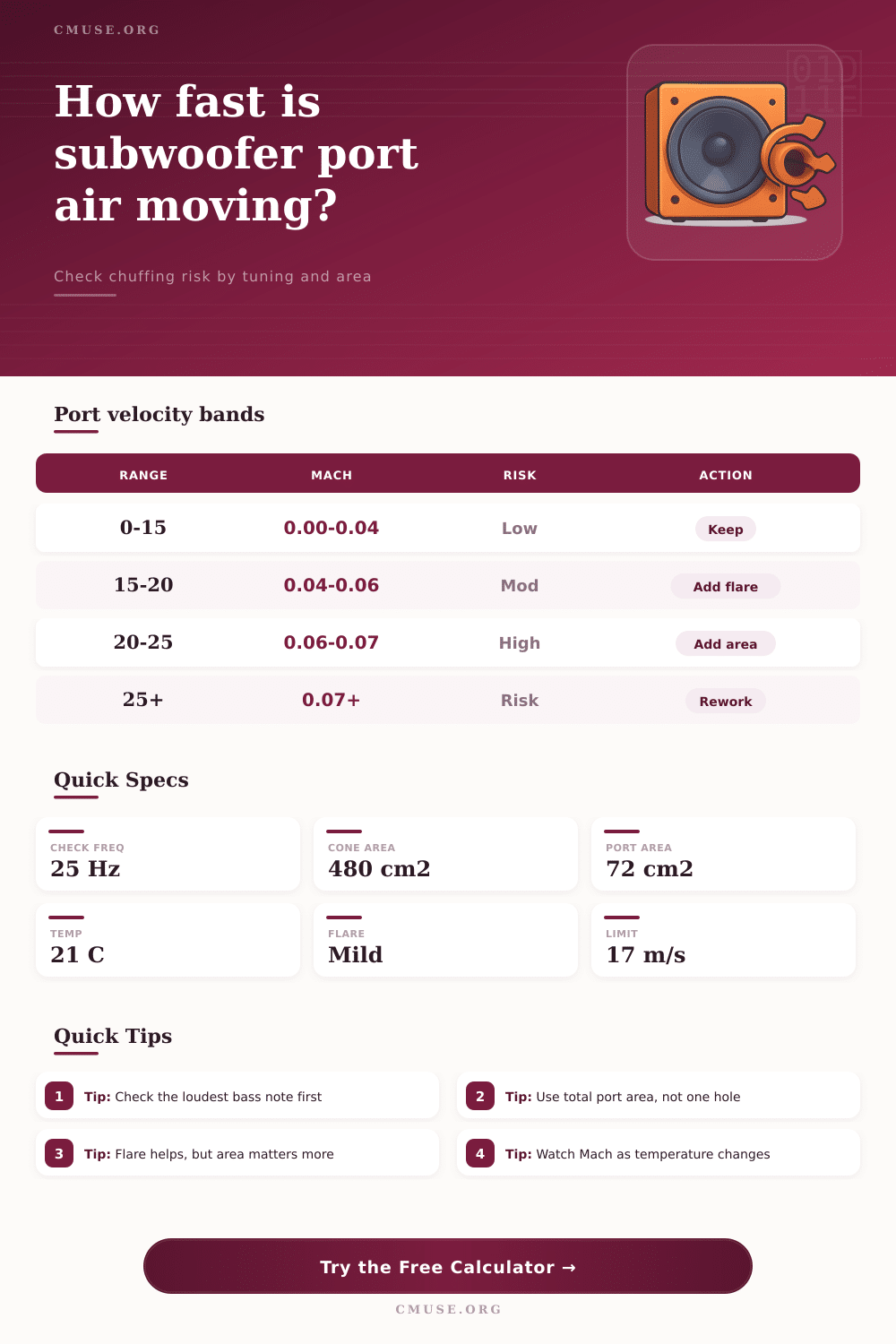
| 0 to 15 m/s | 0.00 to 0.04 | Low | Keep the design as-is. |
| 15 to 20 m/s | 0.04 to 0.06 | Moderate | Use flare and watch edge quality. |
| 20 to 25 m/s | 0.06 to 0.07 | High | Add area or split the vent. |
| Above 25 m/s | Above 0.07 | Very high | Redesign the port before cutting wood. |
| Round port size | Area | Area in2 | Common use |
|---|---|---|---|
| 2 in / 5.1 cm | 20.3 cm2 | 3.14 in2 | Small helper vent. |
| 3 in / 7.6 cm | 45.6 cm2 | 7.07 in2 | Compact single sub. |
| 4 in / 10.2 cm | 81.1 cm2 | 12.57 in2 | Very common sub size. |
| 5 in / 12.7 cm | 126.7 cm2 | 19.63 in2 | Moderate output build. |
| 6 in / 15.2 cm | 182.4 cm2 | 28.27 in2 | Higher excursion systems. |
| Temp | Speed of sound | Feet per second | Design note |
|---|---|---|---|
| 0 C | 331.3 m/s | 1086.3 ft/s | Cold air slightly lowers c. |
| 10 C | 337.4 m/s | 1106.3 ft/s | Cool rooms stay close to nominal. |
| 20 C | 343.4 m/s | 1126.0 ft/s | Standard room reference. |
| 30 C | 349.5 m/s | 1145.9 ft/s | Warm air nudges Mach down a bit. |
| 40 C | 355.5 m/s | 1165.6 ft/s | Hot stage air changes the ratio again. |
| Slot size | Area | Hydraulic diameter | Notes |
|---|---|---|---|
| 3 x 20 cm | 60 cm2 | 4.29 cm | Compact slot with moderate output. |
| 4 x 25 cm | 100 cm2 | 5.71 cm | Balanced starting point for 12s. |
| 5 x 30 cm | 150 cm2 | 7.06 cm | Useful when noise control matters. |
| 6 x 35 cm | 210 cm2 | 8.40 cm | Often suits louder single-15 builds. |
| 8 x 40 cm | 320 cm2 | 10.53 cm | Large slot reference for high output. |
💾 Driver and Port Spec Grid
💡 Tips
Port chuffing occur when air travels through a subwoofer port in a turbulent manner and create noise instead of the desired sound from the subwoofer. Air moving too quick against the edges of the subwoofer port creates turbulence, which is the cause of the noise. Subwoofer port chuffing can be present in home theater and car audio system.
When air velocity is too high for an area of the port, port chuffing occurs. Maintaining control over port velocity can prevent the issue caused by port chuffing. The velocity of the air through the port is calculated by dividing the volume of air move by the subwoofer driver by the area of the port.
What Causes Port Chuffing and How to Fix It
Subwoofer drivers move in and out of there enclosure, moving air into the port. If the area of the port is too small for the area that the driver moves air through, then the velocity of the air is too high for the area of the port. This high velocity of air against the edges of the port create the noise of port chuffing.
To avoid this noise, the designer should size the area of the port to ensure that the velocity of the air through the port is low enough to avoid turbulence. Many subwoofer port design use a rule of thumb to determine the area of the port. Rules of thumb for subwoofer ports suggest making the port area between 12 and 16 times the area of the cone of the subwoofer driver.
Using this rule of thumb may not provide enough area for the air movement if the goal is to produce low frequencies through the subwoofer. Low frequencies requires more movement of air through the port, so if the port area is too narrow for the air movement, port chuffing will occur. The shape of the port can also affect the movement of air through the port.
Corners on the port will create turbulence in the air movement, while rounded edges will allow air to move more smoothly through the port. The materials used to make the port will also affect the movement of air through the port; air will move more easy through smooth materials like PVC than through rough materials like MDF. The shape of the edges of the port, or the flare of the port, can also have a significant effect on the velocity of the air through the port.
For ports with straight edges, the velocity of the air through the port should be kept below 15 meters per second. For ports with a radius or flare on the edges of the port, the velocity of the air through the port can be increased to 17 or 18 meters per second. For ports with an aggressive aerodynamic flare on the edges of the port, the velocity of the air through the port may reach velocities of 20 meters per second or higher.
However, the total area of the port is still the most important factor for subwoofers with ports. An additional area within the port can be reserved for items like grille cloth. The velocity of the air within the subwoofer should be calculated with the area of the port being enlarged to account for this additional space within the port.
The Mach number of the subwoofer can be used to calculate the velocity of the air moving through the port in relation to the speed of sound. If the Mach number of the subwoofer is below 0.04, the velocity of the air through the port is slow enough that port chuffing is unlikely. If the Mach number reaches 0.06, there is a moderate risk of port chuffing.
When the Mach number reaches 0.07 or higher, there is a high risk of port chuffing. In these instances, the designer should increase the area of the port or the designer should modify the subwoofer to include multiple vent. The Mach number is relative to the velocity of sound, which changes with the temperature of the air.
Therefore, the Mach number will also change with changes in the temperature of the air within the subwoofer. A common mistake with subwoofers is to create a very small port on the subwoofer to save space within the cabinet. Small ports for subwoofers will create high velocity of air through the ports.
This high velocity of air will lead to port chuffing. If there are multiple driver within a cabinet, even if each driver is of the same size, then the total volume of air that is moving will be larger. Therefore, the area of the port will have to be larger to allow for the movement of this increased volume of air.
It may be more efficient to use one large port than two ports of half the size. Using software simulations to determine the dimensions of the subwoofer ports will allow designers to ensure that the velocity of the air through the ports is low enough to avoid chuffing within the subwoofers. Software simulations allow designers to calculate the dimensions of the ports and avoid port chuffing.
Additionally, using these same software simulations, designers can test subwoofers with frequency sweeps to determine if the sound that is created includes the sound of port chuffing. If the sound of port chuffing is detected, then the area of the port should be increased or the flares of the port should be increased to allow for the movement of the air at higher velocities without creating noise. You should of checked the port area more carefuly to avoid this.
It is actualy a moddern problem for people building high power systems.