Dotted 8th Note Delay Calculator
Match BPM to dotted eighth timing, compare it with a straight eighth, and shape rhythmic repeats for guitar, keys, and vocal throws.
🎸 Preset Scenes
⚙ Delay Inputs
📖 Reference Tables
| Division | Multiplier | 120 BPM Timing | Musical feel |
|---|---|---|---|
| Quarter note | 1.00x | 500.00 ms | Beat anchor |
| Dotted quarter | 1.50x | 750.00 ms | Compound pulse |
| Eighth note | 0.50x | 250.00 ms | Tight bounce |
| Dotted 8th | 0.75x | 375.00 ms | Classic groove |
| Eighth triplet | 0.33x | 166.67 ms | Rolling trio |
| Sixteenth | 0.25x | 125.00 ms | Fast slap |
| Dotted sixteenth | 0.38x | 187.50 ms | Short shimmer |
| BPM | Quarter | Dotted 8th | Straight 8th | Gap |
|---|---|---|---|---|
| 72 | 833.33 ms | 625.00 ms | 416.67 ms | 208.33 ms |
| 84 | 714.29 ms | 535.71 ms | 357.14 ms | 178.57 ms |
| 96 | 625.00 ms | 468.75 ms | 312.50 ms | 156.25 ms |
| 108 | 555.56 ms | 416.67 ms | 277.78 ms | 138.89 ms |
| 120 | 500.00 ms | 375.00 ms | 250.00 ms | 125.00 ms |
| 132 | 454.55 ms | 340.91 ms | 227.27 ms | 113.64 ms |
| 144 | 416.67 ms | 312.50 ms | 208.33 ms | 104.17 ms |
| Meter | Beats / bar | Bar length at 120 | Dotted 8ths / bar |
|---|---|---|---|
| 4/4 | 4.0 | 2.00 sec | 5.33 |
| 6/8 | 3.0 | 1.50 sec | 4.00 |
| 9/8 | 4.5 | 2.25 sec | 6.00 |
| 12/8 | 6.0 | 3.00 sec | 8.00 |
| Source | Delay note | Wet mix | Feedback | Spread |
|---|---|---|---|---|
| Clean electric guitar | Dotted 8th | 18-24% | 22-30% | 8-14 ms |
| Lead vocal throw | Quarter or dotted 8th | 8-14% | 10-18% | 0-6 ms |
| Ambient synth pluck | Dotted 8th | 14-20% | 28-40% | 12-20 ms |
| Worship or post-rock lead | Dotted 8th | 20-28% | 26-36% | 10-18 ms |
🔊 Comparison Grid
Clean Electric Arpeggio
Sharp note definition with a rhythmic dotted 8th bounce.
Lead Vocal Throw
Keeps the lyric forward while the tail lands on the grid.
Ambient Synth Pluck
A wider repeat cloud works when the source is short and bright.
Cinematic Lead Wash
Big melodic parts usually benefit from a wider stereo lane.
💡 Tips
Dotted Eighth Note Delay
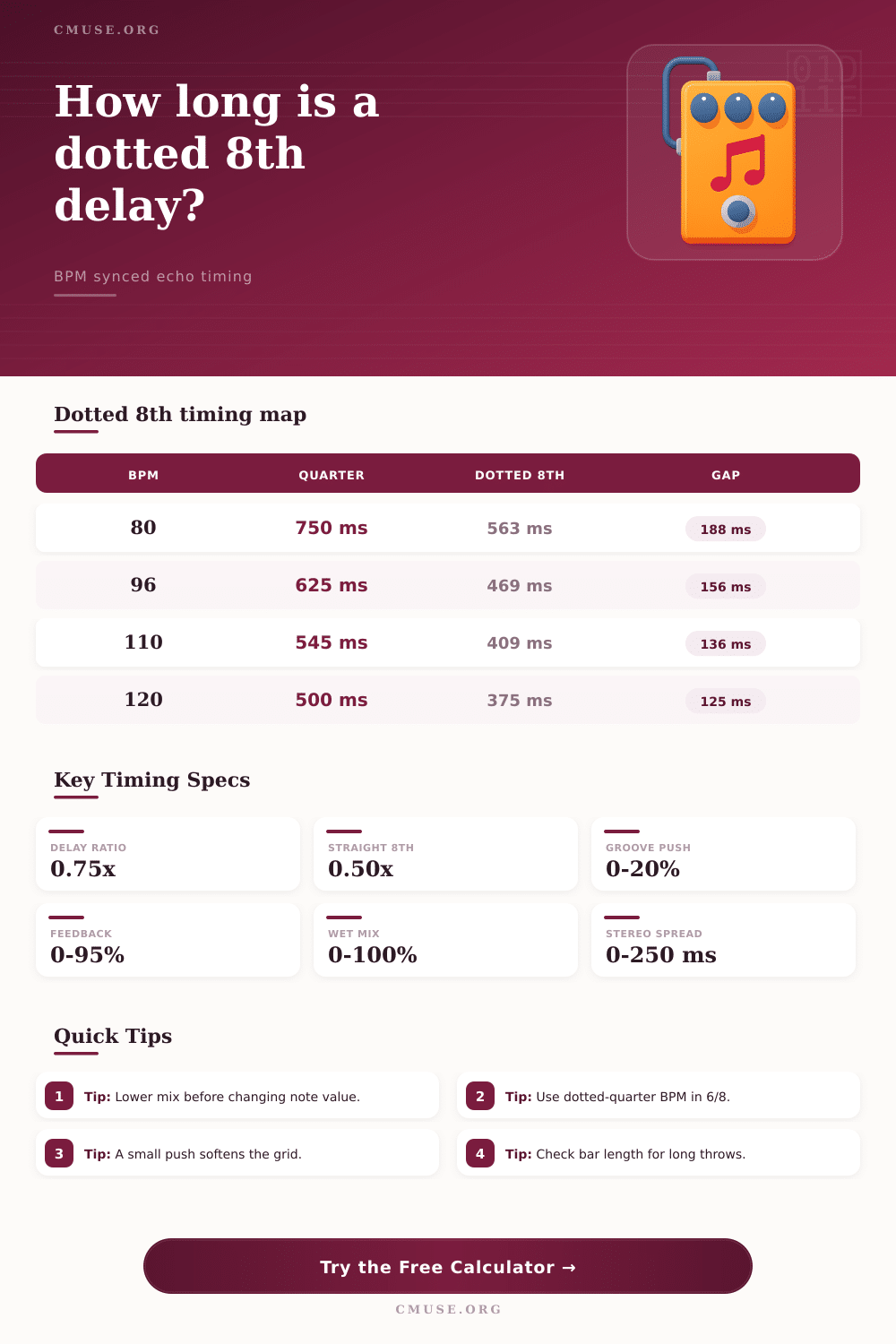
A dotted eighth note delay use a timing value of three quarters of a quarter note. This type of delay can be used to create a rhythmic effect where the delay repeats falls between the beats of a song. Using a dotted eighth note delay create a sense of rhythmic tension because the delay repeats appear to be chasing the downbeat rather than emphasize it.
Many musicians uses dotted eighth note delay effects on guitar instruments, on keyboard, and on vocals. To properly use a dotted eighth note delay effect, the musician must understand the relationship between the timing of the delay and the tempo of the song. The tempo of the song is expressed in beats per minute.
How to Use a Dotted Eighth Note Delay
Songs with a 4/4 time signature use a quarter note as there primary pulse. Songs with a time signature of 6/8 or 12/8 use a dotted quarter note as their primary pulse. Because the primary pulse of a song can change with a change in time signature, a dotted eighth note delay will sound differently in a 4/4 time signature than it will in a 6/8 time signature.
Many producers makes a mistake with their delay settings because they do not understand that they must match the dotted eighth note delay effect with the meter of the song. The groove push setting allow a producer to fine-tune the delay of the song by a small percentage. This setting is used to make the dotted eighth note delay sound more or less tight.
The feedback setting and the mix level of the dotted eighth note delay effect will determine the sound of the dotted eighth note delay within the mix of the song. The feedback setting control how many times the note will repeat within the song before the effect stop. Using a high feedback setting will create long delay repeat, while using a low feedback setting will create short delay repeats.
The mix level control allow the producer to balance the dry signal (the original sound) and the wet signal (the delayed sound). Maintaining the proper balance between the dry and wet signals will leave the original note within the sound. For example, for a bright electric guitar effect, you will need to set the wet signal of the dotted eighth note delay effect to a lower level to maintain the attack of the guitar note.
Additionally, you can use the stereo spread to make the delay sound more wide. The stereo spread offset the left and right taps of the delay effect by a few milliseconds. Mathematical calculations allow you to program the delay to be a dotted eighth note.
For instance, if your song is playing at 96 beats per minute, your quarter note is 625 milliseconds long, so your dotted eighth note delay should be set to 470 milliseconds. This create a gap between the notes, providing the swing effect for dotted eighth note delays. A sixteenth note delay happen at a much faster rate than dotted eighth note delays and creates a different effect on the song.
The time signature impact how many times the delay will repeat within your musical phrase. In 4/4 time, there is enough room in a musical phrase for many instance of dotted eighth note delays. In 6/8 time, the bar is shorter, and there is less room in the musical phrase for dotted eighth note delays.
Count the number of times the delay will repeat within your musical phrase. For long musical phrase use a low feedback setting to ensure that the delayed notes dont become too loud. For short musical phrases use a high feedback control to add energy to the song.
There are a few common mistake people can make when using dotted eighth note delays. One of the most common is to ignore the source material. If you are using an instrument like a guitar, you will need a higher wet mix level than a vocal source.
A vocal require a lower wet mix control to ensure that the lyrics remains clear and audible to the listener. Another mistake is to make the stereo spread too wide for a mono source. The stereo spread should not smear a mono source but enhance it’s sound.
Finally, always lower the mix level prior to changing the division of the delay. Lowering the mix level prior to adjusting the delay division create a smoother transition between settings.