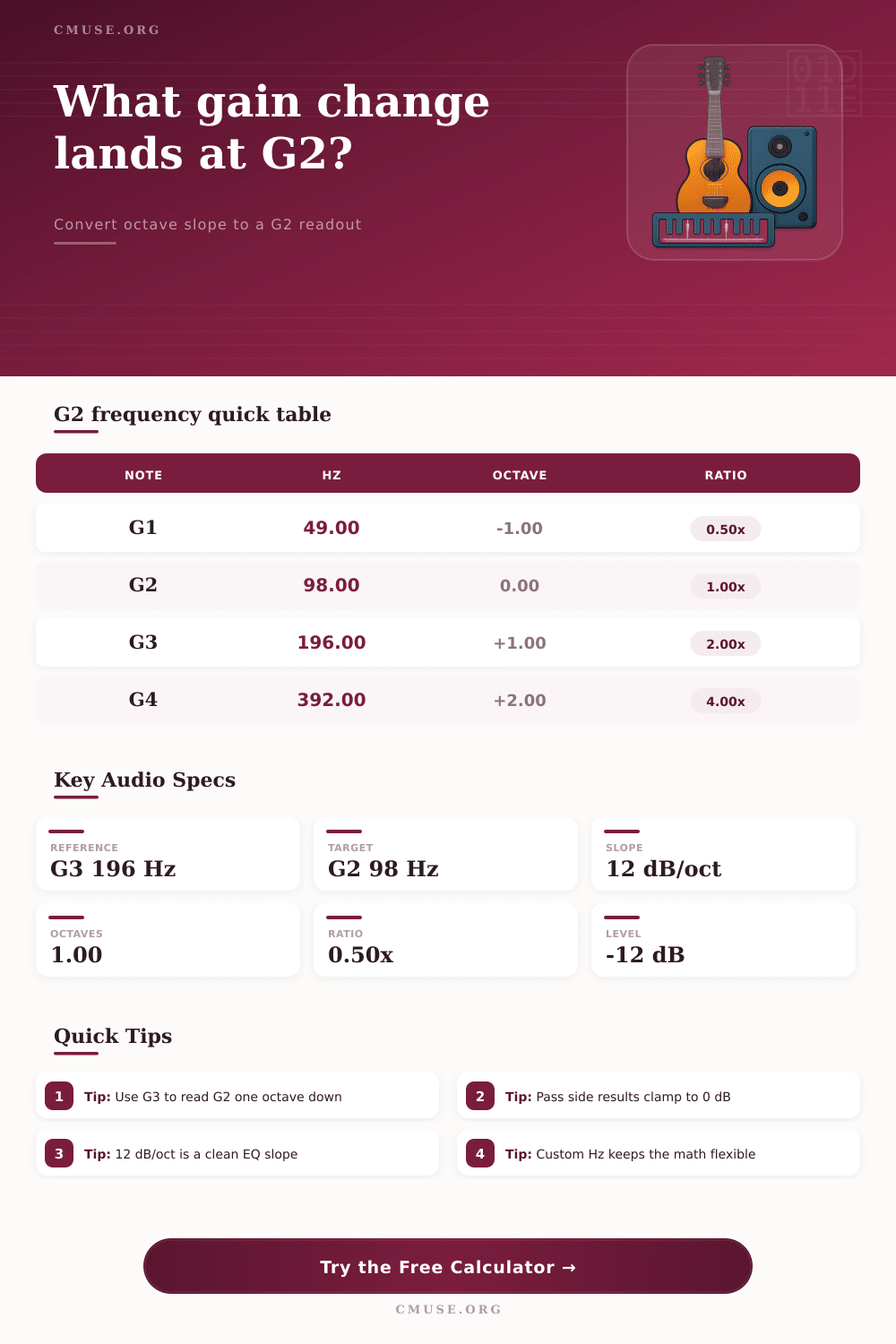
dB/Octave to G2 Hz Calculator
Convert a filter slope into gain, level, and octave distance around G2.
🎵 Real Presets
📊 G2 Conversion Inputs
How it works: the calculator compares the target note or custom Hz against the reference note, then applies the selected dB/octave slope to the attenuated side only.
📈 G2 Anchor Grid
🎸 G Note Frequency Table
| Note | Hz | Octaves From G2 | Ratio |
|---|---|---|---|
| G1 | 49.00 | -1.00 | 0.50x |
| G2 | 98.00 | 0.00 | 1.00x |
| G3 | 196.00 | +1.00 | 2.00x |
| G4 | 392.00 | +2.00 | 4.00x |
🎧 Slope Comparison Table
| Slope | 1 Oct | 2 Oct | Typical Use |
|---|---|---|---|
| 6 dB/oct | 6 dB | 12 dB | Soft shaping |
| 12 dB/oct | 12 dB | 24 dB | Vocal cleanup |
| 18 dB/oct | 18 dB | 36 dB | Bass control |
| 24 dB/oct | 24 dB | 48 dB | Steep guard |
🎶 G2 Octave Checkpoints
| Span | Down From G2 | Up From G2 | Ratio |
|---|---|---|---|
| 0.25 | 82.41 Hz | 116.54 Hz | 1.189x |
| 0.50 | 69.30 Hz | 138.59 Hz | 1.414x |
| 1.00 | 49.00 Hz | 196.00 Hz | 2.000x |
| 2.00 | 24.50 Hz | 392.00 Hz | 4.000x |
📑 Filter Use Reference
| Direction | Pass Side | Cut Side | Common Anchor |
|---|---|---|---|
| High-pass | Above ref | Below ref | G3 to G2 |
| Low-pass | Below ref | Above ref | G1 to G2 |
| High-pass | Above ref | Below ref | G4 to G2 |
| Low-pass | Below ref | Above ref | G2 to G3 |
Tip Box 1
- Use G3 as the reference for a clean one-octave G2 test.
- The attenuated side is the only side that changes.
Tip Box 2
- Custom Hz is ideal when the source note is not a G.
- Zero slope means the target level stays flat.
A high-pass filter remove low frequency from the audio signal while allowing high frequencies to pass through the signal. High-pass filters is used to remove unwanted low-end noise from vocal tracks. Room rumble on vocal tracks occur at around 100 Hz, so the high-pass filter can be set to the frequency of G2 (98 Hz).
The high-pass filter slope determine the amount of attenuation of the signal. For example, if a high-pass filter is set to 12 dB per octave, the high-pass filter will reduce the volume of the signal by 12 dB for every octave the frequency of the signal drops from the reference frequency of that signal. Octaves are not linear distances.
How High-Pass Filters Work
An octave is doubling of the frequency of a signal. For instance, the frequency of G3 is 196 Hz. The frequency of the note G2 is 98 Hz, which is the frequency of G3 divided by two.
A high-pass filter with a slope of 12 dB per octave will reduce the volume of the signal by 12 dB at the frequency of G2 if the reference frequency for the signal is the frequency of G3. However, if the frequency of the signal is dropped two octaves from the reference frequency, the high-pass filter will reduce the volume of the signal by 24 dB. A calculator can help determine these logarithmic calculations. Using a calculator ensure that the high-pass filter will remove the correct amount of volume from the audio signal at the targeted frequency.
The direction of a high-pass filter determine the frequencies that will be removed from an audio signal. High-pass filters remove low frequencies and leave high frequencies alone. Low-pass filters remove high frequencies and leave low frequencies alone.
High-pass filters are applied to remove low-end rumble from a kick drum signal. In contrast, low-pass filters are applied to limit the high frequencies of a synthesizer signal. The reference level of a signal can be set at any frequency.
For example, the reference level of a vocal signal could be set to G3. Additionally, the target frequency for attenuation can be set to G2 (98 Hz). A custom target frequency can be used for non-musical signals, such as a bass guitar signal that might have a target frequency of 75 Hz. Filter slopes range from 6 dB per octave to 24 dB per octave.
A 6 dB per octave high-pass filter slope is a gentle filter that reduce the volume of low frequencies. A 6 dB per octave high-pass filter is used for microphones for radio and television broadcasts because these signals should remain in there natural state. A 24 dB per octave high-pass filter is a steeper filter that remove more low frequencies from the signal.
This high-pass filter is used to remove rumble from signal sources such as overhead microphones for drum kits. A steeper high-pass filter remove low frequencies more sharply. However, steep filter slopes can cause ringing on audio transients.
A 12 dB drop in the amplitude of a signal will reduce the voltage to 0.25 times the original voltage of the signal. Thus, a 12 dB drop in amplitude is a reduction of the signal to one-quarter of its original amplitude. Common mistakes in using high-pass filters are ignoring the direction of the octave distances for which the filter is set.
A negative octave distance indicate that the frequency will be dropped in distance from the reference frequency of the signal. Thus, people use negative octave distances when using a high-pass filter. A positive octave distance indicate that the frequency will be increased from the reference frequency.
This positive octave distance are used for low-pass filters. High-pass filters and low-pass filters are often set with the wrong direction of the filter. For example, a high-pass filter could accidently boost the low frequencies of the signal instead of removing them.
High-pass filters must be set to the correct direction so that they will remove the rumble frequencies instead of boosting the volume of the low-end of the signal. The frequency of G2 can be used to attenuate the low end of a signal. G2 is a musical note and falls within the range of bass frequencies.
Many room modes and low frequencies of rooms is near the frequency of G2. For example, if a high-pass filter is used to clean up a vocal track, the reference frequency can be set at G3, and the target frequency for the high-pass filter can be set to G2. Similarly, if a low-pass filter is used to remove hiss from a hi-hat signal, the reference frequency for the low-pass filter can be set to G2. A table can be used to map the frequency to another frequency, such as mapping the frequency of G2 to 69 Hz. Finally, the passband of a filter is at 0 dB change. This means that the frequencies that are not being attenuated by the high-pass filter will remain the same.
For example, if the target frequency for a high-pass filter is above the knee of the high-pass filter, the high-pass filter will apply no change to the frequency. Understanding the slope of the high-pass filter and using musical frequencies as targets for attenuation will allow a producer or engineer to use a high-pass filter with more precision. Furthermore, understanding the impact of high-pass filter slopes will allow engineers to make confident cuts with a high-pass filter.
You should of known that high-pass filters can be tricky. Its important to get the settings right for the best results.