Samples to ms Calculator
Convert sample frames into milliseconds, seconds, and frame counts for audio editing, latency checks, and sync work.
⏱ Real Presets
⚙ Input Settings
📊 Reference Spec Grid
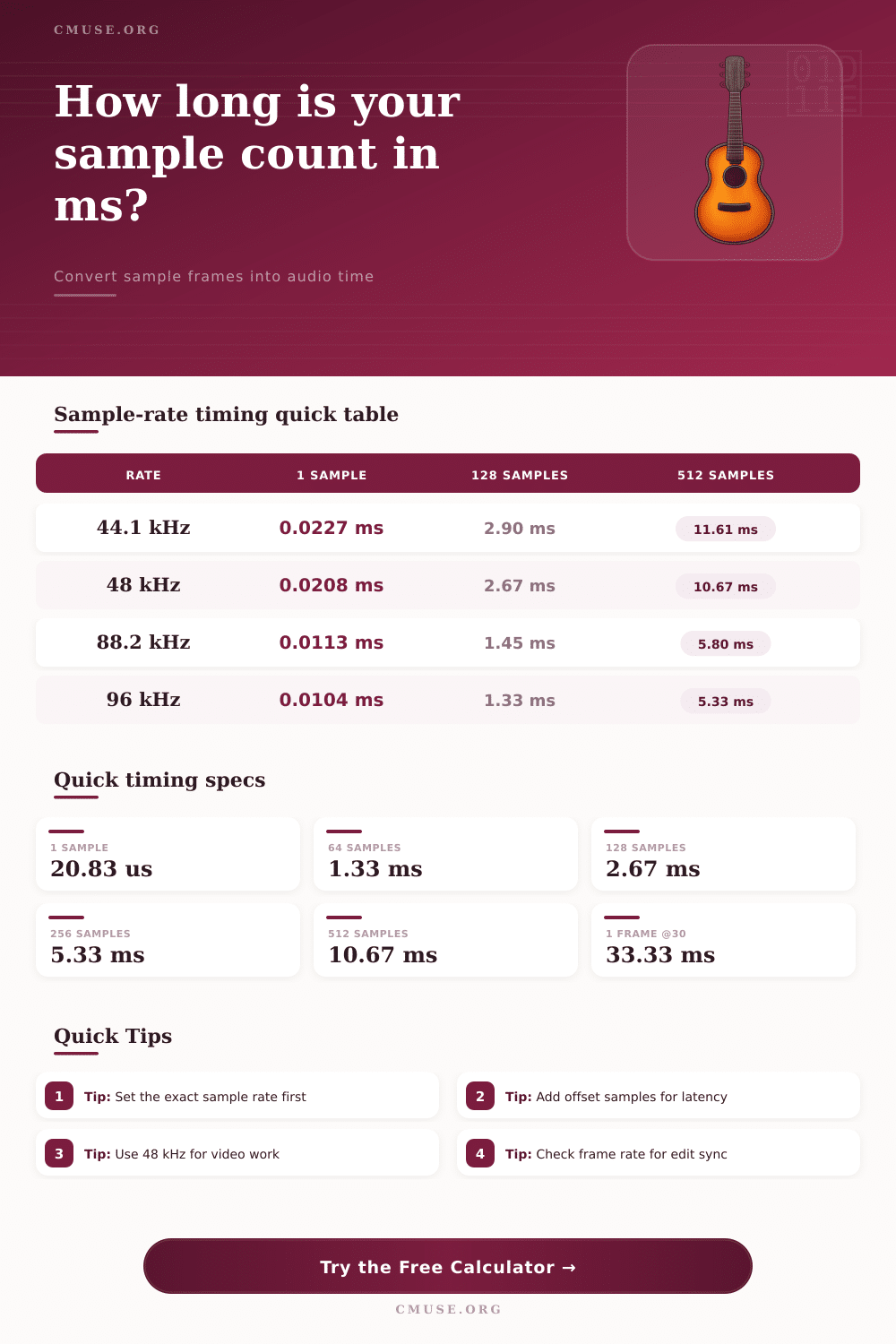
📈 Common Sample-Rate Timing
| Rate | 1 Sample | 128 Samples | 512 Samples |
|---|---|---|---|
| 44.1 kHz | 0.0227 ms | 2.90 ms | 11.61 ms |
| 48 kHz | 0.0208 ms | 2.67 ms | 10.67 ms |
| 88.2 kHz | 0.0113 ms | 1.45 ms | 5.80 ms |
| 96 kHz | 0.0104 ms | 1.33 ms | 5.33 ms |
📝 Buffer Size Latency Guide
| Buffer | 44.1 kHz | 48 kHz | 96 kHz |
|---|---|---|---|
| 64 | 1.45 ms | 1.33 ms | 0.67 ms |
| 128 | 2.90 ms | 2.67 ms | 1.33 ms |
| 256 | 5.80 ms | 5.33 ms | 2.67 ms |
| 512 | 11.61 ms | 10.67 ms | 5.33 ms |
⏲ Milliseconds To Sample Count
| Time | 44.1 kHz | 48 kHz | 96 kHz |
|---|---|---|---|
| 1 ms | 44.1 | 48 | 96 |
| 5 ms | 220.5 | 240 | 480 |
| 10 ms | 441 | 480 | 960 |
| 20 ms | 882 | 960 | 1920 |
🎧 Frame Sync Reference
| FPS | Ms / Frame | 48 kHz | 96 kHz |
|---|---|---|---|
| 24 | 41.67 | 2000 | 4000 |
| 25 | 40.00 | 1920 | 3840 |
| 30 | 33.33 | 1600 | 3200 |
| 60 | 16.67 | 800 | 1600 |
Audio work require an understanding of the relationship between audio samples and time in milliseconds. Audio samples is the individual units of sound that are used in audio files. However, the units of time that a person hears are in millisecond.
Therefore, audio samples must be converted into milliseconds in order to understand how much time each sample of audio occupy. The sample rate that is used within the digital audio workstation (DAW) in which the audio file are created determine the length of time that an audio sample will occupy. The sample rate is a measurement of the number of audio samples that will be used in representing one second of audio.
How Audio Samples Relate to Milliseconds
For example, if a sample rate is set to 44.1kHz, then there are 44,100 audio samples in one second of audio. At 48kHz, there is 48,000 audio samples in one second of audio. If the sample rate is increased, the amount of time that each individual audio sample will occupy will decrease.
Higher sample rate allow for more precise timing in audio projects. At 48kHz, for example, one audio sample will last for 20.8 microseconds (approximately). Latency is the amount of time delay between an action and the resulting sound.
The buffer size cause latency. The buffer size is the number of audio samples that the computer process at once. Using a small buffer size, such as 128 audio samples, will result in low latency.
However, the computer will have to use more processing power to process these samples. Using a high buffer size, such as 1024 audio samples, will result in high latency. However, the computer can dedicate more of it processing power to other tasks.
The buffer size and the sample rate must be balanced with one another in order to determine the total latency in milliseconds. In audio projects, many individuals will encounter difficulties in relation to the sample rate. For instance, if an individual change the sample rate of their audio file from 44.1kHz to 48kHz, the amount of time that their audio samples will represent will change.
At 44.1kHz, 512 audio samples will represent 11.6 milliseconds; however, at 48kHz, 512 audio samples will represent 10.7 milliseconds. Thus, changing the sample rate will change the amount of time that each audio sample occupy; therefore, the timing of those samples will change as well. When audio is used in video projects, the frame rate must also be considered.
Frame rates are used to measure the amount of speed at which the video plays. The frame rate must match the sample rate of the audio file. For example, 30 frame per second in the video will mean that each frame of the video will last 33.33 milliseconds.
If the audio is not timed to the video frames, the two media will drift apart from one another. Thus, the number of audio samples in relation to each video frame must be calculated for synchronization. In choosing a buffer size and sample rate, various trade-offs exist.
For instance, using a small buffer size will allow for live recording of audio files since the latency will be lower. However, using small buffer sizes may result in audio glitches when the computer isnt able to process the audio samples at the required speed. Using a high buffer size allow for mixing and mastering of audio files since the computer will experience less glitches in its audio processing capabilities.
However, using a high buffer size will result in high latency. Thus, choosing a buffer size that is appropriate for the task that is to be performed with the audio file is essential. Overall, audio samples and milliseconds are related to one another through the sample rate.
The sample rate will determine the amount of time that each audio sample will last. The buffer size will determine the number of audio samples that the computer will process at once. Because both of these factors will impact the latency in audio projects, it is important for individuals to manage these variable to maintain timekeeping within their audio projects.
Maintaining the correct timekeeping with audio files will ensure that the audio is locked to the beat or each video frame.