Studio Monitor Placement Calculator
Find a cleaner stereo triangle, speaker spacing, listening distance, and front-wall gap for home studios, control rooms, and edit suites.
🎧 Placement Presets
⚙ Room and Unit Setup
📊 Placement Spec Grid
📑 Reference Tables
| Room type | Triangle | Wall gap | Use |
|---|---|---|---|
| Bedroom nearfield | 0.9-1.2 m | 0.20-0.30 m | Desk mix |
| Project studio | 1.2-1.6 m | 0.25-0.38 m | Balanced |
| Control room | 1.5-1.9 m | 0.35-0.45 m | Stereo focus |
| Mastering room | 1.8-2.4 m | 0.45-0.60 m | Long throw |
| Monitor class | Spacing | Toe-in | Gap |
|---|---|---|---|
| Desktop nearfield | 0.8-1.1 m | 31 deg | 0.20 m |
| Coaxial nearfield | 0.9-1.4 m | 28 deg | 0.24 m |
| Midfield monitor | 1.3-2.1 m | 22 deg | 0.38 m |
| Flush mounted | 1.4-2.6 m | 15 deg | 0.10 m |
| Gap | Notch | Risk | Move |
|---|---|---|---|
| 0.20 m | 429 Hz | Bright | Treat more |
| 0.30 m | 286 Hz | Lean | Good nearfield |
| 0.40 m | 214 Hz | Safer | Control room |
| 0.60 m | 143 Hz | Deep | Midfield |
| Surface | Reflect | Toe shift | Use |
|---|---|---|---|
| Painted drywall | High | +3 deg | More aim |
| Carpet mix | Medium | +1 deg | Soft floor |
| Bookshelves | Medium | -2 deg | Diffuse rear |
| Glass front wall | Very high | +4 deg | Need angle |
💡 Tips
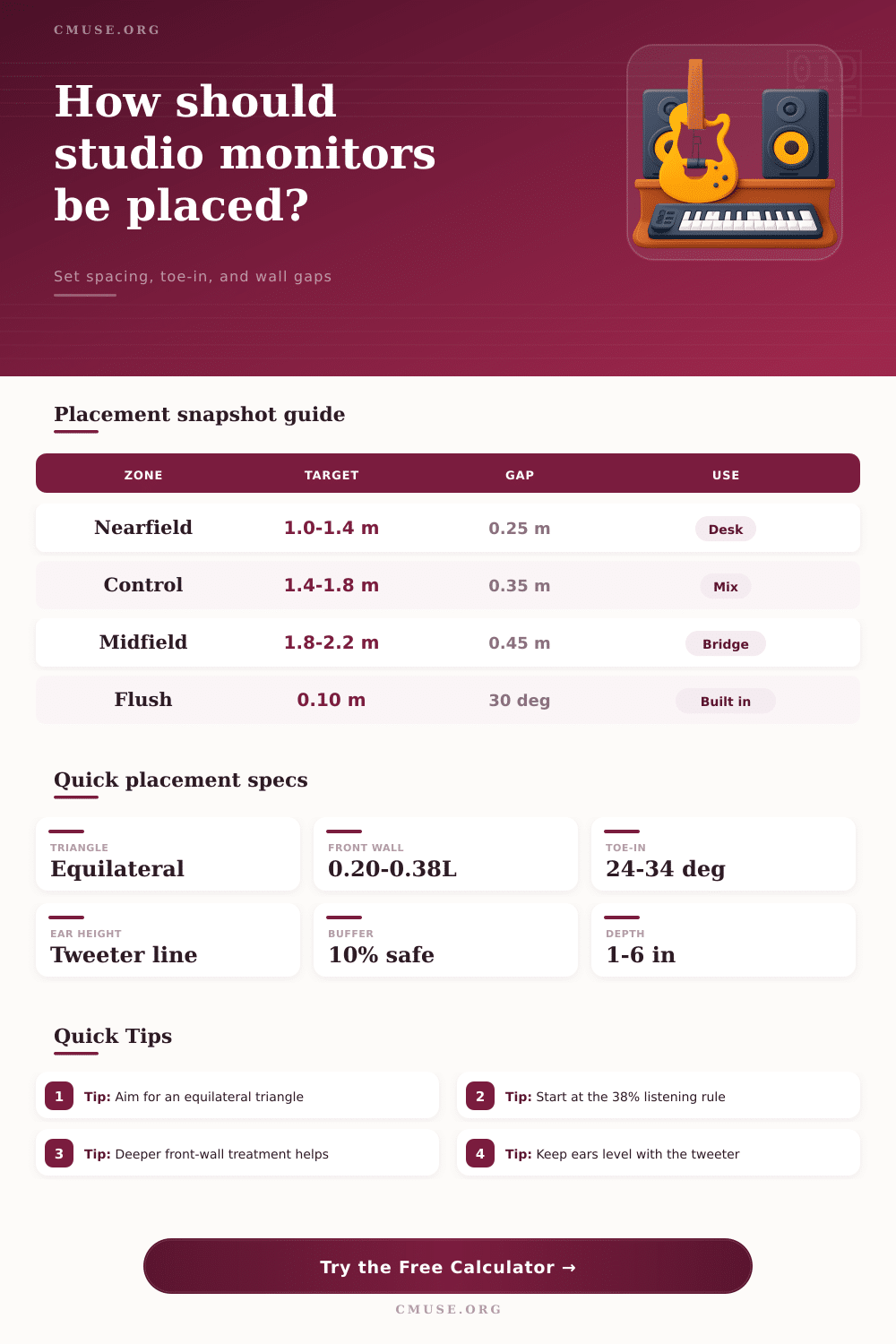
Speaker placements is a process that ensures that the sound from the monitors is accuracy. It is important for speaker placement to ensure that the sound is accurate because inaccurate sound can cause issue for the mixer in that they will hear the mix incorrectly. Inaccurate sound occur if the speakers are placed in the wrong spot in the room.
If the speakers are not placed correctly, inaccurate sound will result in the stereo image being vague or the low end of the music sound bloated. In order to create the proper placement of the speakers, one should form an equilateral triangle with the monitors. An equilateral triangle mean that the distance from each speaker to the other is the same than the distance between each speaker and the listener.
How to Place Speakers for Clear Sound
When forming this equilateral triangle, it ensure that the sound from each monitor will reach the ears at the same time. The arrival of the sounds at the same time ensures that the listener can hear the width and depth of the sounds. Additionally, if the equilateral triangle is not formed correctly with the monitors, this can cause phase issue with the speakers.
Phase issues between the speakers will make the positioning of instrument in the song sound unclear. The rooms that are used for mixing sound will have a certain shape to them. The shape of the room will indicate how the speakers should be placed within that room.
For example, if the room is long and narrow, the listening position should be placed at 38% mark along the length of the room. Using the 38% rule for listening positions will allow the listener to avoid hearing certain room mode that will color the sound of the mix. Another factor related to the shape of the room is the dimensions of the room, which will allow engineer to determine the size of the equilateral triangle in which the monitors should be placed within the mixing room.
The type of monitors that are used can also impact how the speakers should be placed. For example, if nearfield monitor are used on a desktop computer, there should be about one meter between the speakers. This is because nearfield monitors will have a narrow dispersion of sound if they are close to the listener.
Additionally, if midfield monitors are used, the monitors should be placed further away from the listener. The midfield monitors will also need more space between the speakers and the walls of the room. Coaxial monitors have the drivers for the speakers align along the same axis.
These monitors are more forgiving if the speakers are angulated toward the listener. The type of monitors must dictate the spacing between the speakers. The gap between the monitor speakers and the front wall of the room should not be too close.
If the monitors are too close to the front wall of the room, it will cause Speaker Boundary Interference Response or SBIR. If SBIR occur, certain frequencies will cancel out. If the monitors are too close to the front wall, it will cause a dip in the mid-range frequencies of the song being played.
For example, if there is a 20 cm gap between the speakers and the room wall, it can cause a dip in the 400 Hz range of the song. In order to avoid this issue, the engineers can use sound absorption between the monitors and the walls of the room. They could also move the monitors further from the room wall.
Toe-in is the process of angulating the monitors toward the listener. The tweeters on each monitor should be aimed at the ears of the listener. Using the proper toe-in will result in a total spread of 24 to 34 degree.
If the speakers have too little toe-in, the sweet spot for the speakers will be small. Additionally, if there is too much toe-in with the speakers, the sweet spot will be narrow. Additionally, the level of the tweeters should be leveled with the listener’s ear.
If the tweeters are too high or too low, it may cause vertical lobing which will affect the tonal balance of the speakers. There are various factor that can create errors in the speaker placement process. For example, the height of the ceiling in the room can cause issue with vertical modes in the room.
In these cases, higher stand may be used for the monitors so that the monitors are not too close to the ceiling. Additionally, if the speakers are too close to the side wall of the listening room, it will cause comb filtering in the sound. To avoid this, engineers can play pink noise through the speakers and adjust the positioning of the speakers until the engineer can hear nulls in that frequency range.
Finally, speaker placement is an iterative process. This means that engineers will have to listen to the speakers after each placement adjustment. For instance, first the engineers should set up the equilateral triangle with the monitors.
Then they can adjust the distance between the monitors and the walls of the listening room, as well as the toe-in of the monitors. After making these adjustments, the engineers should test the monitors until they find the perfect placement for each monitor. When the monitors are correctly placed, the sound in the room will not get distorted by the monitors or the room, and the mix that are created will translate correctly to other speaker systems.