🎵 Audio Delay Calculator
Calculate tempo-synced delay times, distance-based speaker delay, and note subdivision values for any BPM or environment.
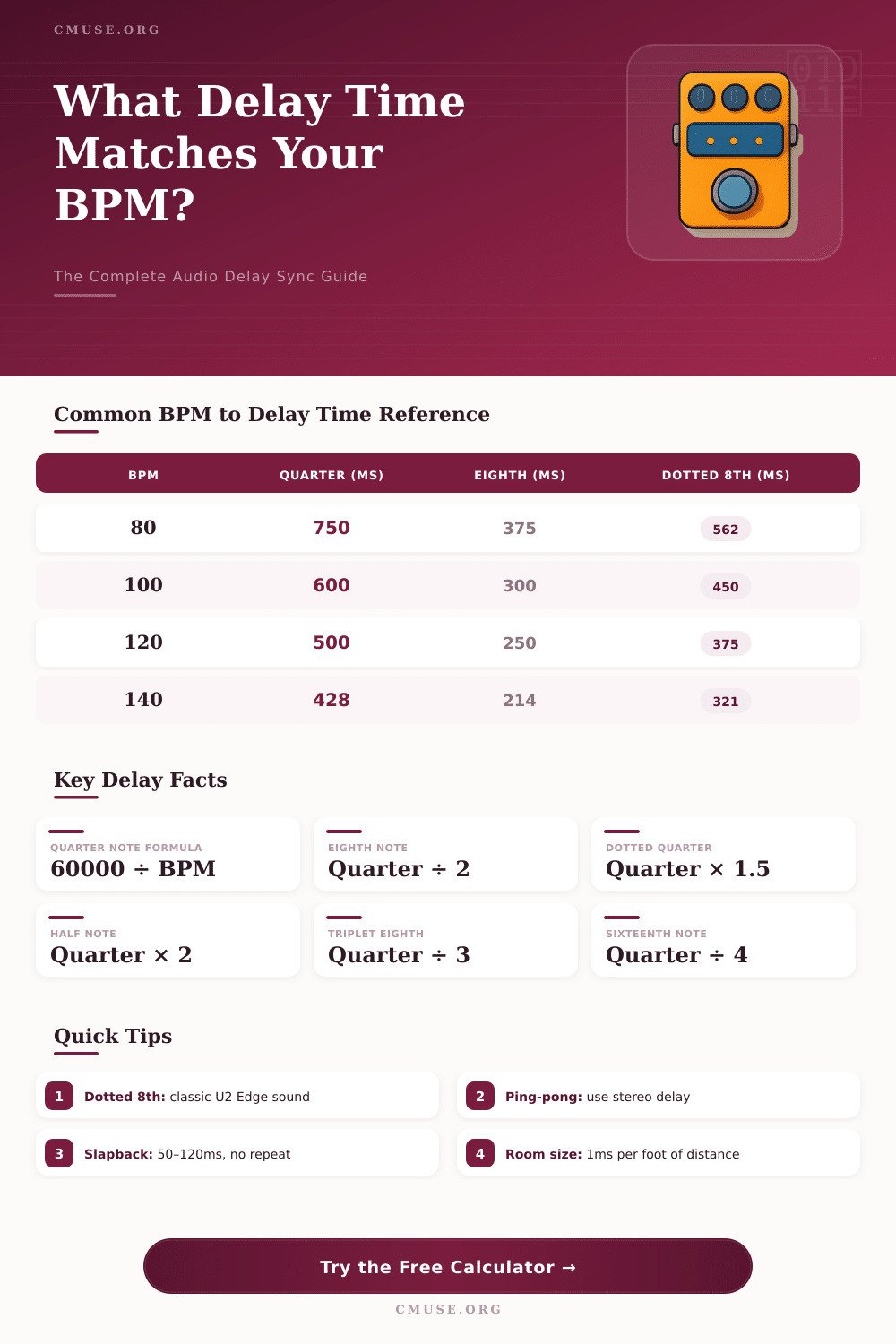
| BPM | Whole Note (ms) | Half Note (ms) | Quarter (ms) | Dotted 8th (ms) | Eighth (ms) | 16th (ms) |
|---|
| Distance (ft) | Distance (m) | Delay @ 68°F (ms) | Delay @ 32°F (ms) | Delay @ 86°F (ms) |
|---|---|---|---|---|
| 10 ft | 3.05 m | 8.8 | 9.2 | 8.5 |
| 20 ft | 6.10 m | 17.7 | 18.4 | 17.0 |
| 30 ft | 9.14 m | 26.5 | 27.6 | 25.6 |
| 50 ft | 15.24 m | 44.2 | 46.0 | 42.7 |
| 75 ft | 22.86 m | 66.3 | 69.0 | 64.0 |
| 100 ft | 30.48 m | 88.4 | 92.0 | 85.3 |
| 150 ft | 45.72 m | 132.6 | 138.0 | 128.0 |
| 200 ft | 60.96 m | 176.8 | 184.0 | 170.6 |
| Note / Description | Frequency (Hz) | Period (ms) | Wavelength @ 68°F (ft) | Wavelength (m) |
|---|---|---|---|---|
| Sub-bass rumble | 40 Hz | 25.0 | 28.0 ft | 8.54 m |
| Kick drum fundamental | 80 Hz | 12.5 | 14.0 ft | 4.27 m |
| Bass guitar open E | 41 Hz | 24.4 | 27.3 ft | 8.32 m |
| Middle C (C4) | 261.6 Hz | 3.8 | 4.3 ft | 1.31 m |
| Concert A (A4) | 440 Hz | 2.3 | 2.55 ft | 0.78 m |
| Guitar high E (E4) | 329.6 Hz | 3.0 | 3.40 ft | 1.04 m |
| Snare crack | 1,000 Hz | 1.0 | 1.12 ft | 0.34 m |
| Presence peak | 3,000 Hz | 0.33 | 0.37 ft | 0.11 m |
| Air / cymbal shimmer | 10,000 Hz | 0.10 | 0.11 ft | 0.034 m |
| Delay Type | Typical Range (ms) | Common Use | Feedback |
|---|---|---|---|
| Slapback Echo | 50 – 120 ms | Rockabilly guitar, vocals | 0–1 repeats |
| Short Room Delay | 20 – 50 ms | Thickening, doubles | 0 repeats |
| Dotted Eighth | Tempo-synced | U2-style guitar, pads | 3–5 repeats |
| Quarter Note | Tempo-synced | Rhythmic guitar, vocals | 2–4 repeats |
| Long Echo / Tape | 300 – 600 ms | Ambient, shoegaze | 5+ repeats |
| Speaker Alignment | 1 ms per ft | PA system alignment | N/A |
| Pre-delay (Reverb) | 5 – 30 ms | Separates dry signal | N/A |
| Ping-Pong | Tempo-synced | Stereo width, bounce | 3–6 repeats |
audio delay means the time between when sound should start and when one indeed hears it. It happens between captured sound, for instance voice or musical instrument, and the moment when that sound reaches the ears, gets recorded or prepared for use. This delay shows in many cases, from watching TV programs to making music with a computer.
Computers commonly fill memory buffers with data before sending them to the next stage, and that causes audio delay. Like this one ensures that no sound disappears when it should be here right away. The size of that buffer in the audio system matters a lot.
What is audio delay and how to fix it
A bigger buffer allows the computer to work better, handle more sound without pauses or breaks, although it grows the wait time.
Connections with Bluetooth commonly cause such delays. Wireless sound passes through some steps before arriving to the headphones, rather than a wired link, that is more simple. Speakers with Bluetooth show clear delay during viewing of films.
For Bluetooth, the typical range of delay is 100 to 200 milliseconds. Devices that support A2DP 1.3 help to settle that buffer problem, but both the sending and the receiving device must have this feature.
In televisions, the sound occasionally processes more quickly than the image. To escape this difference, the device adds a fake delay too the audio, so that it appears at the same time with the slower video. One finds the settings under labels like audio delay, AV Sync or Audio/Video Sync in the sound options of the television.
Features like motion smoothing or fake surround sound on a soundbar come from that mismatch in dialogs. In some cases, one can settle that with a passthrough audio setting in the television.
Receivers from Marantz also can show audio delay. To fix them, it commonly helps to turn off the Eco Mode or Automatic Standby, change the settings about audio delay in the menu, turn off Automatic Lip Sync or update the firmware.
In Windows, one can settle delay causes by swapping the Realtek high-definition audio driver for the general Microsoft version. Features like DTS:X, turned on in the system, add delay to the sound. A program called ASIO4ALL escapes the usual long delay of the Windows audio drivers, allowing programs to address it as a separate choice.
Voicemeeter offers another way. It works as a free mixer for audio, that means paths andsettings of sound on computers with Windows.
During recording with OBS, the sound can lag by one or two seconds in the final video. A helpful fix is direct listening through audio outputs, because that allows you to hear the signal inside the computer instead of outside, which reduces the delay. The highest allowed delay is around 150 milliseconds, which matches almost nine frames in 60 frames per second.
There are also apps that switch the sound of a computer to a phone in real time with tiny delay, using the phone wireless speaker.